跳转到主内容
加入维修社区 - 创建账户

OLPC XO-4 Touch Battery Replacement

  1. OLPC XO-4 Touch Battery Replacement, Battery: 步骤 1 中的图像 1,1
    • Turn the laptop upside-down, with the handle facing away from you.

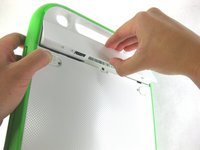
  2. OLPC XO-4 Touch Battery Replacement: 步骤 2 中的图像 1,2 OLPC XO-4 Touch Battery Replacement: 步骤 2 中的图像 2,2
    • Pull the lock tabs towards the green outer edges of the laptop.

    • Hold the left lock tab in the unlock position until the battery is completely removed in the next step.

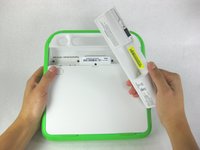
  3. OLPC XO-4 Touch Battery Replacement: 步骤 3 中的图像 1,2 OLPC XO-4 Touch Battery Replacement: 步骤 3 中的图像 2,2
    • Lift up on the middle of the battery to remove it from the device.

结论

To reassemble your device, follow these instructions in reverse order.

另外一个人完成了本指南。

Robby Hubilla

于01/24/13注册

41 声望

创作了2篇指南

团队

Cal Poly, Team 3-30, Amido Winter 2013 Cal Poly, Team 3-30, Amido Winter 2013 的会员

CPSU-AMIDO-W13S3G30

3 名成员

创作了12篇指南

0指南评论

添加评论

浏览统计数据:

过去 24 小时: 2

过去 7 天: 5

过去 30 天: 27

总计 760