跳转到主内容
加入维修社区 - 创建账户

Nokia 2115i battery replacement

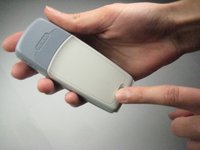
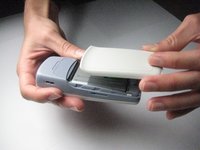
  1. Nokia 2115i battery replacement, Nokia 2115i Battery: 步骤 1 中的图像 1,3 Nokia 2115i battery replacement, Nokia 2115i Battery: 步骤 1 中的图像 2,3 Nokia 2115i battery replacement, Nokia 2115i Battery: 步骤 1 中的图像 3,3
    • To prevent shock, press down on the power button located on the top of the phone until the phone shuts off.

    • Press down on the small gray button located on the back of the phone.

    • Slide the back plate down and off.

    询问修复机器人
  2. Nokia 2115i battery replacement: 步骤 2 中的图像 1,2 Nokia 2115i battery replacement: 步骤 2 中的图像 2,2
    • To remove the battery, begin by holding the phone sideways.

    • Then, insert your thumb in the groove below the battery and push the battery up and out.

    询问修复机器人
结论

To reassemble your device, follow these instructions in reverse order.

另外一个人完成了本指南。

Shane

于09/30/10注册

80 声望

创作了6篇指南

团队

Cal Poly, Team 14-38, Forte Fall 2010 Cal Poly, Team 14-38, Forte Fall 2010 的会员

CPSU-FORTE-F10S14G38

5 名成员

创作了6篇指南

0指南评论

添加评论

浏览统计数据:

过去 24 小时: 2

过去 7 天: 6

过去 30 天: 74

总计 1,817