跳转到主内容
加入维修社区 - 创建账户

Nintendo Wii mini Disc Drive Replacement

你所需要的

  1. Nintendo Wii mini Disc Drive Replacement, Unscrew the Bottom: 步骤 1 中的图像 1,2 Nintendo Wii mini Disc Drive Replacement, Unscrew the Bottom: 步骤 1 中的图像 2,2
    • Remove the two rubber feet at the back of the console to reveal the hidden screws.

    • Remove the four 6mm Phillips #0 screws.

  2. Nintendo Wii mini Disc Drive Replacement, Remove the Cover: 步骤 2 中的图像 1,3 Nintendo Wii mini Disc Drive Replacement, Remove the Cover: 步骤 2 中的图像 2,3 Nintendo Wii mini Disc Drive Replacement, Remove the Cover: 步骤 2 中的图像 3,3
    • Turn the Wii mini right-side up. Then run a plastic opening tool around the middle edge of the console to loosen the top piece.

    • Gently lift the top piece of the console and set it aside.

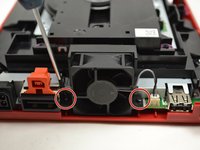
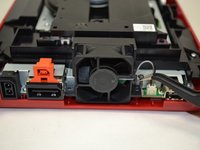
  3. Nintendo Wii mini Disc Drive Replacement, Unscrew the Fan: 步骤 3 中的图像 1,2 Nintendo Wii mini Disc Drive Replacement, Unscrew the Fan: 步骤 3 中的图像 2,2
    在这个步骤中使用的工具:
    Tweezers
    $4.99
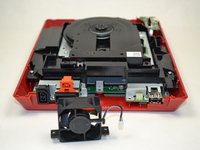
    • Turn the Wii mini around so that the back of the device is facing you.

    • Using a Phillips #0 Screwdriver, unscrew the two 6mm screws on either side of the fan piece.

    • You may need to use tweezers to pull out the screws once they are loosened.

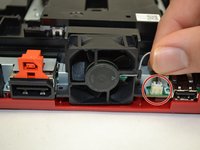
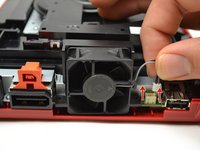
  4. Nintendo Wii mini Disc Drive Replacement, Detach the Fan Connector: 步骤 4 中的图像 1,3 Nintendo Wii mini Disc Drive Replacement, Detach the Fan Connector: 步骤 4 中的图像 2,3 Nintendo Wii mini Disc Drive Replacement, Detach the Fan Connector: 步骤 4 中的图像 3,3
    • Using your fingers, gently pull the top of the pin connector straight up to detach the fan from the console.

    • Do not wiggle the connector or cable while removing. This may cause the connector to come loose

    • Remove the fan piece and set it aside.

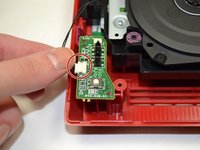
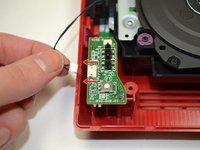
  5. Nintendo Wii mini Disc Drive Replacement, Power Board: 步骤 5 中的图像 1,3 Nintendo Wii mini Disc Drive Replacement, Power Board: 步骤 5 中的图像 2,3 Nintendo Wii mini Disc Drive Replacement, Power Board: 步骤 5 中的图像 3,3
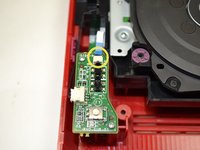
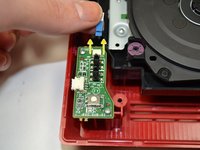
    • Using your fingers, slide out the blue ribbon cable from the the top of the power board.

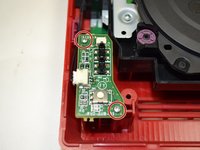
    • Using a Phillips #0 Screwdriver, unscrew the two 4mm screws at the top and bottom of the power board.

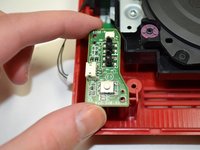
  6. Nintendo Wii mini Disc Drive Replacement: 步骤 6 中的图像 1,2 Nintendo Wii mini Disc Drive Replacement: 步骤 6 中的图像 2,2
    • Using your fingers, gently pull the pin connector to disconnect the power board from the disc drive.

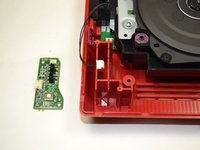
  7. Nintendo Wii mini Disc Drive Replacement: 步骤 7 中的图像 1,2 Nintendo Wii mini Disc Drive Replacement: 步骤 7 中的图像 2,2
    • Lift the power board from the console and set it aside.

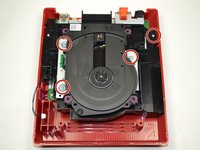
  8. Nintendo Wii mini Disc Drive Replacement, Disc Drive: 步骤 8 中的图像 1,2 Nintendo Wii mini Disc Drive Replacement, Disc Drive: 步骤 8 中的图像 2,2
    • Using a Phillips #0 Screwdriver, unscrew the four 6mm screws.

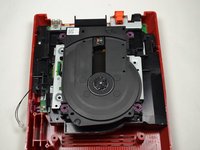
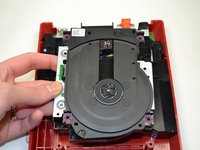
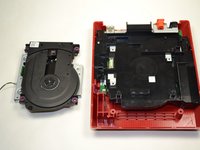
  9. Nintendo Wii mini Disc Drive Replacement: 步骤 9 中的图像 1,2 Nintendo Wii mini Disc Drive Replacement: 步骤 9 中的图像 2,2
    • Lift the disc drive out of the console and set it aside.

结论

To reassemble your device, follow these instructions in reverse order.

4等其他人完成本指南。

Kristin Anderson

于01/23/15注册

1,011 声望

创作了5篇指南

团队

UWT Liner: Group 5 UWT Liner: Group 5 的会员

Community

3 名成员

创作了11篇指南

1指南评论

i even took apart the disk drive. turns out it wasn't working because the lid was missing one of the plastic parts that pushes the sensor in the disk drive that indicates that the lid is closed

Alexander Busse - 回复 分享

添加评论

浏览统计数据:

过去 24 小时: 5

过去 7 天: 19

过去 30 天: 69

总计 5,644