跳转到主内容
加入维修社区 - 创建账户

NETGEAR WGT624 v3 Antenna Replacement

你所需要的

    1. NETGEAR WGT624 v3 Antenna Replacement, Lower Case: 步骤 1 中的图像 1,1
      • Turn the device so that the bottom is facing up.

      询问修复机器人
      添加评论

    2. NETGEAR WGT624 v3 Antenna Replacement: 步骤 2 中的图像 1,3 NETGEAR WGT624 v3 Antenna Replacement: 步骤 2 中的图像 2,3 NETGEAR WGT624 v3 Antenna Replacement: 步骤 2 中的图像 3,3
      • Use the plastic opening tool to carefully lift the rubber stops in each corner.

      • Do not completely remove the rubber stops, because they are difficult to replace.

      询问修复机器人
      添加评论

    3. NETGEAR WGT624 v3 Antenna Replacement: 步骤 3 中的图像 1,2 NETGEAR WGT624 v3 Antenna Replacement: 步骤 3 中的图像 2,2
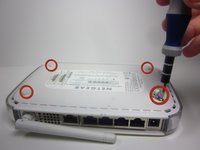
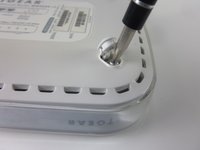
      • Unscrew the 4 11.8 mm T-8 Torx screws from each corner of the device.

      询问修复机器人
      添加评论

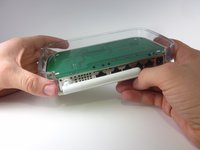
    4. NETGEAR WGT624 v3 Antenna Replacement: 步骤 4 中的图像 1,2 NETGEAR WGT624 v3 Antenna Replacement: 步骤 4 中的图像 2,2
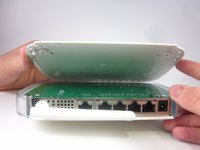
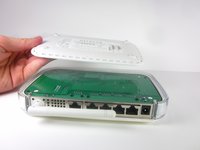
      • Lift the lower case straight up from the rest of the router.

      询问修复机器人

      添加评论

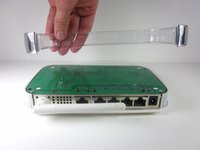
    1. NETGEAR WGT624 v3 Antenna Replacement, Motherboard: 步骤 5 中的图像 1,2 NETGEAR WGT624 v3 Antenna Replacement, Motherboard: 步骤 5 中的图像 2,2
      • Remove the clear plastic casing by lifting it straight up from the router.

      询问修复机器人

      添加评论

    2. NETGEAR WGT624 v3 Antenna Replacement: 步骤 6 中的图像 1,2 NETGEAR WGT624 v3 Antenna Replacement: 步骤 6 中的图像 2,2
      • Separate the motherboard from the top shell by lifting it straight up from the router.

      询问修复机器人

      添加评论

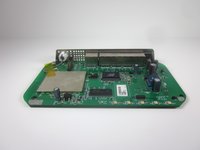
    1. NETGEAR WGT624 v3 Antenna Replacement, Antenna: 步骤 7 中的图像 1,1
      • Turn the motherboard, so that the top is facing upwards.

      • Place the motherboard on a clean flat surface.

      询问修复机器人

      添加评论

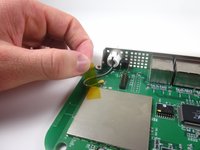
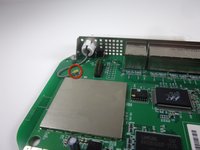
    2. NETGEAR WGT624 v3 Antenna Replacement: 步骤 8 中的图像 1,2 NETGEAR WGT624 v3 Antenna Replacement: 步骤 8 中的图像 2,2
      • Remove the yellow tape that holds the wire.

      • Make sure that you set the tape aside on a clean surface, so that it can be reused.

      询问修复机器人
      添加评论

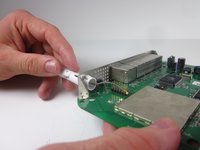
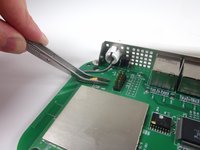
    3. NETGEAR WGT624 v3 Antenna Replacement: 步骤 9 中的图像 1,3 NETGEAR WGT624 v3 Antenna Replacement: 步骤 9 中的图像 2,3 NETGEAR WGT624 v3 Antenna Replacement: 步骤 9 中的图像 3,3
      在这个步骤中使用的工具:
      Tweezers
      $4.99
      • Use tweezers to gently pull the metal bracket that connects the antenna to the motherboard.

      • The wire should now be completely separate from the motherboard.

      询问修复机器人

      添加评论

    4. NETGEAR WGT624 v3 Antenna Replacement: 步骤 10 中的图像 1,1
      • Extend the antenna away from the device, so that it becomes straight.

      询问修复机器人

      添加评论

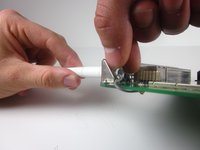
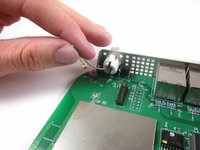
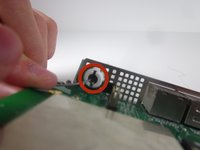
    5. NETGEAR WGT624 v3 Antenna Replacement: 步骤 11 中的图像 1,3 NETGEAR WGT624 v3 Antenna Replacement: 步骤 11 中的图像 2,3 NETGEAR WGT624 v3 Antenna Replacement: 步骤 11 中的图像 3,3
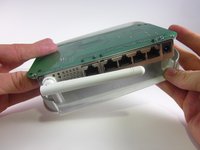
      • Find the clips that hold the antenna onto the router.

      • Use one hand to push the clips in, while using your other hand to pull out the antenna. You may need to gently twist the antenna so it can separate from the hole.

      • The antenna may take considerable force to remove.

      询问修复机器人

      添加评论

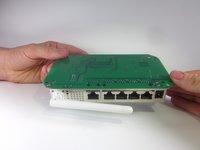
    6. NETGEAR WGT624 v3 Antenna Replacement: 步骤 12 中的图像 1,1
      • Completely separate the antenna and wire from the rest of the device.

      询问修复机器人

      添加评论

结论

To reassemble your device, follow these instructions in reverse order.

取消:我没有完成这个指南。

团队

Cal Poly, Team 3-31, Amido Winter 2013 Cal Poly, Team 3-31, Amido Winter 2013 的会员

CPSU-AMIDO-W13S3G31

3 名成员

创作了12篇指南

0指南评论

添加评论

浏览统计数据:

过去 24 小时: 0

过去 7 天: 5

过去 30 天: 26

总计 4,857