跳转到主内容
加入维修社区 - 创建账户

NABI XD Battery Replacement

你所需要的

    1. NABI XD Battery Replacement, Rear panel: 步骤 1 中的图像 1,2 NABI XD Battery Replacement, Rear panel: 步骤 1 中的图像 2,2
      • Use the plastic opening tool at the top left corner seam, then pry the corner apart.

      询问修复机器人

      添加评论

    2. NABI XD Battery Replacement: 步骤 2 中的图像 1,1
      • Next slide the plastic opening tool across the sides of the Nabi. It will slowly open.

      • There are small plastic clips that need to be release. Gently apply outwards pressure until the clips give.

      • Go around the NABI XD and separate the rear panel from the device.

      询问修复机器人

      添加评论

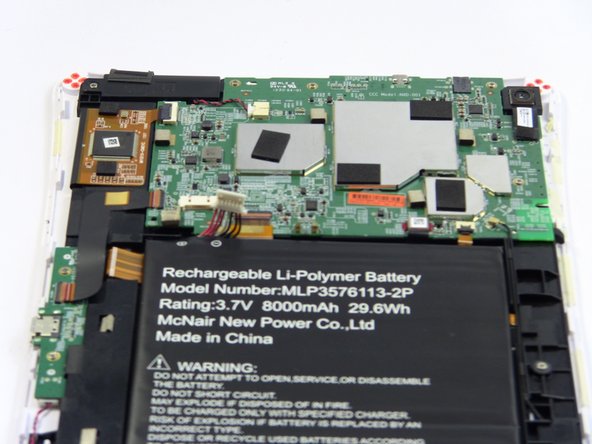
    1. NABI XD Battery Replacement, Battery: 步骤 3 中的图像 1,2 NABI XD Battery Replacement, Battery: 步骤 3 中的图像 2,2
      • Place your fingernails on both sides of the connector and pull it straight back away from the holder.

      询问修复机器人

      添加评论

    2. NABI XD Battery Replacement: 步骤 4 中的图像 1,1
      • Battery is glued to the base, lift carefully.

      • To remove battery, lift the battery up from the motherboard.

      询问修复机器人

      添加评论

结论

To reassemble your device, follow these instructions in reverse order.

取消:我没有完成这个指南。

团队

USF Tampa, Team 17-2, Blackwell Fall 2016 USF Tampa, Team 17-2, Blackwell Fall 2016 的会员

USFT-BLACKWELL-F16S17G2

3 名成员

创作了12篇指南

1指南评论

Where can you get the battery?

Dave - 回复 分享

添加评论

浏览统计数据:

过去 24 小时: 2

过去 7 天: 5

过去 30 天: 31

总计 1,159