跳转到主内容
加入维修社区 - 创建账户

N-Strike Nite Finder EX-3 Wire Replacement Guide

你所需要的

  1. N-Strike Nite Finder EX-3 Wire Replacement Guide, Wire: 步骤 1 中的图像 1,1
    • Place the blaster upside down on the table, and remove the screw in the bottom of the handle.

    • Remove the battery door and take the batteries out.

    询问修复机器人
  2. N-Strike Nite Finder EX-3 Wire Replacement Guide: 步骤 2 中的图像 1,3 N-Strike Nite Finder EX-3 Wire Replacement Guide: 步骤 2 中的图像 2,3 N-Strike Nite Finder EX-3 Wire Replacement Guide: 步骤 2 中的图像 3,3
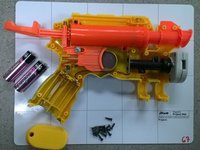
    • Set the blaster on its side with the screws facing up (the blaster will be placed on its left side). Remove all 14 phillips head, 8.2 mm screws and set them aside.

    • Lift the side of the blaster to expose its internal parts.

    询问修复机器人
  3. N-Strike Nite Finder EX-3 Wire Replacement Guide: 步骤 3 中的图像 1,1
    • Visually inspect all the wires in order to find the break, fray, or any other problem.

    • Locate the end connections of the affected wire.

    询问修复机器人
  4. N-Strike Nite Finder EX-3 Wire Replacement Guide: 步骤 4 中的图像 1,1
    • Use a hot soldering iron to melt the solder at one end of the wire until the wire can be pulled free from the connection.

    • Repeat on the other end of the connection to remove the wire from the blaster.

    • (End points marked on image are for the black wire)

    询问修复机器人
结论

To reassemble your device, follow these instructions in reverse order.

团队

Michigan Tech, Team 5-8, Lauer Spring 2014 Michigan Tech, Team 5-8, Lauer Spring 2014 的会员

MTU-LAUER-S14S5G8

3 名成员

创作了13篇指南

0指南评论

添加评论

浏览统计数据:

过去 24 小时: 1

过去 7 天: 13

过去 30 天: 87

总计 1,300