跳转到主内容
加入维修社区 - 创建账户

Motorola i850 SIM Card Replacement

  1. Motorola i850 SIM Card Replacement, Disassembling Motorola i850 Back Cover: 步骤 1 中的图像 1,1
    • Use your thumb to slide the back cover locker away from the antenna.

    询问修复机器人

    添加评论

  2. Motorola i850 SIM Card Replacement: 步骤 2 中的图像 1,2 Motorola i850 SIM Card Replacement: 步骤 2 中的图像 2,2
    • Slide the back cover towards the antenna while lifting the cover away from the phone.

    询问修复机器人

    添加评论

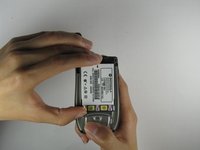
  3. Motorola i850 SIM Card Replacement, Battery: 步骤 3 中的图像 1,1
    • Place your thumb on the indicated corner while stabilizing the phone and the upper portion of the battery with your forefinger.

    询问修复机器人

    添加评论

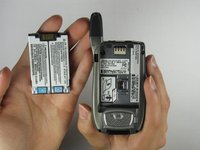
  4. Motorola i850 SIM Card Replacement: 步骤 4 中的图像 1,2 Motorola i850 SIM Card Replacement: 步骤 4 中的图像 2,2
    • Lift the battery out of the phone while pushing it towards the antenna.

    询问修复机器人

    添加评论

  5. Motorola i850 SIM Card Replacement, SIM Card: 步骤 5 中的图像 1,1
    • Place thumb on SIM Card door latch.

    询问修复机器人

    添加评论

  6. Motorola i850 SIM Card Replacement: 步骤 6 中的图像 1,1
    • Slide the SIM Card door latch away from the SIM Card. The door should pop open. If it does not pop open, use a fingernail to open it.

    询问修复机器人

    添加评论

  7. Motorola i850 SIM Card Replacement: 步骤 7 中的图像 1,1
    • Lift the SIM Card with your thumb and forefinger to complete the removal of the SIM card!

    询问修复机器人

    添加评论

结论

To reassemble your device, follow these instructions in reverse order.

取消:我没有完成这个指南。

Alex Jones

于04/09/10注册

1 声望

创作了3篇指南

团队

Cal Poly, Team 34-56, Forte Spring 2010 Cal Poly, Team 34-56, Forte Spring 2010 的会员

CPSU-FORTE-S10S34G56

4 名成员

创作了10篇指南

0指南评论

添加评论

浏览统计数据:

过去 24 小时: 0

过去 7 天: 7

过去 30 天: 34

总计 4,972