跳转到主内容
加入维修社区 - 创建账户

Motorola V190 Display Screen Replacement

你所需要的

  1. Motorola V190 Display Screen Replacement, Display Screen: 步骤 1 中的图像 1,3 Motorola V190 Display Screen Replacement, Display Screen: 步骤 1 中的图像 2,3 Motorola V190 Display Screen Replacement, Display Screen: 步骤 1 中的图像 3,3
    • Remove the four 6.3mm TR6 Torx screws surrounding the screen.

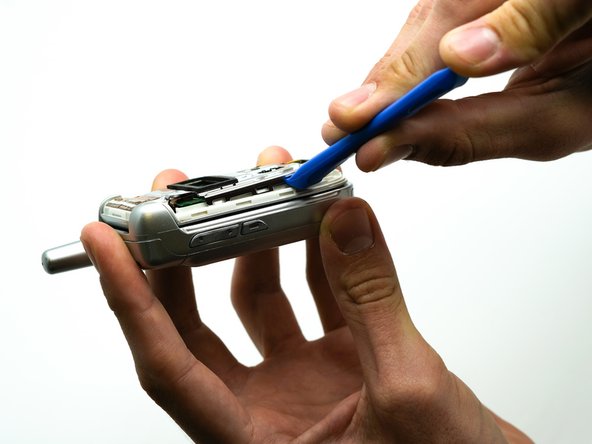
    • Use the iFixit opening tool to separate the casing.

    • To further separate the casing, start at the top of the screen, and run the opening tool along the edges.

    • Remove the face plate by pulling it from the top hinge.

  2. Motorola V190 Display Screen Replacement: 步骤 2 中的图像 1,1
    • Use the soldering iron to separate the ribbon from the phone.

  3. Motorola V190 Display Screen Replacement: 步骤 3 中的图像 1,1
    • Use the iFixit opening tool to remove the screen from the plastic casing .

  4. Motorola V190 Display Screen Replacement: 步骤 4 中的图像 1,1
    在这个步骤中使用的工具:
    Tweezers
    $4.99
    • Use the precision tweezers set to remove the black rectangular piece from the phone casing.

  5. Motorola V190 Display Screen Replacement: 步骤 5 中的图像 1,1
    • Use the precision tweezers set to remove the rectangular ribbon from the green display board.

  6. Motorola V190 Display Screen Replacement: 步骤 6 中的图像 1,2 Motorola V190 Display Screen Replacement: 步骤 6 中的图像 2,2
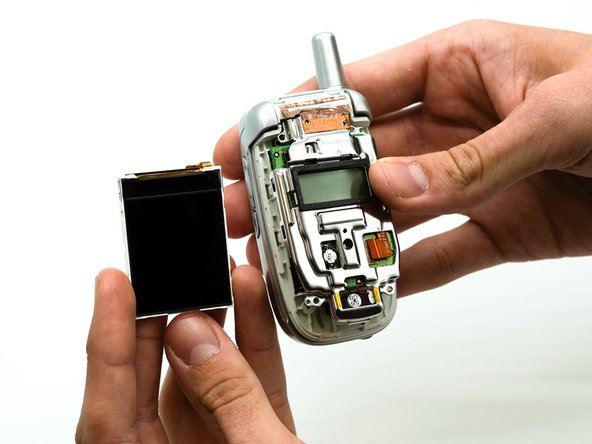
    • Remove the display screen from the phone.

结论

To reassemble your device, follow these instructions in reverse order.

0指南评论

添加评论

浏览统计数据:

过去 24 小时: 0

过去 7 天: 3

过去 30 天: 7

总计 319