跳转到主内容
加入维修社区 - 创建账户

Motorola SLVR L9 Camera Lens Cover Replacement

你所需要的

  1. Motorola SLVR L9 Camera Lens Cover Replacement, Camera Lens Cover: 步骤 1 中的图像 1,2 Motorola SLVR L9 Camera Lens Cover Replacement, Camera Lens Cover: 步骤 1 中的图像 2,2
    • Turn the phone over so that the back of the phone is facing towards you.

  2. Motorola SLVR L9 Camera Lens Cover Replacement: 步骤 2 中的图像 1,3 Motorola SLVR L9 Camera Lens Cover Replacement: 步骤 2 中的图像 2,3 Motorola SLVR L9 Camera Lens Cover Replacement: 步骤 2 中的图像 3,3
    • Press down on the battery cover latch located at the top of the phone.

    • Pull the battery cover down and away from the latch; then lift it up to remove the battery cover.

  3. Motorola SLVR L9 Camera Lens Cover Replacement: 步骤 3 中的图像 1,1
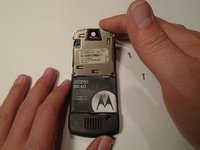
    • Remove the four housing screws (1/8") from each corner of the transceiver PC board shield. Use a screwdriver with a T6 Torx screwdriver head to turn the screws counter-clockwise (left).

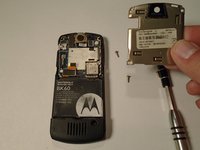
  4. Motorola SLVR L9 Camera Lens Cover Replacement: 步骤 4 中的图像 1,2 Motorola SLVR L9 Camera Lens Cover Replacement: 步骤 4 中的图像 2,2
    • Once you have removed all of the screws, lift the transceiver PC board shield up to remove it.

结论

To reassemble your device, follow these instructions in reverse order.

另外一个人完成了本指南。

团队

0指南评论

添加评论

浏览统计数据:

过去 24 小时: 0

过去 7 天: 9

过去 30 天: 36

总计 400