跳转到主内容
加入维修社区 - 创建账户

Motorola Defy XT Screen Replacement

你所需要的

  1. Motorola Defy XT Screen Replacement, Battery: 步骤 1 中的图像 1,1
    • Wedge the plastic opening tool in between the back cover and the body of the phone in the opening denoted by the arrow.

    询问修复机器人

    添加评论

  2. Motorola Defy XT Screen Replacement: 步骤 2 中的图像 1,1
    • Once wedged in the opening, slide the opening tool sideways around the sides of the phone.

    • Remove the back cover and set it aside.

    询问修复机器人

    添加评论

  3. Motorola Defy XT Screen Replacement: 步骤 3 中的图像 1,1
    • Insert the opening tool between the battery and the battery holder and wedge the battery out.

    询问修复机器人

    添加评论

  4. Motorola Defy XT Screen Replacement, SD Card: 步骤 4 中的图像 1,1
    • Open the plastic cover with your finger, exposing the SD card.

    • Use the opening tool to grab the edge of the SD card and pull it straight out.

    询问修复机器人

    添加评论

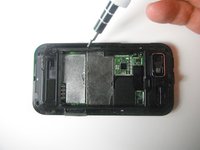
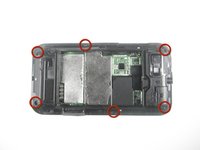
  5. Motorola Defy XT Screen Replacement, Screen: 步骤 5 中的图像 1,2 Motorola Defy XT Screen Replacement, Screen: 步骤 5 中的图像 2,2
    • Use the Torx T4 screwdriver to remove the six 3 mm screws from the back case.

    询问修复机器人

    添加评论

  6. Motorola Defy XT Screen Replacement: 步骤 6 中的图像 1,1
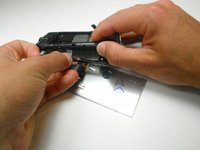
    • Use the plastic opening tool to pop the volume buttons off from the side of the phone.

    询问修复机器人

    添加评论

  7. Motorola Defy XT Screen Replacement: 步骤 7 中的图像 1,1
    • Wedge the plastic opening tool between the plastic layer and the shiny front cover.

    询问修复机器人

    添加评论

  8. Motorola Defy XT Screen Replacement: 步骤 8 中的图像 1,1
    • Slide the plastic opening tool along the edge, wedging the the two pieces apart.

    • Potential for device damage: Do not completely separate the two pieces; there are still internal components that need to be disconnected.

    询问修复机器人

    添加评论

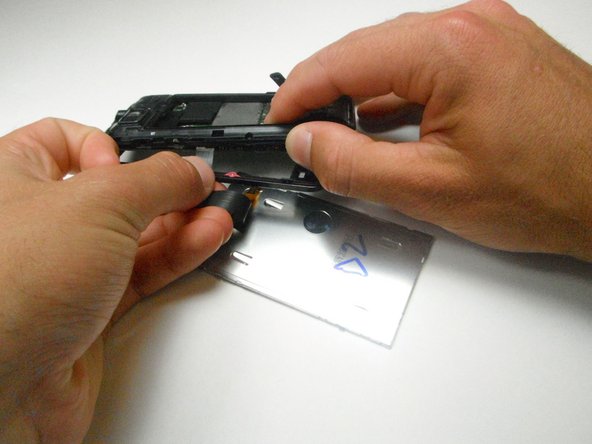
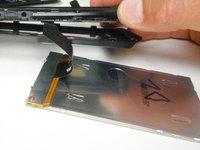
  9. Motorola Defy XT Screen Replacement: 步骤 9 中的图像 1,2 Motorola Defy XT Screen Replacement: 步骤 9 中的图像 2,2
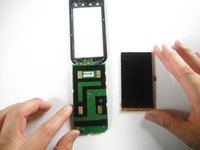
    • Slide the screen out and disconnect the ribbon cable connecting the display to the motherboard by pulling straight outward.

    • Potential for device damage: Be careful when sliding out the screen because the front case and the motherboard are still connected by two other ribbon cables.

    询问修复机器人

    添加评论

  10. Motorola Defy XT Screen Replacement: 步骤 10 中的图像 1,2 Motorola Defy XT Screen Replacement: 步骤 10 中的图像 2,2
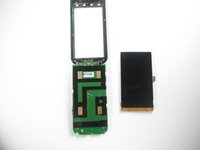
    • Set the old screen aside and replace it with your new screen.

    询问修复机器人

    添加评论

结论

To reassemble your device, follow these instructions in reverse order.

取消:我没有完成这个指南。

2等其他人完成本指南。

团队

Cal Poly, Team 2-22, Maness Spring 2013 Cal Poly, Team 2-22, Maness Spring 2013 的会员

CPSU-MANESS-S13S2G22

3 名成员

创作了8篇指南

0指南评论

添加评论

浏览统计数据:

过去 24 小时: 4

过去 7 天: 11

过去 30 天: 45

总计 3,595