跳转到主内容
加入维修社区 - 创建账户

Merch Source Projector Entertainment II Light Bulb Replacement

你所需要的

  1. Merch Source Projector Entertainment II Light Bulb Replacement, Outer Casing: 步骤 1 中的图像 1,2 Merch Source Projector Entertainment II Light Bulb Replacement, Outer Casing: 步骤 1 中的图像 2,2
    • Flip the projector onto its back and unscrew the nine 15mm screws using the Phillips #0 screw driver.

    询问修复机器人

    添加评论

  2. Merch Source Projector Entertainment II Light Bulb Replacement: 步骤 2 中的图像 1,1
    • Flip the projector right side up and unscrew the two 12mm screws on the light bulb panel located at the rear of the projector with a Phillips #0 screw head.

    • The bottom right panel screw does not come completely out the panel door.

    询问修复机器人

    添加评论

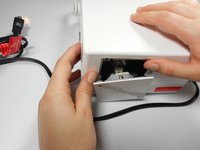
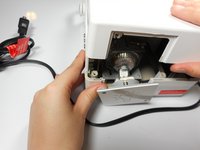
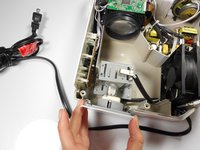
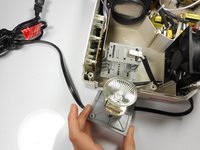
  3. Merch Source Projector Entertainment II Light Bulb Replacement: 步骤 3 中的图像 1,2 Merch Source Projector Entertainment II Light Bulb Replacement: 步骤 3 中的图像 2,2
    • Using your hands, gently pry the top and bottom of the projector casing apart.

    询问修复机器人

    添加评论

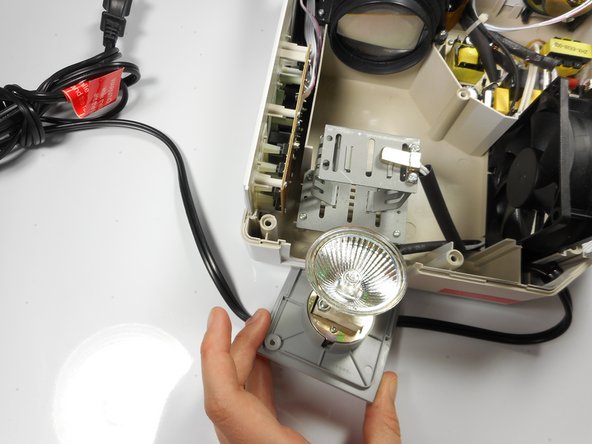
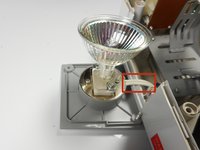
  4. Merch Source Projector Entertainment II Light Bulb Replacement, Remove light bulb assembly from housing unit: 步骤 4 中的图像 1,3 Merch Source Projector Entertainment II Light Bulb Replacement, Remove light bulb assembly from housing unit: 步骤 4 中的图像 2,3 Merch Source Projector Entertainment II Light Bulb Replacement, Remove light bulb assembly from housing unit: 步骤 4 中的图像 3,3
    • Remove the light bulb from its housing unit.

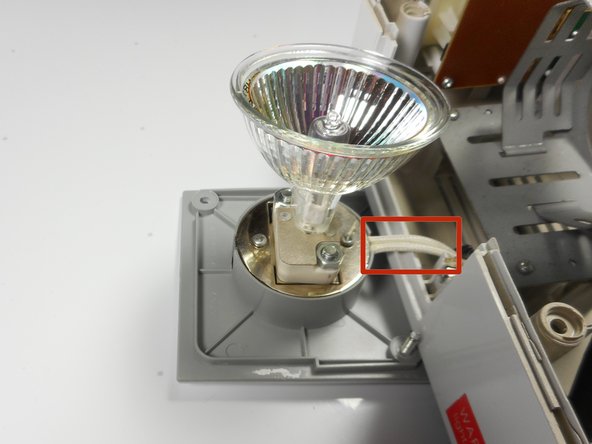
    • Do not damage the 2 white cables leading into the light bulb panel.

    询问修复机器人

    添加评论

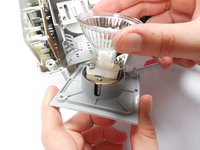
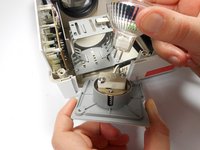
  5. Merch Source Projector Entertainment II Light Bulb Replacement, Replace light bulb: 步骤 5 中的图像 1,2 Merch Source Projector Entertainment II Light Bulb Replacement, Replace light bulb: 步骤 5 中的图像 2,2
    • Remove the light bulb from the door panel by gently wiggling it back and forth. Do not twist the light bulb.

    • The light blub is held into the socket with prongs, and should easily pull straight out.

    添加评论

结论

To reassemble your device, follow these instructions in reverse order.

取消:我没有完成这个指南。

另外一个人完成了本指南。

Stephanie

于01/08/15注册

282 声望

创作了3篇指南

团队

Cal Poly, Team 18-3, Maness Winter 2015 Cal Poly, Team 18-3, Maness Winter 2015 的会员

CPSU-MANESS-W15S18G3

3 名成员

创作了4篇指南

1指南评论

Mi nuevo proyector no prende la luz ni el ventilador al conectarlo al tomacorriente y encenderlo.

JAVIER MUNOZ - 回复 分享

添加评论

浏览统计数据:

过去 24 小时: 0

过去 7 天: 16

过去 30 天: 45

总计 2,609