此翻译由机器生成,尚未经过人工审核。 会说这种语言吗? 查看评论。
简介
屏幕没有背光?更换逆变器即可。
你所需要的
-
-
-
-
-
从电脑的光驱(右)侧拆下两颗十字螺丝:
-
两颗 5.2 mm 十字 #00 螺丝,带杆(杆直径 2.3 mm,长度 3.25 mm)(螺丝头:直径 3.2 mm,厚度 0.5 mm)
-
-
-
-
-
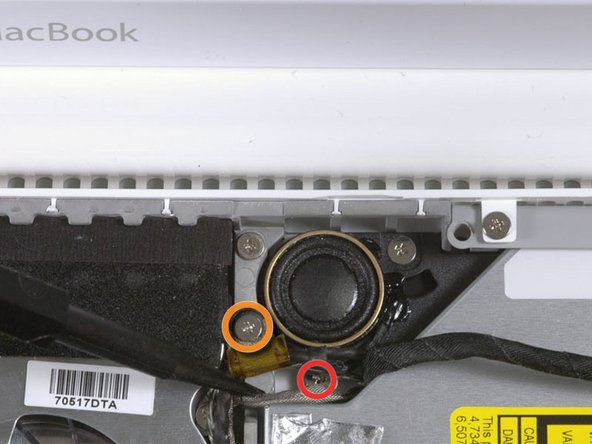
对于原款 Macbook Core Duo 和 Core 2 Duo 机型,请拆下这 3 颗螺丝:
-
右侧扬声器附近的 2 颗 3 mm 十字螺丝。
-
1 颗穿过低音炮上方塑料扣孔的 6 mm 十字螺丝。
-
对于不带 C 型槽的 Santa Rosa/Penryn 和 2009 款机型:
-
只需拆下右侧扬声器上的单颗 3 mm 十字螺丝,并跳过第 26 步。
-
-
-
-
-
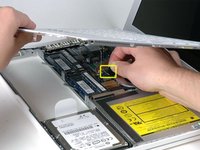
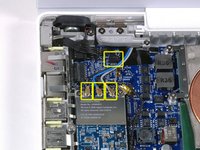
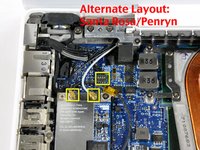
断开 Airport 卡上的天线电缆:
-
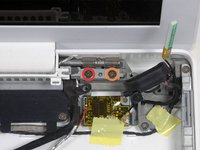
如果你使用的是第一代 MacBook Core Duo 或 Core 2 Duo 机型,请参考第一张图片,其中显示有三根天线电缆。
-
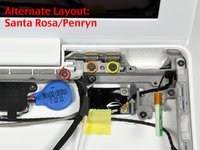
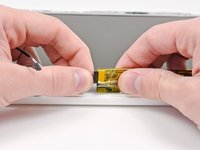
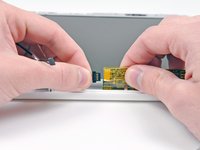
如果你使用的是 MacBook Core 2 Duo Santa Rosa/Penryn 或 2009 年款机型,则只有两根天线电缆,且黑色逆变器电缆的插头/插孔位置有所不同。逆变器板连接器的插头/插孔上可能覆盖着一块方形泡沫。
-
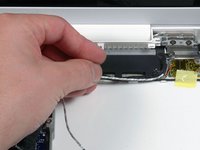
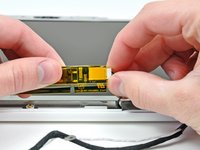
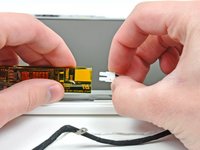
将撬棒插入插头的左右两端与插孔之间,然后垂直轻轻撬起,断开逆变器电缆的连接。请勿撬起插孔——你必须仅向上拉动插头,将其垂直拔出插孔。请勿沿着电缆线的方向拉扯,否则会将插孔从逻辑板上撕下。
-
-
-
对于早期的 MacBook Core Duo 和 Core 2 Duo 机型,请参照第一张图片,从右侧铰链支架上拆下以下 2 颗螺丝:
-
铰链支架左侧的一颗 6 mm Phillips 螺丝。
-
铰链支架右侧的一颗 10 mm Phillips 螺丝。
-
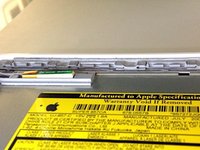
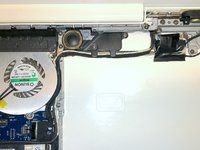
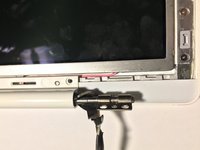
对于 Santa Rosa/Penryn 和 2009 年款机型,请参照第二张图片,从右侧铰链支架上拆下以下 3 颗螺丝:
-
最左侧的一颗 3 mm 小直径 Phillips 螺丝。
-
中间的一颗 5.2 mm 大直径、4.2 mm 螺丝头 Phillips 螺丝。
-
最右侧的一颗 10 mm 大直径、4.2 mm 螺丝头 Phillips 螺丝。
-
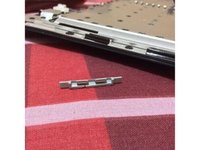
在拆下右侧铰链支架前,请留意各部件是如何组合在一起的,包括那个白色的小塑料件。了解支架各部分的装配方式将有助于重新组装。将右侧铰链支架连同白色小塑料件一起从电脑中取出。
-
-
-
在这个步骤中使用的工具:Plastic Cards$2.99
-
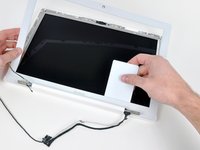
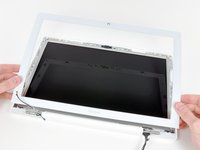
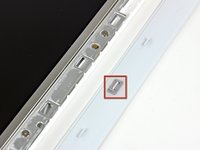
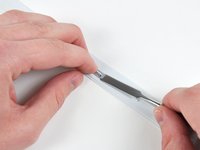
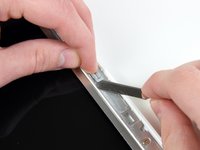
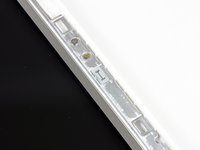
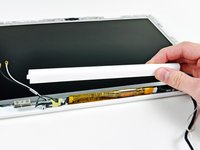
使用一张薄的 塑料卡片 松开将显示屏前边框固定在显示屏组件上的卡扣和夹子。显示屏边框左侧共有五个卡扣。
-
-
-
-

 询问修复机器人























要重新组装设备,请按相反顺序执行这些说明。
152等其他人完成本指南。

8指南评论
Awesome site and awesome guide. This exteneded the life of my MacBook. I can't thank you enough!!!!
For about 3 years I had been dealing with my screen backlight shuting off. I would then dim the screen up and down until I could get it to stay. Sometimes it would work the first time other times I would be doing it for 10 minutes and other times I would give up for a few hours and come back and the screen would be on again. It would also do this sometimes when I opened the laptop at a certain angle or bumped the computer.
Well after these years very annoying behavior, my screen wont turn back on. I can see my desktop when I shine a light on the screen and hear the fan running so I know the computer works fine.
I've tried unpluging the inverter board to see if it was a loose connection, but that didn't work. I tried wiggling it around until the screen turned on and nothing.... Please help!
Is this a problem with my inverter or the inverter cable? Or the backlight cable?
What parts should I buy?
Hi everybody! Last year bought a new inverter, new cable and other stuff and replaced. Problem not solved, screen still turning black. Thinking to get a new display, but today bought spray electronic cleaner, sprayed over the display data cable (https://d3nevzfk7ii3be.cloudfront.net/ig...). Problem &&^&^$^ solved! :) Time: 15 mins, money: 5$. Good tutorial tho! :P
These are a very comprehensive set of instructions and give a really good grand tour of the innards of a MacBook 8. They are also useful for replacing the hard drive or the optical drive.
Couple of hints:
1. Have on hand some canned compressed air - the inside of a laptop is generally quite full of dust and fluff.
2. Also have on hand some contact cleaner spray (do NOT use degreasers/lubricants/anti rust sprays such as RP 7 or WD 50). Contact cleaner sprays generally only contact isopropyl alchohol. It's good to give exposed contacts a bit of a clean - even grease from fingertips can affect conductivity and hence performance. (If possible, use powder free surgical gloves).
3. Make sure you have the right tools (don't skimp - buy the tools set from iFixit). Not using the right spudger on a plug could be the cause of irreparable damage to the circuit board.
(continued next posting)
