此翻译由机器生成,尚未经过人工审核。 会说这种语言吗? 查看评论。
简介
更换屏幕周围的塑料边框。
你所需要的
-
-
-
-
-
从电脑的光驱(右)侧拆下两颗十字螺丝:
-
两颗 5.2 mm 十字 #00 螺丝,带杆(杆直径 2.3 mm,长度 3.25 mm)(螺丝头:直径 3.2 mm,厚度 0.5 mm)
-
-
-
-
-
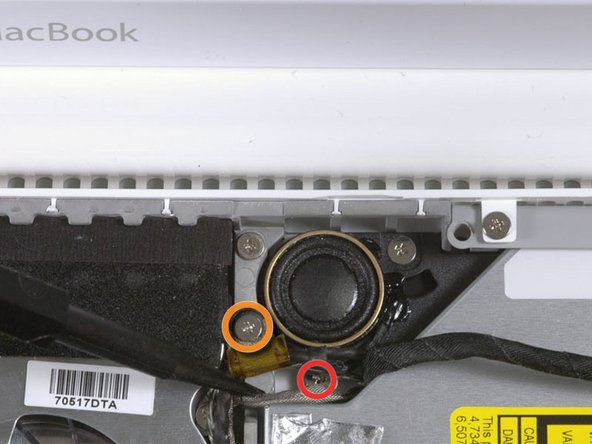
对于原款 Macbook Core Duo 和 Core 2 Duo 机型,请拆下这 3 颗螺丝:
-
右侧扬声器附近的 2 颗 3 mm 十字螺丝。
-
1 颗穿过低音炮上方塑料扣孔的 6 mm 十字螺丝。
-
对于不带 C 型槽的 Santa Rosa/Penryn 和 2009 款机型:
-
只需拆下右侧扬声器上的单颗 3 mm 十字螺丝,并跳过第 26 步。
-
-
-
-
-
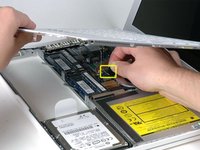
断开 Airport 卡上的天线电缆:
-
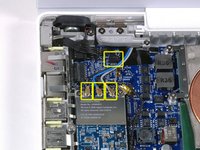
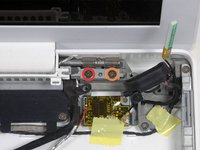
如果你使用的是第一代 MacBook Core Duo 或 Core 2 Duo 机型,请参考第一张图片,其中显示有三根天线电缆。
-
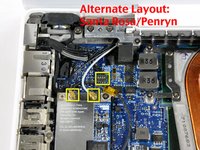
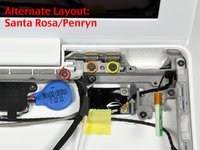
如果你使用的是 MacBook Core 2 Duo Santa Rosa/Penryn 或 2009 年款机型,则只有两根天线电缆,且黑色逆变器电缆的插头/插孔位置有所不同。逆变器板连接器的插头/插孔上可能覆盖着一块方形泡沫。
-
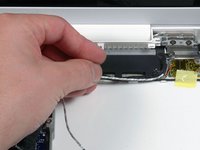
将撬棒插入插头的左右两端与插孔之间,然后垂直轻轻撬起,断开逆变器电缆的连接。请勿撬起插孔——你必须仅向上拉动插头,将其垂直拔出插孔。请勿沿着电缆线的方向拉扯,否则会将插孔从逻辑板上撕下。
-
-
-
对于早期的 MacBook Core Duo 和 Core 2 Duo 机型,请参照第一张图片,从右侧铰链支架上拆下以下 2 颗螺丝:
-
铰链支架左侧的一颗 6 mm Phillips 螺丝。
-
铰链支架右侧的一颗 10 mm Phillips 螺丝。
-
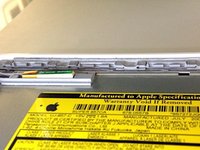
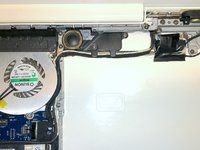
对于 Santa Rosa/Penryn 和 2009 年款机型,请参照第二张图片,从右侧铰链支架上拆下以下 3 颗螺丝:
-
最左侧的一颗 3 mm 小直径 Phillips 螺丝。
-
中间的一颗 5.2 mm 大直径、4.2 mm 螺丝头 Phillips 螺丝。
-
最右侧的一颗 10 mm 大直径、4.2 mm 螺丝头 Phillips 螺丝。
-
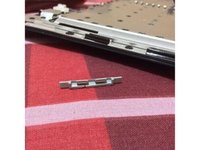
在拆下右侧铰链支架前,请留意各部件是如何组合在一起的,包括那个白色的小塑料件。了解支架各部分的装配方式将有助于重新组装。将右侧铰链支架连同白色小塑料件一起从电脑中取出。
-
-
-
在这个步骤中使用的工具:Plastic Cards$2.99
-
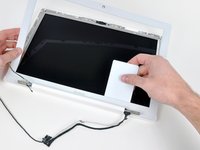
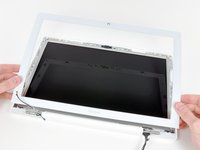
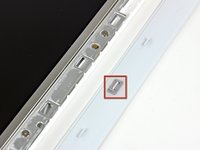
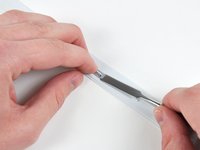
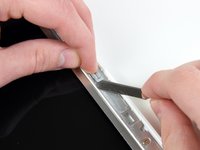
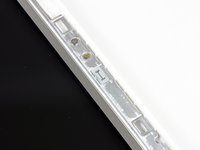
使用一张薄的 塑料卡片 松开将显示屏前边框固定在显示屏组件上的卡扣和夹子。显示屏边框左侧共有五个卡扣。
-
-

 询问修复机器人
















要重新组装设备,请按相反顺序执行这些说明。
73等其他人完成本指南。

9指南评论
One only needs to go to page 14 of this guide to install a new front bezel. This can be replaced without virtually dismantling the entire computer. By that, I mean you don't have to take the battery out, you don't have to take the top of the case off, you don't have to take the entire display off. Simply pry off the old front bezel with a plastic card, just as in the directions, being careful not to overextend the display on its hinges while in the processes.
culthero13 - 回复 分享
There is really no need to disassemble the bottom of the computer and remove the display assembly from the bottom case to replace the display bezel. You can simply start at step 36 if you only want to remove/replace the bezel. (MB062LL/A)
philipgarcia - 回复 分享
I too have confirmed that you can simply start at step 36 if you only want to remove/replace the bezel.
