跳转到主内容

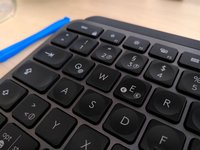
Logitech MX Keys Key Removal and Replacement

你所需要的

  1. Logitech MX Keys Key Removal and Replacement, Take out key: 步骤 1 中的图像 1,1
    • Insert something thin under the top of the key.

    • Apply a little force. It comes out easily.

  2. Logitech MX Keys Key Removal and Replacement, Anatomy of a key: 步骤 2 中的图像 1,2 Logitech MX Keys Key Removal and Replacement, Anatomy of a key: 步骤 2 中的图像 2,2
    • Anatomy of a key

  3. Logitech MX Keys Key Removal and Replacement, Put key back: 步骤 3 中的图像 1,2 Logitech MX Keys Key Removal and Replacement, Put key back: 步骤 3 中的图像 2,2
    • Slide in bottom first

    • Gently push the top part in. It clips easily.

结论

You've successfully removed and replaced a keycap on your Logitech MX Keys keyboard.

25等其他人完成本指南。

sitarane

于09/10/15注册

996 声望

撰写一个指南

24指南评论

Do you think the clips are durable?

Joshua M - 回复

No, they break easily.

ikomrad -

Where can I find the keys for the replacement? I can only find keys for like $15 per key...

Fritz Freund - 回复

I need to know this too!

ikomrad -

If you are having sticky key issues, take the key out, clean out the area beneath the key, and underneath the key, and reinsert the same key. In most cases, this will fix your issue. This may happen if debree/dust gets in-between the keys.

Gitesh Agarwal -

添加评论

浏览统计数据:

过去 24 小时: 75

过去 7 天: 666

过去 30 天: 2,758

总计 67,162