跳转到主内容
加入维修社区 - 创建账户

此翻译可能不反映源指南的最新更新。 帮助更新翻译查看源指南

罗技M720 微动开关更换

你所需要的

  1. 罗技M720 微动开关更换, 拆解: 步骤 1 中的图像 1,3 罗技M720 微动开关更换, 拆解: 步骤 1 中的图像 2,3 罗技M720 微动开关更换, 拆解: 步骤 1 中的图像 3,3
    • 从取下电池开始拆解。

    • 撕开电池下面的贴纸,底下会露出一个十字螺丝。由于我的鼠标已经被拆过了,所以图中没有贴纸。

    • 用平口螺丝刀或者类似的工具撕开上部的橡胶脚垫,下面还有两个螺丝。

    • 如图所示,总共需要拧掉5个十字螺丝。

  2. 罗技M720 微动开关更换, 分离上下壳体: 步骤 2 中的图像 1,1
    • 轻轻地将鼠标的上下两部分分开,注意不要用力过猛,以免损坏连接上盖微动开关和主板的细小排线。

    • 拨开卡扣然后从主板上取下排线,这样鼠标的上下部分就分开了。

    • 主板上的连接器比另一端的连接器小得多,也脆弱得多。最好不要触碰小端,只需拔开大端的卡扣。

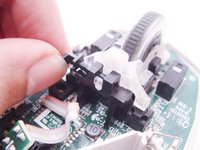
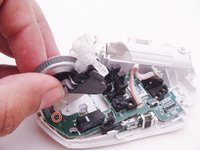
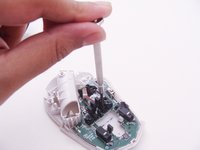
  3. 罗技M720 微动开关更换, 拆下滚轮: 步骤 4 中的图像 1,3 罗技M720 微动开关更换, 拆下滚轮: 步骤 4 中的图像 2,3 罗技M720 微动开关更换, 拆下滚轮: 步骤 4 中的图像 3,3
    • 拆下将半透明滚轮组件固定到黑色塑料底座上的卡扣

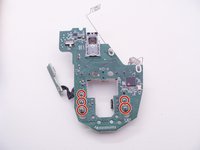
    • 抬起滚轮组件,注意不要弄丢滚轮下方靠近前端的两个小弹簧。我的鼠标里这两个弹簧已经不见了,但我已用红色标记出了它们的位置。

    • 拆下固定黑色塑料底座的两颗螺丝,滚轮组件就安装在这个塑料件上。

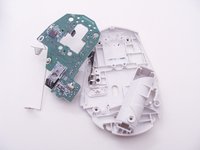
  4. 罗技M720 微动开关更换, 取下主板: 步骤 5 中的图像 1,3 罗技M720 微动开关更换, 取下主板: 步骤 5 中的图像 2,3 罗技M720 微动开关更换, 取下主板: 步骤 5 中的图像 3,3
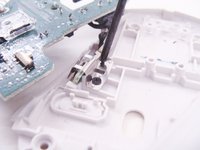
    • 取下主板,轻轻放在一旁,注意不要损坏连接到底部外壳上的小型开关和支架组件的剩余排线。

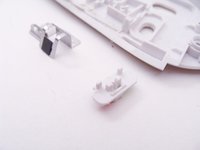
    • 拧下螺丝并取下金属支架。现在,排线及其末端的PCB小板应该可以自由活动了。

    • 请勿遗失作为开关滑块盖的小塑料片,现在如果将底部外壳翻转过来,它应该可以自由掉出来。

  5. 罗技M720 微动开关更换, 拆焊微动开关: 步骤 6 中的图像 1,3 罗技M720 微动开关更换, 拆焊微动开关: 步骤 6 中的图像 2,3 罗技M720 微动开关更换, 拆焊微动开关: 步骤 6 中的图像 3,3
    在这个步骤中使用的工具:
    Desoldering Pump
    $3.99
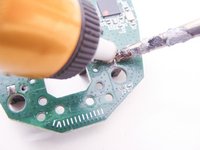
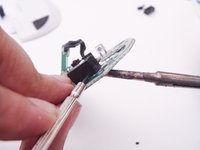
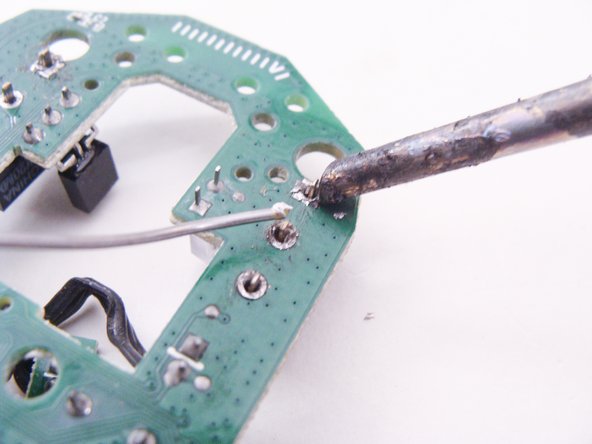
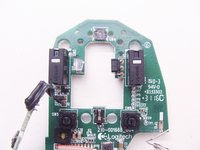
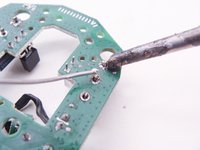
    • 使用您喜欢的拆焊方法(例如吸锡器或吸锡带)找到并拆焊微动开关的焊盘。您的烙铁头应该干净且镀锡良好,不像我图中这个糟糕的烙铁头。

    • 如果有必要的话,可在加热焊盘的同时用一字螺丝刀撬起旧开关。

  6. 罗技M720 微动开关更换, 更换微动开关: 步骤 7 中的图像 1,3 罗技M720 微动开关更换, 更换微动开关: 步骤 7 中的图像 2,3 罗技M720 微动开关更换, 更换微动开关: 步骤 7 中的图像 3,3
    在这个步骤中使用的工具:
    Soldering Iron 60w Hakko 503F
    $19.99
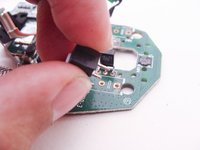
    • 安装并焊接新的微动开关

    • 再次提醒,务必使用镀锡良好且干净的烙铁头。你的烙铁头不应该像我图片里这样脏兮兮的。

结论

要重新组装您的设备,请按相反的顺序来执行以下指南。

22等其他人完成本指南。

由衷感谢以下译者:

en zh

94%

这些译者帮助我们修补全世界! 您也想加入吗?
开始翻译 ›

Santaji

于03/25/11注册

1,359 声望

创作了4篇指南

11指南评论

Next time show ALL screws, type and position.

On this mouse screws are not all similar and if somebody forget that your “guide” don’t help

John Travolta - 回复 分享

Thanks for the guide! It helped so very much.

The_Rural_Juror - 回复 分享

thank you! i only needed to open and clean the dust inside and it clicks well again.
mine was double clicking when i click and hold.
was about to unsolder and swap the left and right switches but didn't have to go all the way there.
screws are fine i think. just be careful and put them on a safe place with the same relative positions to make it easier to put back, as with all other devices when disassembling.


UPDATE: mine is double clicking again 1 month later, and just found out recently from reddit that breathing humidity to the switches will often fix the double clicking problem with these Omron switches inside. it's magic! i tried and it really fixed it.

ted - 回复 分享

Just replaced mine m720's switches with Kailh GM 8.0 Mouse Switches, working like charm!

Dishendra - 回复 分享

Wow. I read your comment and bought some Kailh GM 8.0 switches. They are really awesome. It's such a great mouse to use now. Thanks for such a great recommendation.

Edward Furey - 分享

添加评论

浏览统计数据:

过去 24 小时: 17

过去 7 天: 147

过去 30 天: 620

总计 30,885