简介
This guide will show you how to fix a mouse button failure caused by wear on the pad that presses on the microswitch.
你所需要的
-
-
-
Follow the teardown guide to disassemble the mouse
-
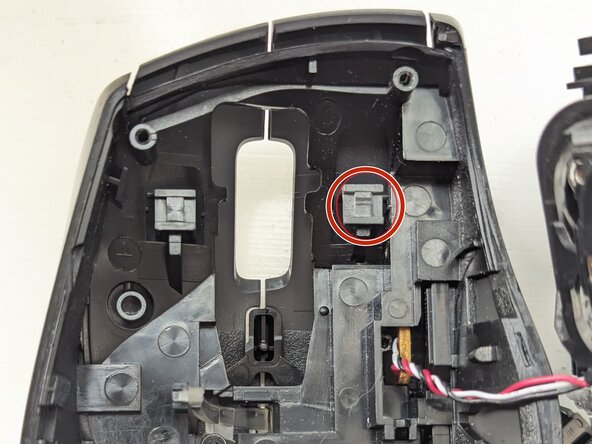
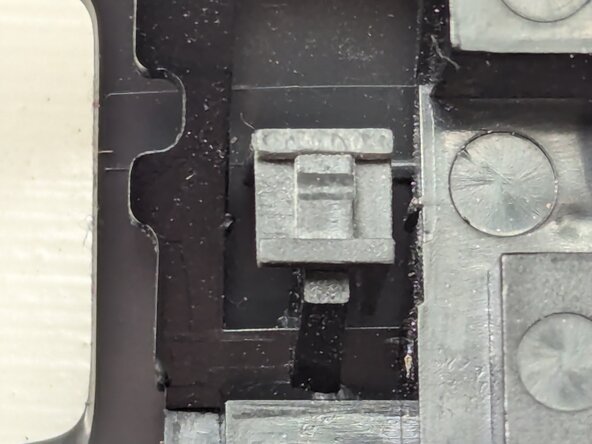
The pad in the upper shell of the mouse that presses on the microswitch has worn , circled red in the photograph. Comapre the wear on this side with the lower level of wear in the equivalent part for the right hand mouse on the left side of the photograph. A close up of the worn part is shown in thhe second photogrpah
 询问修复机器人
-
-
-
-
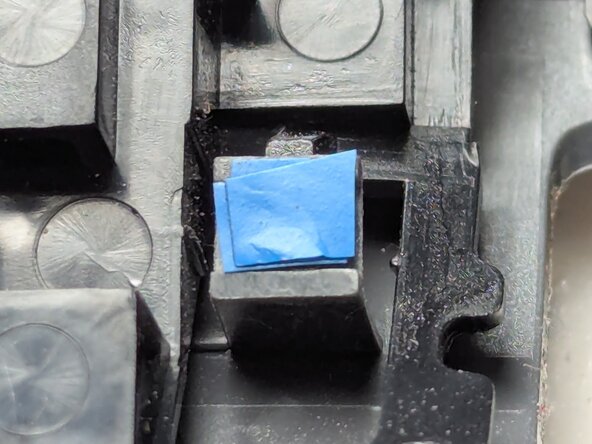
Use electrical insulation tape (blue in the photographs) to build up the level of the worn pad. Here I've used four layers
-
Then reassemble the mouse
-
-
To reassemble your device, reverse the dissasembly process as per the Teardown Guide.
另外一个人完成了本指南。

