跳转到主内容
加入维修社区 - 创建账户

Lens Replacement

你所需要的

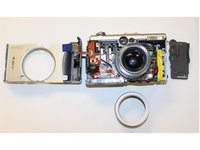
  1. Lens Replacement, Lens: 步骤 1 中的图像 1,3 Lens Replacement, Lens: 步骤 1 中的图像 2,3 Lens Replacement, Lens: 步骤 1 中的图像 3,3
    • Step 1. Remove: Remove the indicated screws from the camera.

    询问修复机器人
  2. Lens Replacement: 步骤 2 中的图像 1,3 Lens Replacement: 步骤 2 中的图像 2,3 Lens Replacement: 步骤 2 中的图像 3,3
    • Step 2. Remove all the screws: Keep all the screws and disconnect the cables carefully.

    • Step 3. Lift: After removing all the cables, lift up and flip over the PCB.

    询问修复机器人
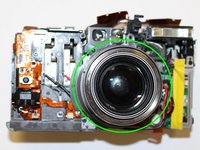
  3. Lens Replacement: 步骤 3 中的图像 1,2 Lens Replacement: 步骤 3 中的图像 2,2
    • Step 4. Remove: Remove marked screws on top and around the lent.

    • **Remove all the parts, be aware that there are a lot of screws and keep count them a long the way of the dissambley **

    询问修复机器人
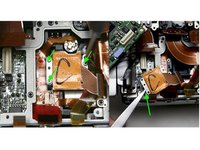
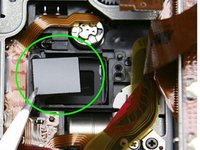
  4. Lens Replacement: 步骤 4 中的图像 1,2 Lens Replacement: 步骤 4 中的图像 2,2
    • Step 5. Carefully remove as much of the glue as possible before proceeding to the next step.

    • Step 6. Remove the marked focus spacers.

    • Place a bead of silicone adhesive on each side of the ir filter to fix it in position and allow to cure.

    询问修复机器人
结论

To reassemble your device, follow these instructions in reverse order.

0指南评论

添加评论

浏览统计数据:

过去 24 小时: 0

过去 7 天: 11

过去 30 天: 70

总计 1,838