简介
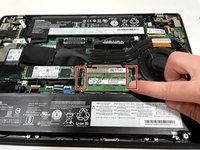
This guide will show you how to replace a RAM stick in a Lenovo ThinkPad T470S laptop. RAM replacement may be necessary if there is an error in your RAM or if there is not enough RAM.
你所需要的
-
-
-
Use a Phillips #000 screwdriver to remove the five 7 mm screws from the bottom of the laptop.
-
Lift the bottom panel up and off the laptop.
 询问修复机器人
-
-
-
-



To reassemble your device, follow these instructions in reverse order.
2等其他人完成本指南。

团队

Illinois Wesleyan University, Team S1-G3, Bullock Spring 2021 Illinois Wesleyan University, Team S1-G3, Bullock Spring 2021 的会员
IWU-BULLOCK-S21S1G3
4 名成员
创作了54篇指南
