跳转到主内容
加入维修社区 - 创建账户

LG Optimus T Motherboard Replacement

你所需要的

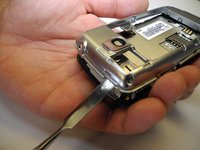
  1. LG Optimus T Motherboard Replacement, Motherboard: 步骤 1 中的图像 1,3 LG Optimus T Motherboard Replacement, Motherboard: 步骤 1 中的图像 2,3 LG Optimus T Motherboard Replacement, Motherboard: 步骤 1 中的图像 3,3
    • Working on your device while it is turned on may result in electric shock. Make sure to shut down and unplug your device before you begin.

    • Using a prying device, such as a plastic opening tool, remove the phone’s back cover. At the top of the phone, there’s an indentation to put the Spudger into to pop the case off

    询问修复机器人
  2. LG Optimus T Motherboard Replacement: 步骤 2 中的图像 1,1
    • Remove the battery. There’s an indentation to the left of the camera lens to pull up on the battery with your finger

    询问修复机器人
  3. LG Optimus T Motherboard Replacement: 步骤 3 中的图像 1,1
    • Use a J0 screwdriver to remove the six 4.5mm screws.

    询问修复机器人
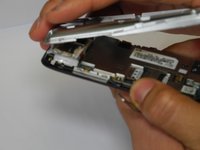
  4. LG Optimus T Motherboard Replacement: 步骤 4 中的图像 1,2 LG Optimus T Motherboard Replacement: 步骤 4 中的图像 2,2
    • You might have difficulty popping the interior case off. You may use the metal spudger here with caution if the plastic opening tool fails

    • Remove interior case. Insert the spudger into the indentations at the top, or bottom of the phone to pry off the interior case.

    询问修复机器人
  5. LG Optimus T Motherboard Replacement: 步骤 5 中的图像 1,1
    • Pull up on connector tab

    询问修复机器人
  6. LG Optimus T Motherboard Replacement: 步骤 6 中的图像 1,2 LG Optimus T Motherboard Replacement: 步骤 6 中的图像 2,2
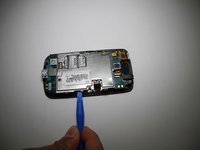
    • Remove SD card mount. Insert the plastic opening tool on the right side to pop off

    询问修复机器人
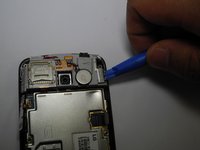
  7. LG Optimus T Motherboard Replacement: 步骤 7 中的图像 1,2 LG Optimus T Motherboard Replacement: 步骤 7 中的图像 2,2
    • Remove metal panel

    • There are four retaining points to insert plastic opening tool and pop off panel

    询问修复机器人
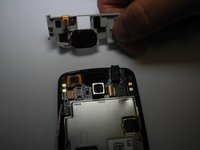
  8. LG Optimus T Motherboard Replacement: 步骤 8 中的图像 1,1
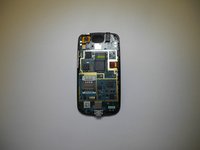
    • Use a J0 screwdriver to remove the two 1.8mm screws from charging port. (Charging port and motherboard are connected.)

    • Remove motherboard

    询问修复机器人
结论

To reassemble your device, follow these instructions in reverse order.

另外一个人完成了本指南。

stacey

于02/07/17注册

219 声望

创作了2篇指南

团队

Ohio State, Team 1-3, Wilder Spring 2017 Ohio State, Team 1-3, Wilder Spring 2017 的会员

OSU-WILDER-S17S1G3

4 名成员

创作了5篇指南

0指南评论

添加评论

浏览统计数据:

过去 24 小时: 0

过去 7 天: 5

过去 30 天: 29

总计 468