跳转到主内容
加入维修社区 - 创建账户

LG Optimus 3D Motherboard Replacement

你所需要的

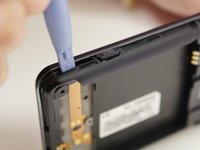
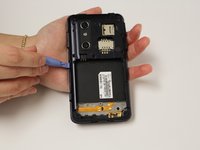
  1. LG Optimus 3D Motherboard Replacement, Back Cover Removal: 步骤 1 中的图像 1,2 LG Optimus 3D Motherboard Replacement, Back Cover Removal: 步骤 1 中的图像 2,2
    • Pry the back cover off of the phone with your fingernail. There is a notch located at the bottom of the phone for improved leverage.

  2. LG Optimus 3D Motherboard Replacement, Battery Removal: 步骤 2 中的图像 1,3 LG Optimus 3D Motherboard Replacement, Battery Removal: 步骤 2 中的图像 2,3 LG Optimus 3D Motherboard Replacement, Battery Removal: 步骤 2 中的图像 3,3
    • The battery is the large black rectangle towards the bottom half of the phone.

    • There is a semi-circular notch at the bottom edge of the battery. Press against and up on the battery to pop it out.

  3. LG Optimus 3D Motherboard Replacement, Screw Removal: 步骤 3 中的图像 1,2 LG Optimus 3D Motherboard Replacement, Screw Removal: 步骤 3 中的图像 2,2
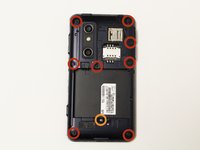
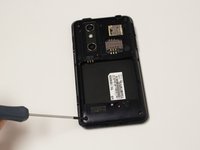
    • Remove 9 screws from the phone. The locations of these screws are circled in the picture.

    • 5.5mm length PH00 screws

    • 4mm length PH00 screws

  4. LG Optimus 3D Motherboard Replacement, Bottom Cover Removal: 步骤 4 中的图像 1,2 LG Optimus 3D Motherboard Replacement, Bottom Cover Removal: 步骤 4 中的图像 2,2
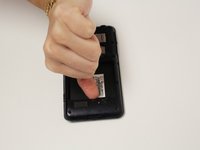
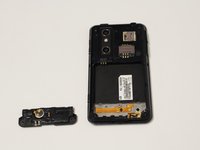
    • Gently pull down on the bottom cover to remove it.

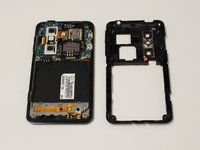
  5. LG Optimus 3D Motherboard Replacement, Mid-Cover Bezel Removal: 步骤 5 中的图像 1,3 LG Optimus 3D Motherboard Replacement, Mid-Cover Bezel Removal: 步骤 5 中的图像 2,3 LG Optimus 3D Motherboard Replacement, Mid-Cover Bezel Removal: 步骤 5 中的图像 3,3
    • Using a plastic opening tool, gently pry around the perimeter of the device.

    • The ribbons behind the buttons and ports are very delicate. Make sure you do not run your plastic opening tool too deep into the bezel, as you could damage them.

    • The button covers rest under the Mid-Cover Bezel. Remove them and set aside.

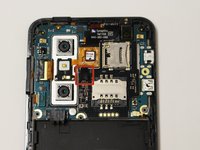
  6. LG Optimus 3D Motherboard Replacement, Ribbon Cable Disconnection: 步骤 6 中的图像 1,2 LG Optimus 3D Motherboard Replacement, Ribbon Cable Disconnection: 步骤 6 中的图像 2,2
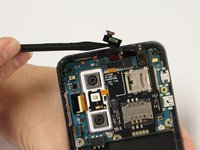
    • Using a spudger or plastic opening tool, gently disconnect the ribbon cable attached to the black SIM card board.

  7. LG Optimus 3D Motherboard Replacement, Adhesive Loosening: 步骤 7 中的图像 1,1
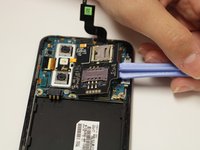
    • Use a hair-dryer on high, or a heat-gun on low to heat the device and loosen the adhesive which holds down the SD/SIM Card Board.

    • Evenly heat the device in short intervals for about one minute.

    • Do not heat the device for more than 30 seconds at a time to prevent over-heating.

  8. LG Optimus 3D Motherboard Replacement, SD/SIM Card Board Removal: 步骤 8 中的图像 1,3 LG Optimus 3D Motherboard Replacement, SD/SIM Card Board Removal: 步骤 8 中的图像 2,3 LG Optimus 3D Motherboard Replacement, SD/SIM Card Board Removal: 步骤 8 中的图像 3,3
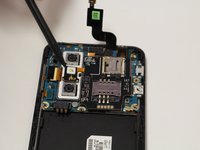
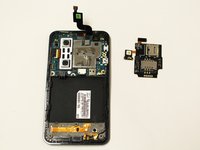
    • Gently pry the board up to release it from the now soft adhesive. Make sure you pry up the little tab connected to the camera unit as well.

    • If the board is too difficult to separate than more heating may be required.

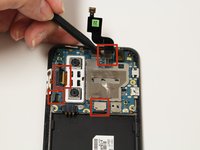
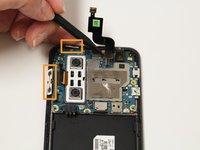
  9. LG Optimus 3D Motherboard Replacement, Disconnect Ribbon Cables: 步骤 9 中的图像 1,2 LG Optimus 3D Motherboard Replacement, Disconnect Ribbon Cables: 步骤 9 中的图像 2,2
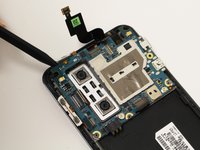
    • Using a spudger or plastic opening tool, gently lift the ribbon cables connected to the motherboard.

    • The button tabs, highlighted in orange, are held in with a light adhesive. Gently lift them out of the body of the phone with a spudger.

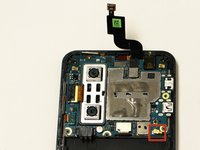
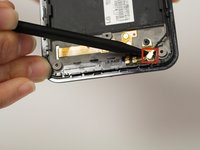
  10. LG Optimus 3D Motherboard Replacement, Disconnect Antenna: 步骤 10 中的图像 1,2 LG Optimus 3D Motherboard Replacement, Disconnect Antenna: 步骤 10 中的图像 2,2
    • Remove the antenna cable by disconnecting both ends.

    • One end connects to the motherboard and the other connects near bottom of the phone.

  11. LG Optimus 3D Motherboard Replacement, Remove Motherboard: 步骤 11 中的图像 1,2 LG Optimus 3D Motherboard Replacement, Remove Motherboard: 步骤 11 中的图像 2,2
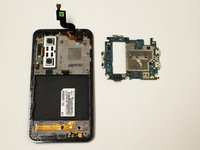
    • Using a spudger gently lift the motherboard assembly out of the case.

    • Make sure the motherboard does not get snagged on the camera's ribbon cable.

结论

To reassemble your device, follow these instructions in reverse order.

3等其他人完成本指南。

Dale Pearson

于09/22/14注册

784 声望

创作了6篇指南

团队

USF Tampa, Team 10-6, Brown Fall 2014 USF Tampa, Team 10-6, Brown Fall 2014 的会员

USFT-BROWN-F14S10G6

3 名成员

创作了6篇指南

0指南评论

添加评论

浏览统计数据:

过去 24 小时: 2

过去 7 天: 12

过去 30 天: 44

总计 1,732