跳转到主内容
加入维修社区 - 创建账户

此翻译由机器生成,尚未经过人工审核。 会说这种语言吗? 查看评论

LG G5 辅助接口更换

你所需要的

    1. LG G5 辅助接口更换, 前面板组件: 步骤 1 中的图像 1,2 LG G5 辅助接口更换, 前面板组件: 步骤 1 中的图像 2,2
      • 按住电池 释放按钮 ,将手机底部拉出身体。

      询问修复机器人

      添加评论

    2. LG G5 辅助接口更换: 步骤 2 中的图像 1,3 LG G5 辅助接口更换: 步骤 2 中的图像 2,3 LG G5 辅助接口更换: 步骤 2 中的图像 3,3
      • 取出插入的SIM卡(SIM卡弹出工具0.8mm的小孔喷出头)上的卡槽。

      • 用一些力向内按压,使托盘弹出。

      • 将SIM卡托盘从电话中拉出。

      询问修复机器人

      添加评论

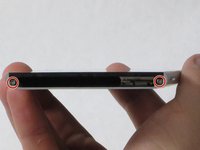
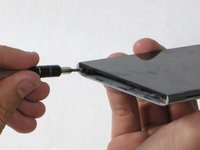
    3. LG G5 辅助接口更换: 步骤 3 中的图像 1,2 LG G5 辅助接口更换: 步骤 3 中的图像 2,2
      • 从手机的尾部拆下两个5.5 mm 菲利普斯# 00螺钉。

      询问修复机器人

      添加评论

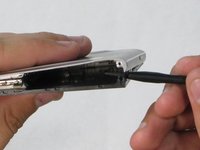
    4. LG G5 辅助接口更换: 步骤 4 中的图像 1,1
      • 将平角撬棒插入玻璃屏幕和金属体身之间的接缝中。

      • 把玻璃从机身上撬一下就可以了。

      添加评论

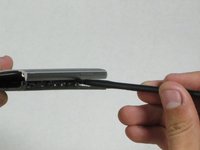
    5. LG G5 辅助接口更换: 步骤 5 中的图像 1,2 LG G5 辅助接口更换: 步骤 5 中的图像 2,2
      • 将撬棒插入到机身与屏幕之间的开放空间。

      • 慢慢向内推使屏幕更加分离。

      • 慢慢在边缘滑动尼龙撬棍,手机直到屏幕弹出机身。

      • 当把屏幕放进去时,将边缘从手机顶部压到底部。屏幕应该“滑动”到位。

      添加评论

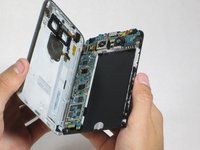
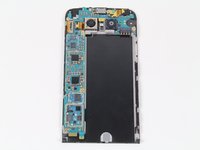
    6. LG G5 辅助接口更换: 步骤 6 中的图像 1,2 LG G5 辅助接口更换: 步骤 6 中的图像 2,2
      • 使屏幕分离机身。这两部分应该完全分开。

      询问修复机器人

      添加评论

    1. LG G5 辅助接口更换, 辅助接口: 步骤 7 中的图像 1,1
      • 找到手机右上角的辅助端口。

      • 用手指小心地将端口取出。

      • 将新辅助端口的孔朝向手机顶部,金色排线朝向左侧(如图所示),放入设备以完成更换。

      询问修复机器人

      添加评论

结论

要重新组装设备,请按相反顺序执行这些说明。

取消:我没有完成这个指南。

8等其他人完成本指南。

团队

Cal Poly, Team 18-2, Forte Fall 2016 Cal Poly, Team 18-2, Forte Fall 2016 的会员

CPSU-FORTE-F16S18G2

4 名成员

创作了72篇指南

3指南评论

I saw a video where someone used a guitar pick as the plastic opening tool, seems safer to me. And that person also had a great idea to shove a pencil in the battery bay to apply a separating force, so that as you work the seam with a guitar pick, the the two halves will naturally want to separate.

Adam Mizban - 回复 分享

Hi, I have two LG G5 phone. Let's call them

A & B.

So , B overheats and the battery last less than an hour. So I took the battery from A and I put it in B and I put the B battery in the A. Results: B still overheats and not the A ??? I also left the connector blocks on the batteries when I did the switching. So what could be the cause of this?

Julie Desruisseaux - 回复 分享

weak signal problem

Bilal Khan - 回复 分享

添加评论

浏览统计数据:

过去 24 小时: 1

过去 7 天: 11

过去 30 天: 54

总计 6,119