跳转到主内容
加入维修社区 - 创建账户

LG G4 Speaker Replacement

你所需要的

    1. LG G4 Speaker Replacement, Back Cover: 步骤 1 中的图像 1,1
      • Make sure the phone is powered off.

      • Remove the rear cover by placing the plastic opening tool in the groove on the bottom left side of the LG G4 and gently prying up.

      询问修复机器人

      添加评论

    2. LG G4 Speaker Replacement: 步骤 2 中的图像 1,2 LG G4 Speaker Replacement: 步骤 2 中的图像 2,2
      • Place the plastic opening tool at the bottom edge of the battery and lift up. Carefully remove battery with your hands.

      询问修复机器人

      添加评论

    3. LG G4 Speaker Replacement: 步骤 3 中的图像 1,3 LG G4 Speaker Replacement: 步骤 3 中的图像 2,3 LG G4 Speaker Replacement: 步骤 3 中的图像 3,3
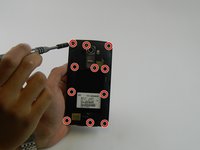
      • Remove the eleven 3.9 mm Phillips #00 screws found at the back of the phone.

      询问修复机器人

      添加评论

    4. LG G4 Speaker Replacement: 步骤 4 中的图像 1,3 LG G4 Speaker Replacement: 步骤 4 中的图像 2,3 LG G4 Speaker Replacement: 步骤 4 中的图像 3,3
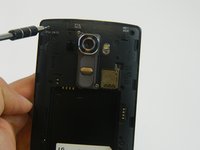
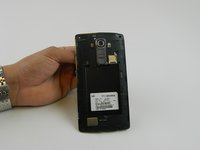
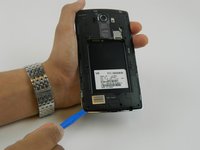
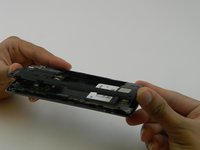
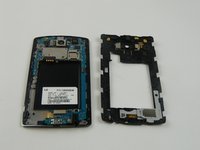
      • Once all the screws have been removed, place the plastic opening tool in the lower left corner and firmly lift the cover up.

      • Detach the cover with your fingers

      询问修复机器人

      添加评论

    1. LG G4 Speaker Replacement, Speaker: 步骤 5 中的图像 1,2 LG G4 Speaker Replacement, Speaker: 步骤 5 中的图像 2,2
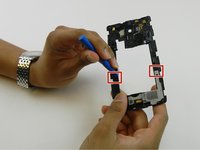
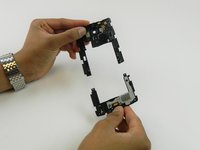
      • Detach the bottom portion of the plastic panel you just removed by wedging the plastic opening tool under the top part of the clip, and sliding the bottom portion of the panel downward away from the top portion.

      • The bottom portion of the plastic panel contains the speaker to be replaced, all as one part.

      询问修复机器人

      添加评论

结论

To reassemble your device, follow these instructions in reverse order.

取消:我没有完成这个指南。

8等其他人完成本指南。

carolinavind

于08/30/15注册

2,735 声望

创作了3篇指南

团队

USF Tampa, Team 16-5, Wollert Fall 2015 USF Tampa, Team 16-5, Wollert Fall 2015 的会员

USFT-WOLLERT-F15S16G5

4 名成员

创作了58篇指南

0指南评论

添加评论

浏览统计数据:

过去 24 小时: 0

过去 7 天: 6

过去 30 天: 31

总计 7,485