跳转到主内容
加入维修社区 - 创建账户

LG Chocolate Keypad Replacement

你所需要的

  1. LG Chocolate Keypad Replacement, Battery: 步骤 1 中的图像 1,2 LG Chocolate Keypad Replacement, Battery: 步骤 1 中的图像 2,2
    • Find a sliding button on the lower back side of the device and with your finger, slide it to the left firmly.

    • The battery should pop out fairly easily. If not, slide the button further or grab and pull it while sliding the button.

    询问修复机器人

    添加评论

  2. LG Chocolate Keypad Replacement, Back Cover: 步骤 2 中的图像 1,1
    • You will need to use a Phillips #00 screwdriver.

    • Remove the four screws located at the corners beneath the battery.

    • Detach the back case from the phone.

    询问修复机器人

    添加评论

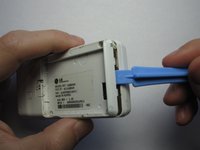
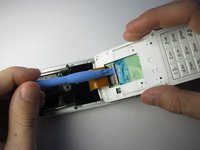
  3. LG Chocolate Keypad Replacement: 步骤 3 中的图像 1,3 LG Chocolate Keypad Replacement: 步骤 3 中的图像 2,3 LG Chocolate Keypad Replacement: 步骤 3 中的图像 3,3
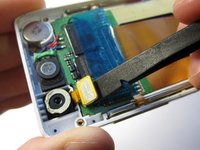
    • Take the case off by using a plastic opening tool.

    • Continue using the plastic opening tool around the sides of the device.

    • Unhook the eight tabs securing the back cover to the rest of the phone as seen in the second photo.

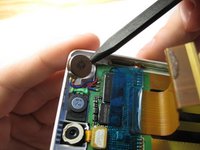
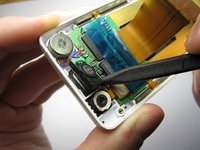
    • The back speaker will be connected to the motherboard.

    • This must be disconnected in order to remove the case.

    询问修复机器人

    添加评论

  4. LG Chocolate Keypad Replacement, Sliding Front: 步骤 4 中的图像 1,1
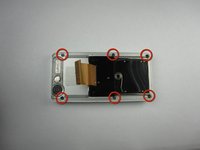
    • Unscrew the 4 Phillips 00 screws that connect the two halves of the phone together.

    询问修复机器人

    添加评论

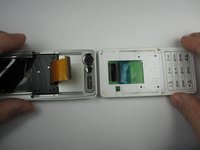
  5. LG Chocolate Keypad Replacement: 步骤 5 中的图像 1,2 LG Chocolate Keypad Replacement: 步骤 5 中的图像 2,2
    • Between the two halves is a ribbon. Use a plastic opening tool to flip up the lock and disconnect it.

    询问修复机器人

    添加评论

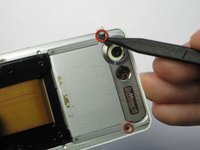
  6. LG Chocolate Keypad Replacement: 步骤 6 中的图像 1,2 LG Chocolate Keypad Replacement: 步骤 6 中的图像 2,2
    • Pry off the plastic tabs that cover two screws, as shown in the first picture.

    • Then, remove the 6 Phillips 00 screws from the back of the case, as shown in the second picture.

    询问修复机器人

    添加评论

  7. LG Chocolate Keypad Replacement: 步骤 7 中的图像 1,1
    • Pry off the back cover from the front of the case using a plastic opening tool.

    询问修复机器人

    添加评论

  8. LG Chocolate Keypad Replacement, LCD Board: 步骤 8 中的图像 1,3 LG Chocolate Keypad Replacement, LCD Board: 步骤 8 中的图像 2,3 LG Chocolate Keypad Replacement, LCD Board: 步骤 8 中的图像 3,3
    • Pry the front speaker and wireless receiver out of the front case using a spudger.

    • They may be taped into the case, so don't be afraid to pry hard.

    询问修复机器人

    添加评论

  9. LG Chocolate Keypad Replacement: 步骤 9 中的图像 1,2 LG Chocolate Keypad Replacement: 步骤 9 中的图像 2,2
    • Starting with the side that has the speaker and receiver, carefully lift the LCD Board out of the case.

    询问修复机器人

    添加评论

  10. LG Chocolate Keypad Replacement: 步骤 10 中的图像 1,1
    • Unhook the ribbon cable using that flat side of a spudger.

    询问修复机器人

    添加评论

  11. LG Chocolate Keypad Replacement: 步骤 11 中的图像 1,1
    • Next, carefully remove the tape from the LCD board.

    询问修复机器人

    添加评论

  12. LG Chocolate Keypad Replacement: 步骤 12 中的图像 1,2 LG Chocolate Keypad Replacement: 步骤 12 中的图像 2,2
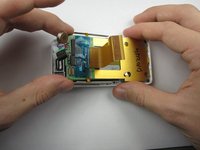
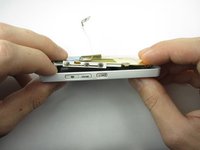
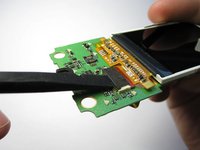
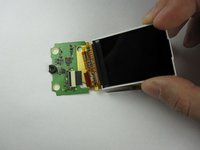
    • Finally, flip up the black switch to unhook the LCD screen from the LCD board using a spudger.

    • The LCD Board in now accessible.

    询问修复机器人

    添加评论

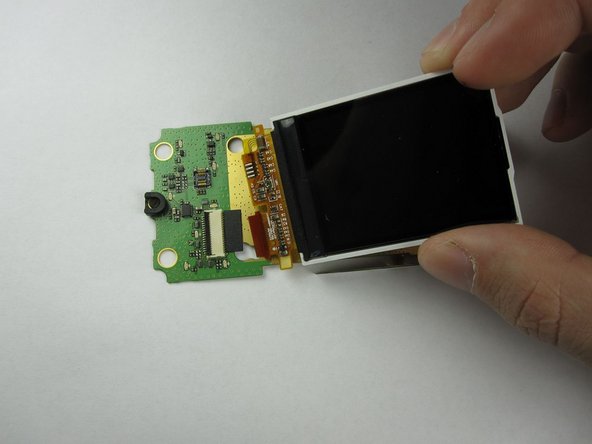
  13. LG Chocolate Keypad Replacement, LCD Screen: 步骤 13 中的图像 1,1
    • The LCD screen is no longer connected to the LCD board.

    询问修复机器人

    添加评论

  14. LG Chocolate Keypad Replacement, Keypad: 步骤 14 中的图像 1,1
    • Push the keypad out from the front of the phone and remove it.

    询问修复机器人

    添加评论

结论

To reassemble your device, follow these instructions in reverse order.

取消:我没有完成这个指南。

Maci Miri

于01/18/13注册

39 声望

创作了3篇指南

团队

Cal Poly, Team 19-46, Regan Winter 2013 Cal Poly, Team 19-46, Regan Winter 2013 的会员

CPSU-REGAN-W13S19G46

4 名成员

创作了22篇指南

0指南评论

添加评论

浏览统计数据:

过去 24 小时: 3

过去 7 天: 11

过去 30 天: 43

总计 620