跳转到主内容
加入维修社区 - 创建账户

LG CF360 Front Case Replacement

你所需要的

  1. LG CF360 Front Case Replacement, Battery: 步骤 1 中的图像 1,2 LG CF360 Front Case Replacement, Battery: 步骤 1 中的图像 2,2
    • On the back of the phone, place your thumb on the three raised bumps and slide the back cover upward.

    询问修复机器人

    添加评论

  2. LG CF360 Front Case Replacement: 步骤 2 中的图像 1,1
    • Lift and remove the battery.

    询问修复机器人

    添加评论

  3. LG CF360 Front Case Replacement, Back Cover: 步骤 3 中的图像 1,2 LG CF360 Front Case Replacement, Back Cover: 步骤 3 中的图像 2,2
    在这个步骤中使用的工具:
    Tweezers
    $4.99
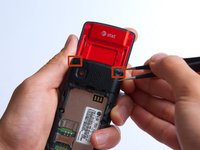
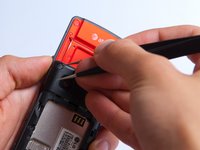
    • Remove the two screw covers at the top of phone with tweezers.

    询问修复机器人

    添加评论

  4. LG CF360 Front Case Replacement: 步骤 4 中的图像 1,1
    • Remove the six Phillips #000 (3mm) screws.

    询问修复机器人

    添加评论

  5. LG CF360 Front Case Replacement: 步骤 5 中的图像 1,3 LG CF360 Front Case Replacement: 步骤 5 中的图像 2,3 LG CF360 Front Case Replacement: 步骤 5 中的图像 3,3
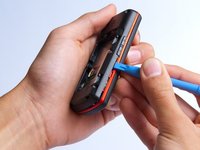
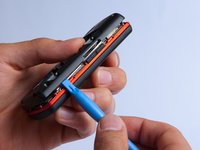
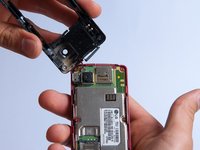
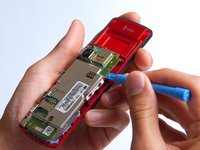
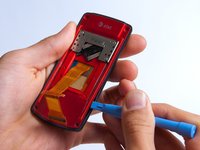
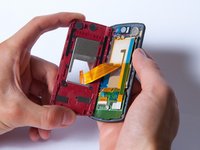
    • Use the plastic opening tool to pry the back cover off. Insert the tool between the back cover and red mid section and go around the entire phone.

    • The plastic side buttons fall out when you take the back cover off.

    • The back cover is connected to the speaker by red and black wires.

    询问修复机器人

    添加评论

  6. LG CF360 Front Case Replacement: 步骤 6 中的图像 1,1
    • Use the tweezers to remove the red and black wires connecting the speaker to the green motherboard by pinching the sides of the plastic base near the motherboard.

    • Set the back cover with the speaker aside.

    询问修复机器人

    添加评论

  7. LG CF360 Front Case Replacement, Motherboard: 步骤 7 中的图像 1,2 LG CF360 Front Case Replacement, Motherboard: 步骤 7 中的图像 2,2
    • Use the plastic opening tool to gently lift the snapped-in motherboard from the front panel.

    • An orange ribbon from the LCD is connected to the underside of the motherboard, so do not force the motherboard from the rest of the phone yet.

    询问修复机器人

    添加评论

  8. LG CF360 Front Case Replacement: 步骤 8 中的图像 1,1
    • Gently remove the blue transparent tape from the connector.

    询问修复机器人

    添加评论

  9. LG CF360 Front Case Replacement: 步骤 9 中的图像 1,1
    • With the plastic opening tool, gently pry the LCD connector from the motherboard.

    • Set the motherboard aside.

    询问修复机器人

    添加评论

  10. LG CF360 Front Case Replacement, Front Case: 步骤 10 中的图像 1,1
    • Take the front case and unscrew the four Phillips #000 (1mm) screws around the ribbon.

    询问修复机器人

    添加评论

  11. LG CF360 Front Case Replacement: 步骤 11 中的图像 1,1
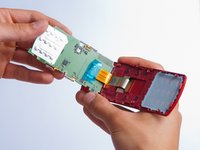
    • Gently pull the orange ribbon from the number pad casing.

    • Set the number pad case to the side once it is detached from the ribbon.

    询问修复机器人

    添加评论

  12. LG CF360 Front Case Replacement: 步骤 12 中的图像 1,1
    在这个步骤中使用的工具:
    Tweezers
    $4.99
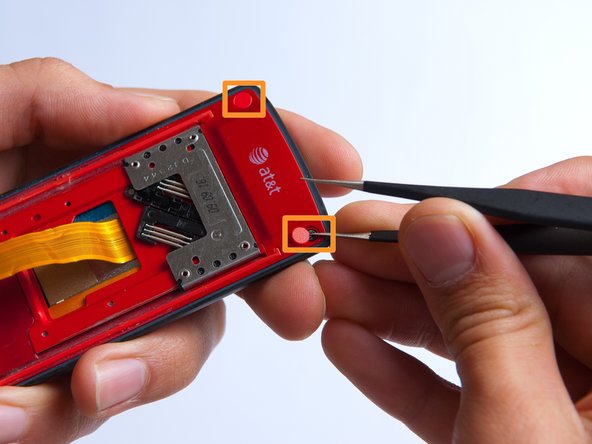
    • Remove the two red sticker screw coverings at the top corners with tweezers.

    询问修复机器人

    添加评论

  13. LG CF360 Front Case Replacement: 步骤 13 中的图像 1,1
    • Unscrew the four Phillips #000 (3mm) screws at the corners of the phone.

    询问修复机器人

    添加评论

  14. LG CF360 Front Case Replacement: 步骤 14 中的图像 1,2 LG CF360 Front Case Replacement: 步骤 14 中的图像 2,2
    • Pry the red sliding backing from the front cover by inserting the plastic opening tool in between the two sections and going around the entire phone.

    • Set the red sliding backing and front cover to the side.

    询问修复机器人

    添加评论

结论

To reassemble your device, follow these instructions in reverse order.

取消:我没有完成这个指南。

另外一个人完成了本指南。

团队

Cal Poly, Team 4-27, Amido Fall 2013 Cal Poly, Team 4-27, Amido Fall 2013 的会员

CPSU-AMIDO-F13S4G27

4 名成员

创作了19篇指南

0指南评论

添加评论

浏览统计数据:

过去 24 小时: 1

过去 7 天: 5

过去 30 天: 49

总计 693