跳转到主内容
加入维修社区 - 创建账户

Kindle Touch Bezel Replacement

你所需要的

    1. Kindle Touch Bezel Replacement, Back Cover: 步骤 1 中的图像 1,3 Kindle Touch Bezel Replacement, Back Cover: 步骤 1 中的图像 2,3 Kindle Touch Bezel Replacement, Back Cover: 步骤 1 中的图像 3,3
      • Use the plastic opening tool to undo the six plastic clips around the bottom of the back panel of the Kindle.

      • Don't pry the clips on the top half of the back panel.

      添加评论

    2. Kindle Touch Bezel Replacement: 步骤 2 中的图像 1,2 Kindle Touch Bezel Replacement: 步骤 2 中的图像 2,2
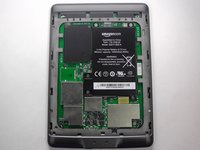
      • Slide the back panel downward, toward the charging port. This will release the clips on the top half.

      • Once the top clips release, gently lift the back panel away.

      添加评论

    1. Kindle Touch Bezel Replacement, Bezel: 步骤 3 中的图像 1,2 Kindle Touch Bezel Replacement, Bezel: 步骤 3 中的图像 2,2
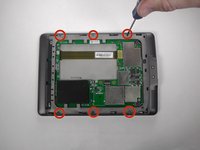
      • Using a Phillips #00 screwdriver, remove the six 4 mm screws to access the front plate.

      询问修复机器人

      添加评论

    2. Kindle Touch Bezel Replacement: 步骤 4 中的图像 1,3 Kindle Touch Bezel Replacement: 步骤 4 中的图像 2,3 Kindle Touch Bezel Replacement: 步骤 4 中的图像 3,3
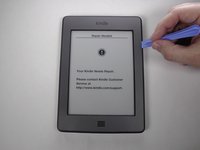
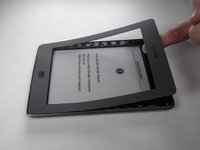
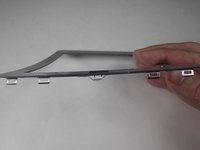
      • Use the plastic opening tool to pry the bezel from the top and sides

      • The bottom of the bezel will be glued, so be careful when sliding the clips out.

      • The clips can be easily bent, so do not try to force them out. If you do bend some, they can be bent back.

      询问修复机器人

      添加评论

结论

To reassemble your device, follow these instructions in reverse order.

取消:我没有完成这个指南。

4等其他人完成本指南。

团队

USF Tampa, Team 19-5, Blackwell Winter 2015 USF Tampa, Team 19-5, Blackwell Winter 2015 的会员

USFT-BLACKWELL-W15S19G5

3 名成员

创作了10篇指南

1指南评论

I want to paint The bezel white. Will it come back and fit perfectly after the removal I have to make?

denianyc - 回复 分享

添加评论

浏览统计数据:

过去 24 小时: 2

过去 7 天: 19

过去 30 天: 54

总计 3,950