跳转到主内容
加入维修社区 - 创建账户

InFocus LP540 Projector Lamp Replacement

你所需要的

  1. InFocus LP540 Projector Lamp Replacement, Lamp: 步骤 1 中的图像 1,2 InFocus LP540 Projector Lamp Replacement, Lamp: 步骤 1 中的图像 2,2
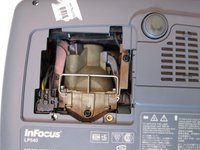
    • Place the projector on its back with the control buttons facing down.

    • Remove the black 7mm screw on the external case with a Phillips 2 screwdriver.

    询问修复机器人
  2. InFocus LP540 Projector Lamp Replacement: 步骤 2 中的图像 1,1
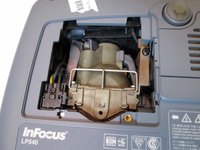
    • Use the plastic flat-head to remove the lamp lid.

    询问修复机器人
  3. InFocus LP540 Projector Lamp Replacement: 步骤 3 中的图像 1,2 InFocus LP540 Projector Lamp Replacement: 步骤 3 中的图像 2,2
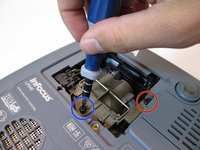
    • Remove the 7mm screw near the bottom center with a Philips 2 screwdriver head.

    • Loosen but do not remove the 7mm screw near the upper right corner with the Phillips 2 screwdriver head.

    询问修复机器人
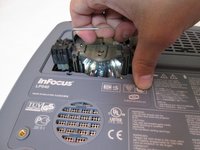
  4. InFocus LP540 Projector Lamp Replacement: 步骤 4 中的图像 1,3 InFocus LP540 Projector Lamp Replacement: 步骤 4 中的图像 2,3 InFocus LP540 Projector Lamp Replacement: 步骤 4 中的图像 3,3
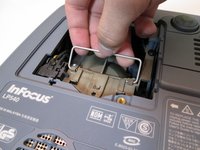
    • Grab the silver handle.

    • Unhook the handle so it can move freely.

    • Pull the handle straight up until the lamp is completely removed from projector.

    询问修复机器人
结论

To reassemble your device, follow these instructions in reverse order.

另外一个人完成了本指南。

团队

Cal Poly, Team 13-17, Regan Winter 2014 Cal Poly, Team 13-17, Regan Winter 2014 的会员

CPSU-REGAN-W14S13G17

6 名成员

创作了5篇指南

0指南评论

添加评论

浏览统计数据:

过去 24 小时: 1

过去 7 天: 10

过去 30 天: 62

总计 3,462