跳转到主内容
加入维修社区 - 创建账户

HyperX QuadCast S Pop Filter Replacement

    1. HyperX QuadCast S Pop Filter Replacement, Tap-To-Mute Sensor: 步骤 1 中的图像 1,3 HyperX QuadCast S Pop Filter Replacement, Tap-To-Mute Sensor: 步骤 1 中的图像 2,3 HyperX QuadCast S Pop Filter Replacement, Tap-To-Mute Sensor: 步骤 1 中的图像 3,3
      • Set the microphone on a flat surface.

      • Pull each of the support bands upwards and off of the notches to release the microphone from its base.

      • There are four support bands in total, but it does not matter which band you choose to take off first.

      询问修复机器人

      添加评论

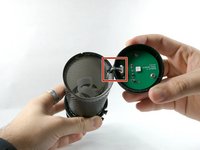
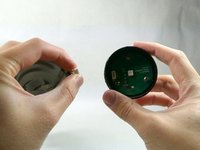
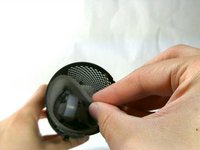
    2. HyperX QuadCast S Pop Filter Replacement: 步骤 2 中的图像 1,3 HyperX QuadCast S Pop Filter Replacement: 步骤 2 中的图像 2,3 HyperX QuadCast S Pop Filter Replacement: 步骤 2 中的图像 3,3
      • Grab ahold of the tap-to-mute Sensor and pull it upwards in a clockwise motion.

      • Be careful not to damage the cable as you remove the top.

      • Once the tap-to-mute sensor detaches from the microphone, you will hear a small "pop."

      添加评论

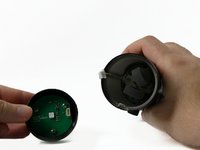
    3. HyperX QuadCast S Pop Filter Replacement: 步骤 3 中的图像 1,3 HyperX QuadCast S Pop Filter Replacement: 步骤 3 中的图像 2,3 HyperX QuadCast S Pop Filter Replacement: 步骤 3 中的图像 3,3
      • Gently unplug the cable, and remove the tap to the Tap-To-Mute sensor from the microphone.

      • The square indicates the location of the cable. This is cable is very small and will require a bit of force to be unplugged.

      询问修复机器人

      添加评论

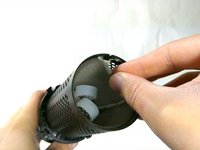
    1. HyperX QuadCast S Pop Filter Replacement, Pop Filter: 步骤 4 中的图像 1,1
      • Once the Tap-To-Mute sensor has been removed, you will now have access to the pop filter.

      • The pop filter is just the grey foam surrounding the inside of the microphone.

      询问修复机器人

      添加评论

    2. HyperX QuadCast S Pop Filter Replacement: 步骤 5 中的图像 1,1
      • The pop filter will be in a fixed position being glued to the wire. Remove glue residue before continuing to remove the pop filter.

      • When you replace the pop filter, remember that you will need to glue it back into place as before.

      询问修复机器人

      添加评论

    3. HyperX QuadCast S Pop Filter Replacement: 步骤 6 中的图像 1,2 HyperX QuadCast S Pop Filter Replacement: 步骤 6 中的图像 2,2
      • Reach into the microphone and remove the pop filter.

      询问修复机器人

      添加评论

结论

To reassemble your device, follow these instructions in reverse order.

取消:我没有完成这个指南。

另外一个人完成了本指南。

团队

UMass Dartmouth, Team 4-1, Sinclaire Fall 2022 UMass Dartmouth, Team 4-1, Sinclaire Fall 2022 的会员

UMASSD-SINCLAIRE-F22S4G1

5 名成员

创作了21篇指南

3指南评论

"Grab ahold of the tap-to-mute Sensor and pull it upwards in a clockwise motion."

This part is keyed. It literally cannot be pulled in any rotational motion...

Kyle Villalovos - 回复 分享

Is there a place where you recomend i can get a replacement peice of foam for the pop filter. I cant find one anywhere online.

Liam Henesy - 回复 分享

did you happen to find anything?

Kamen C-Swartz - 回复 分享

添加评论

浏览统计数据:

过去 24 小时: 6

过去 7 天: 22

过去 30 天: 129

总计 4,581