跳转到主内容
加入维修社区 - 创建账户

How To Clean Nikon Coolpix S30 Lens

你所需要的

    1. How To Clean Nikon Coolpix S30 Lens, Batteries: 步骤 1 中的图像 1,2 How To Clean Nikon Coolpix S30 Lens, Batteries: 步骤 1 中的图像 2,2
      • Slide the battery cover to the right.

      • The hinge is on the left side of the cover which will allow the cover to stay attached.

      询问修复机器人

      添加评论

    2. How To Clean Nikon Coolpix S30 Lens: 步骤 2 中的图像 1,2 How To Clean Nikon Coolpix S30 Lens: 步骤 2 中的图像 2,2
      • Slide the second cover (yellow) to the right (similar to the outer cover). This will allow the batteries to be exposed.

      询问修复机器人

      添加评论

    3. How To Clean Nikon Coolpix S30 Lens: 步骤 3 中的图像 1,1
      • Remove the batteries by gently tipping the camera.

      询问修复机器人

      添加评论

    1. How To Clean Nikon Coolpix S30 Lens, How To Clean Nikon Coolpix S30 Lens: 步骤 4 中的图像 1,1
      • Remove the four screws the hold the back of the case to the rest of the camera.

      询问修复机器人

      添加评论

    2. How To Clean Nikon Coolpix S30 Lens: 步骤 5 中的图像 1,1
      • Remove the left screw from the bottom of the camera first. This can be done using the same T5 tip.

      • Unscrew the screw on the right using a different attachment: PH000 (it is a small Phillip's head)

      询问修复机器人

      添加评论

    3. How To Clean Nikon Coolpix S30 Lens: 步骤 6 中的图像 1,1
      • Remove back case from the rest of the camera carefully.

      询问修复机器人

      添加评论

    4. How To Clean Nikon Coolpix S30 Lens: 步骤 7 中的图像 1,1
      • Remove the three screws the secure the motherboard to the front case.

      询问修复机器人

      添加评论

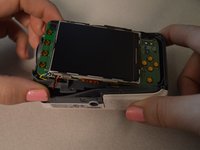
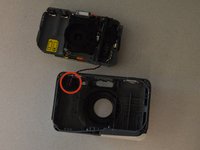
    5. How To Clean Nikon Coolpix S30 Lens: 步骤 8 中的图像 1,2 How To Clean Nikon Coolpix S30 Lens: 步骤 8 中的图像 2,2
      • Remove the motherboard from the front case.

      • Leave the red and black wire attached but lay the piece in front of the case.

      询问修复机器人

      添加评论

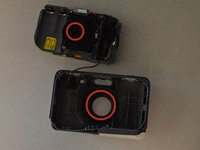
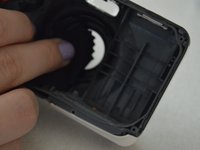
    6. How To Clean Nikon Coolpix S30 Lens: 步骤 9 中的图像 1,2 How To Clean Nikon Coolpix S30 Lens: 步骤 9 中的图像 2,2
      • Wipe the lens and the clear plastic on the front case to remove debris.

      询问修复机器人

      添加评论

结论

To reassemble your device, follow these instructions in reverse order.

取消:我没有完成这个指南。

另外一个人完成了本指南。

团队

Penn State, Team 2-4, Kaschak Winter 2015 Penn State, Team 2-4, Kaschak Winter 2015 的会员

PSU-KASCHAK-W15S2G4

4 名成员

创作了27篇指南

1指南评论

The first three steps are redundant because you already included the prerequisite guide for removal of the batteries.

Dylan Keiter - 回复 分享

添加评论

浏览统计数据:

过去 24 小时: 3

过去 7 天: 7

过去 30 天: 30

总计 2,119