跳转到主内容
加入维修社区 - 创建账户

Hover-1 Maverick Battery Replacement

你所需要的

  1. Hover-1 Maverick Battery Replacement, Battery: 步骤 1 中的图像 1,2 Hover-1 Maverick Battery Replacement, Battery: 步骤 1 中的图像 2,2
    • Remove the twenty 15mm Phillips #1 screws from the shell of the hoverboard.

    • Remove the shell.

    询问修复机器人
  2. Hover-1 Maverick Battery Replacement: 步骤 2 中的图像 1,3 Hover-1 Maverick Battery Replacement: 步骤 2 中的图像 2,3 Hover-1 Maverick Battery Replacement: 步骤 2 中的图像 3,3
    • Remove the four 8mm Phillips #1 screws holding down the black plastic casing.

    • Lift off the black plastic retaining bracket.

    询问修复机器人
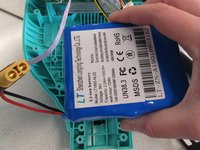
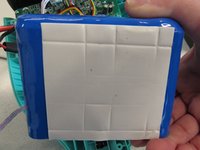
  3. Hover-1 Maverick Battery Replacement: 步骤 3 中的图像 1,2 Hover-1 Maverick Battery Replacement: 步骤 3 中的图像 2,2
    • Pull the battery upward lightly to remove from the device.

    • The battery is secured to the device with adhesive tape.

    询问修复机器人
结论

To reassemble your device, follow these instructions in reverse order.

另外一个人完成了本指南。

Piper Feldman

于01/23/20注册

409 声望

创作了4篇指南

团队

Cal Poly, Team S2-G2, White Winter 2020 Cal Poly, Team S2-G2, White Winter 2020 的会员

CPSU-WHITE-W20S2G2

2 名成员

创作了4篇指南

2指南评论

What voltage should the battery put out? Mines is 30v, charger is green at the wall but still the board won’t turn on

Barry Rogers - 回复 分享

Where can I find that same battery i cant find one

Toad Blue - 回复 分享

添加评论

浏览统计数据:

过去 24 小时: 2

过去 7 天: 18

过去 30 天: 101

总计 3,909