跳转到主内容
加入维修社区 - 创建账户

HTC Incredible 2 Volume Button Replacement

你所需要的

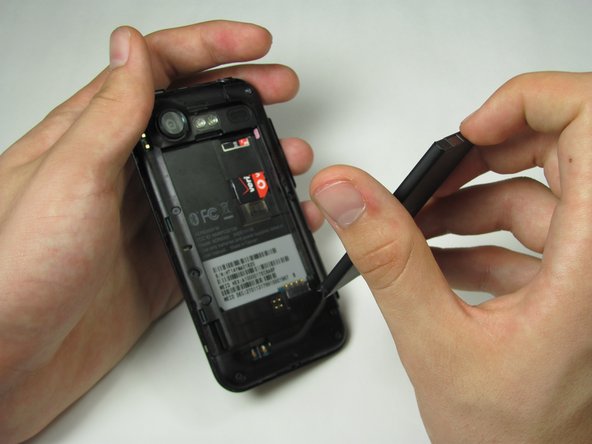
  1. HTC Incredible 2 Volume Button Replacement, Disassembling HTC Incredible 2 Back Panel: 步骤 1 中的图像 1,2 HTC Incredible 2 Volume Button Replacement, Disassembling HTC Incredible 2 Back Panel: 步骤 1 中的图像 2,2
    • Press your thumbnail into the slot between the rear panel and the front casing located on the bottom of the phone. Use a penny or dime if you have trouble using your thumbnail.

    • With a moderate amount of force, pry the rear panel up and away from the phone. You may need to slide your thumbnail up the crack to separate the rear panel from the front casing.

    • This can take a little bit of effort. Don't be discouraged if you can't get it right away.

    询问修复机器人
  2. HTC Incredible 2 Volume Button Replacement: 步骤 2 中的图像 1,1
    • Remove the rear panel from the phone.

    询问修复机器人
  3. HTC Incredible 2 Volume Button Replacement, Battery: 步骤 3 中的图像 1,1
    • Press your fingernail into the slot between the battery and the rear inner frame, located between the battery and LED lights.

    • Use a penny or dime if you can't use your fingernail.

    询问修复机器人
  4. HTC Incredible 2 Volume Button Replacement: 步骤 4 中的图像 1,2 HTC Incredible 2 Volume Button Replacement: 步骤 4 中的图像 2,2
    • Gently lever the battery up and away from the lights.

    • Lift the top of the battery up and remove the battery from the rear inner frame.

    询问修复机器人
  5. HTC Incredible 2 Volume Button Replacement, Mid Panel: 步骤 5 中的图像 1,1
    • Remove the seven 1.42 mm Torx T5 screws

    询问修复机器人
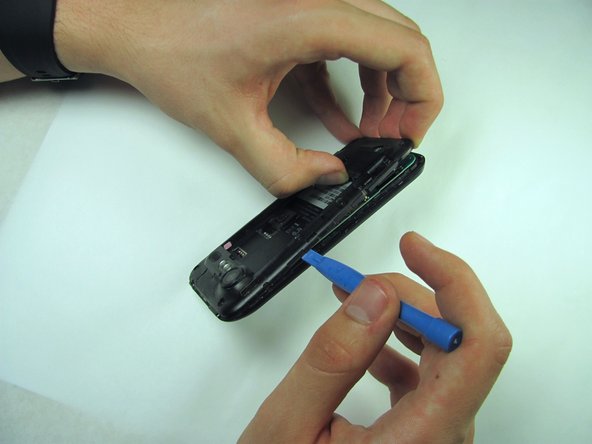
  6. HTC Incredible 2 Volume Button Replacement: 步骤 6 中的图像 1,2 HTC Incredible 2 Volume Button Replacement: 步骤 6 中的图像 2,2
    • Use a plastic opening tool to run along the phone's side and lever mid panel upward.

    • Apply minimal pressure as the mid panel is very delicate.

    询问修复机器人
  7. HTC Incredible 2 Volume Button Replacement: 步骤 7 中的图像 1,1
    • Gently grasp and carefully lift mid panel up and away from the device with your fingers.

    询问修复机器人
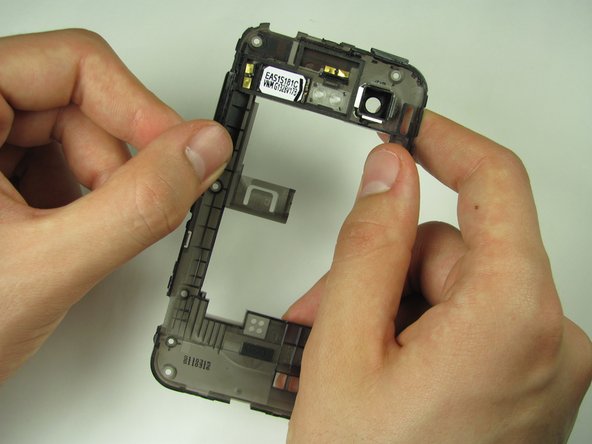
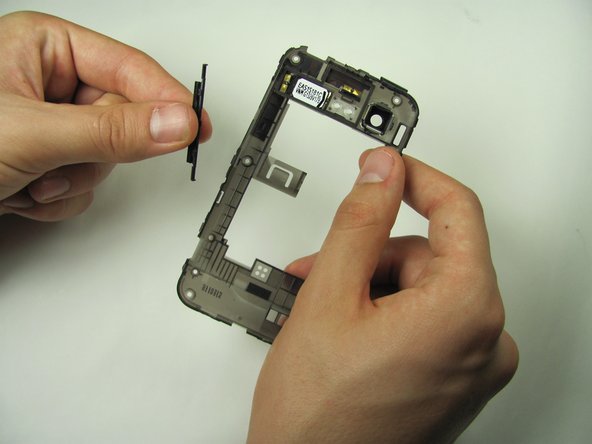
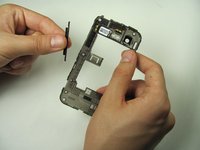
  8. HTC Incredible 2 Volume Button Replacement, Volume Button: 步骤 8 中的图像 1,3 HTC Incredible 2 Volume Button Replacement, Volume Button: 步骤 8 中的图像 2,3 HTC Incredible 2 Volume Button Replacement, Volume Button: 步骤 8 中的图像 3,3
    • Firmly grasp the volume button from the mid panel on the clip side

    • Gently lift the button upwards and remove it

    询问修复机器人
结论

To reassemble your device, follow these instructions in reverse order.

2等其他人完成本指南。

团队

Cal Poly, Team 11-53, Amido Spring 2014 Cal Poly, Team 11-53, Amido Spring 2014 的会员

CPSU-AMIDO-S14S11G53

5 名成员

创作了14篇指南

0指南评论

添加评论

浏览统计数据:

过去 24 小时: 0

过去 7 天: 3

过去 30 天: 37

总计 536