跳转到主内容
加入维修社区 - 创建账户

HP Pavilion tx2500 Screen Rotator Replacement

你所需要的

    1. HP Pavilion tx2500 Screen Rotator Replacement, Screen Rotator: 步骤 1 中的图像 1,1
      • Completely turn off and unplug device. Lay the device bottom side up on a soft surface.

      添加评论

    2. HP Pavilion tx2500 Screen Rotator Replacement: 步骤 2 中的图像 1,2 HP Pavilion tx2500 Screen Rotator Replacement: 步骤 2 中的图像 2,2
      • Squeeze the latches on the battery until you hear a click. Slide out the battery.

      询问修复机器人

      添加评论

    3. HP Pavilion tx2500 Screen Rotator Replacement: 步骤 3 中的图像 1,1
      • Using the Phillips #0 screwdriver, remove the 4.5 mm screw from the WLAN model screen.

      • Once unscrewed, lift the right side of the WLAN module compartment cover and swing it to the left.

      添加评论

    4. HP Pavilion tx2500 Screen Rotator Replacement: 步骤 4 中的图像 1,1
      • Using the plastic opening tool, disconnect the WLAN antenna cables from the WLAN module.

      询问修复机器人

      添加评论

    5. HP Pavilion tx2500 Screen Rotator Replacement: 步骤 5 中的图像 1,1
      • Using the Phillips #0 screwdriver, unscrew the 4.5 mm screw from the middle section in the battery compartment.

      询问修复机器人

      添加评论

    6. HP Pavilion tx2500 Screen Rotator Replacement: 步骤 6 中的图像 1,1
      • Use the plastic opening tool to disconnect the wires in the upper corners.

      添加评论

    7. HP Pavilion tx2500 Screen Rotator Replacement: 步骤 7 中的图像 1,1
      • Flip the laptop front side up and then use your fingers to lift up the keyboard.

      添加评论

    8. HP Pavilion tx2500 Screen Rotator Replacement: 步骤 8 中的图像 1,1
      • Lift up the black latch that connects the film strip to the base of the computer.

      • Use the plastic opening tool to disconnect the film strip from the base of the computer.

      询问修复机器人

      添加评论

    9. HP Pavilion tx2500 Screen Rotator Replacement: 步骤 9 中的图像 1,2 HP Pavilion tx2500 Screen Rotator Replacement: 步骤 9 中的图像 2,2
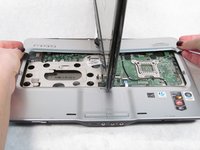
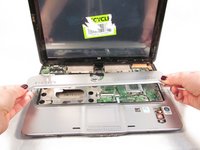
      • Rotate the screen 90 degrees and remove the base under the screen.

      询问修复机器人

      添加评论

    10. HP Pavilion tx2500 Screen Rotator Replacement: 步骤 10 中的图像 1,1
      • Rotate the screen back towards you.

      • Lift up the convertible hinge to unclip it from the base of the computer.

      询问修复机器人

      添加评论

    11. HP Pavilion tx2500 Screen Rotator Replacement: 步骤 11 中的图像 1,2 HP Pavilion tx2500 Screen Rotator Replacement: 步骤 11 中的图像 2,2
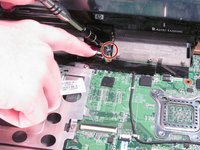
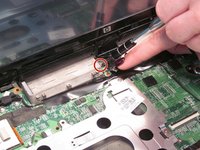
      • Using the Phillips #0 screwdriver, remove both of the 5.0 mm screws on the base of the rotator.

      询问修复机器人

      添加评论

    12. HP Pavilion tx2500 Screen Rotator Replacement: 步骤 12 中的图像 1,1
      • Gently lift up and remove the screen.

      添加评论

结论

To reassemble your device, follow these instructions in reverse order.

取消:我没有完成这个指南。

Sarah Naiser

于10/13/15注册

336 声望

创作了2篇指南

团队

0指南评论

添加评论

浏览统计数据:

过去 24 小时: 2

过去 7 天: 4

过去 30 天: 20

总计 924