跳转到主内容
加入维修社区 - 创建账户

HP Pavilion 15-ba003ds RAM Replacement

你所需要的

    1. HP Pavilion 15-ba003ds RAM Replacement, Battery: 步骤 1 中的图像 1,2 HP Pavilion 15-ba003ds RAM Replacement, Battery: 步骤 1 中的图像 2,2
      • Unplug the AC adapter from the corresponding socket in the laptop.

      • Turn off your laptop before starting this procedure. Make sure it's not in sleep or hibernation mode.

      • Use your fingers to push the slider located just under the battery on either side to unlock the battery from the laptop.

      • Carefully slide the battery out of the laptop frame and place it somewhere safe.

      询问修复机器人

      添加评论

    1. HP Pavilion 15-ba003ds RAM Replacement, Disc Drive: 步骤 2 中的图像 1,1
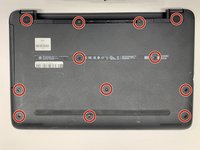
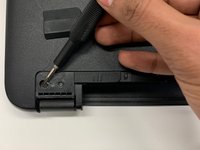
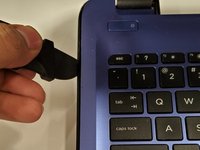
      • Use a spudger to remove the two rubber feet next to the battery.

      • This will reveal two hidden screws.

      • Save the feet for reassembly.

      询问修复机器人

      添加评论

    2. HP Pavilion 15-ba003ds RAM Replacement: 步骤 3 中的图像 1,2 HP Pavilion 15-ba003ds RAM Replacement: 步骤 3 中的图像 2,2
      • Use a Phillips #00 screwdriver to remove twelve 8 mm screws from the bottom of your laptop including the two screws found underneath the rubber feet.

      询问修复机器人

      添加评论

    3. HP Pavilion 15-ba003ds RAM Replacement: 步骤 4 中的图像 1,2 HP Pavilion 15-ba003ds RAM Replacement: 步骤 4 中的图像 2,2
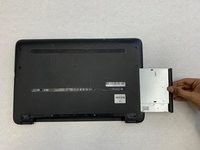
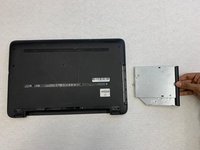
      • Pull the disc drive from your laptop to remove it.

      询问修复机器人

      添加评论

    1. HP Pavilion 15-ba003ds RAM Replacement, Backplate: 步骤 5 中的图像 1,3 HP Pavilion 15-ba003ds RAM Replacement, Backplate: 步骤 5 中的图像 2,3 HP Pavilion 15-ba003ds RAM Replacement, Backplate: 步骤 5 中的图像 3,3
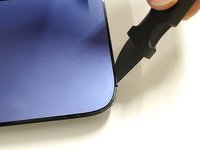
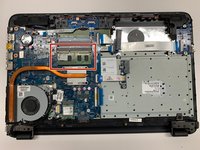
      • Use a Jimmy to pry off the black backplate.

      询问修复机器人

      添加评论

    1. HP Pavilion 15-ba003ds RAM Replacement, RAM Module: 步骤 6 中的图像 1,2 HP Pavilion 15-ba003ds RAM Replacement, RAM Module: 步骤 6 中的图像 2,2
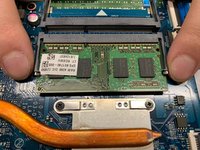
      • To release the RAM, hold and pull the strips outwards on either side of the RAM.

      询问修复机器人

      添加评论

结论

To reassemble your device, follow these instructions in reverse order.

取消:我没有完成这个指南。

团队

0指南评论

添加评论

浏览统计数据:

过去 24 小时: 1

过去 7 天: 4

过去 30 天: 18

总计 551