跳转到主内容
加入维修社区 - 创建账户

HP Compaq nc6400 Optical Drive Replacement

你所需要的

    1. HP Compaq nc6400 Optical Drive Replacement, Battery: 步骤 1 中的图像 1,1
      • Turn off and unplug laptop.

      询问修复机器人

      添加评论

    2. HP Compaq nc6400 Optical Drive Replacement: 步骤 2 中的图像 1,1
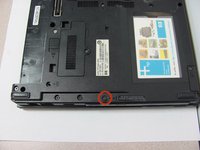
      • Locate the battery lock below the battery labeled one.

      • Slide the lock all the way to the left to release the left lock of the battery.

      询问修复机器人

      添加评论

    3. HP Compaq nc6400 Optical Drive Replacement: 步骤 3 中的图像 1,1
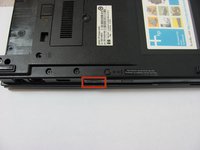
      • Locate the lock labeled two at the bottom right corner below the battery.

      • Slide and hold the lock to the left.

      添加评论

    4. HP Compaq nc6400 Optical Drive Replacement: 步骤 4 中的图像 1,1
      • Once both the battery locks are unlocked, slide the battery out to remove.

      询问修复机器人

      添加评论

    1. HP Compaq nc6400 Optical Drive Replacement, Optical Drive: 步骤 5 中的图像 1,2 HP Compaq nc6400 Optical Drive Replacement, Optical Drive: 步骤 5 中的图像 2,2
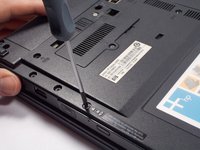
      • Remove the 4 mm P0 Phillips-head screw indicated by the icon of a lock and disk.

      询问修复机器人

      添加评论

    2. HP Compaq nc6400 Optical Drive Replacement: 步骤 6 中的图像 1,2 HP Compaq nc6400 Optical Drive Replacement: 步骤 6 中的图像 2,2
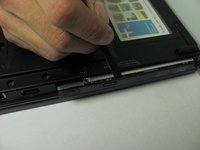
      • Press and release the eject icon to partially eject the optical drive.

      • Use of a spudger may be necessary to pry open the optical drive.

      添加评论

    3. HP Compaq nc6400 Optical Drive Replacement: 步骤 7 中的图像 1,1
      • Grasp the sides and pull the optical drive out.

      询问修复机器人

      添加评论

结论

To reassemble your device, follow these instructions in reverse order.

取消:我没有完成这个指南。

2等其他人完成本指南。

团队

Cal Poly, Team 14-6, Forte Fall 2013 Cal Poly, Team 14-6, Forte Fall 2013 的会员

CPSU-FORTE-F13S14G6

5 名成员

创作了45篇指南

0指南评论

添加评论

浏览统计数据:

过去 24 小时: 1

过去 7 天: 7

过去 30 天: 31

总计 5,083