跳转到主内容
加入维修社区 - 创建账户

HP Compaq nc6400 Bluetooth Module Replacement

你所需要的

  1. HP Compaq nc6400 Bluetooth Module Replacement, Battery: 步骤 1 中的图像 1,1
    • Turn off and unplug laptop.

    询问修复机器人

    添加评论

  2. HP Compaq nc6400 Bluetooth Module Replacement: 步骤 2 中的图像 1,1
    • Locate the battery lock below the battery labeled one.

    • Slide the lock all the way to the left to release the left lock of the battery.

    询问修复机器人

    添加评论

  3. HP Compaq nc6400 Bluetooth Module Replacement: 步骤 3 中的图像 1,1
    • Locate the lock labeled two at the bottom right corner below the battery.

    • Slide and hold the lock to the left.

    添加评论

  4. HP Compaq nc6400 Bluetooth Module Replacement: 步骤 4 中的图像 1,1
    • Once both the battery locks are unlocked, slide the battery out to remove.

    询问修复机器人

    添加评论

  5. HP Compaq nc6400 Bluetooth Module Replacement, Bluetooth Module: 步骤 5 中的图像 1,1
    • Flip the computer top down and locate the second to-the-right 1.2 Philips #1 screw in the bottom-left corner.

    • Remove the screw.

    询问修复机器人

    添加评论

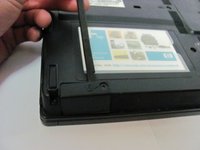
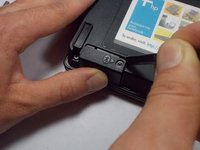
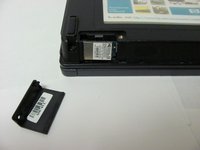
  6. HP Compaq nc6400 Bluetooth Module Replacement: 步骤 6 中的图像 1,3 HP Compaq nc6400 Bluetooth Module Replacement: 步骤 6 中的图像 2,3 HP Compaq nc6400 Bluetooth Module Replacement: 步骤 6 中的图像 3,3
    • Lift the right side of the Bluetooth Module cover upwards.

    • Slide the spudger under the lifted case, and slide it left towards the closed end. The case will pop open and be removed from the compartment.

    询问修复机器人

    添加评论

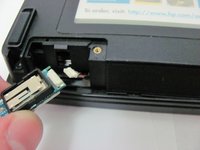
  7. HP Compaq nc6400 Bluetooth Module Replacement: 步骤 7 中的图像 1,1
    • Locate the Bluetooth Module after removing the cover.

    • Using the spudger, push the module to the right (i.e. towards the screw hole).

    • Pull outwards and remove bluetooth module and wire from casing.

    询问修复机器人

    添加评论

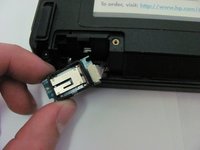
  8. HP Compaq nc6400 Bluetooth Module Replacement: 步骤 8 中的图像 1,2 HP Compaq nc6400 Bluetooth Module Replacement: 步骤 8 中的图像 2,2
    • Once the module and wire are completely outside of the casing, gently pull apart the wire from the module clip.

    添加评论

结论

To reassemble your device, follow these instructions in reverse order.

取消:我没有完成这个指南。

3等其他人完成本指南。

团队

Cal Poly, Team 14-6, Forte Fall 2013 Cal Poly, Team 14-6, Forte Fall 2013 的会员

CPSU-FORTE-F13S14G6

5 名成员

创作了5篇指南

1指南评论

Hi,

My HP nx9420 did not have the Bluetooth. I wish to install one. I got one from my old HP nx9420. it Part Number is 397922-001 but the actual laptop says it requires the 409993-001 are these module the same ?

thanks

Alain

Alain Bastien - 回复 分享

添加评论

浏览统计数据:

过去 24 小时: 0

过去 7 天: 7

过去 30 天: 40

总计 2,605