跳转到主内容
加入维修社区 - 创建账户

HP Compaq 6710b Wireless Card Replacement

你所需要的

  1. HP Compaq 6710b Wireless Card Replacement, Battery: 步骤 1 中的图像 1,1
    • Turn off your computer! Taking out the battery while it's still on is dangerous!

    • Flip the laptop over to the back.

    • Using two hands, push on the tabs while gently taking out the battery.

    询问修复机器人

    添加评论

  2. HP Compaq 6710b Wireless Card Replacement, Wireless Card: 步骤 2 中的图像 1,2 HP Compaq 6710b Wireless Card Replacement, Wireless Card: 步骤 2 中的图像 2,2
    • Make sure the computer is off.

    • Using a Phillips #1, unscrew the 5mm screw on the bottom of the laptop

    • Remove the back cover plate.

    • The cover has popping tabs so it might require a small amount of force to remove.

    询问修复机器人

    添加评论

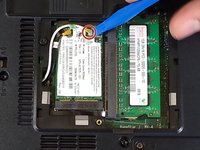
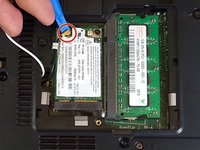
  3. HP Compaq 6710b Wireless Card Replacement: 步骤 3 中的图像 1,2 HP Compaq 6710b Wireless Card Replacement: 步骤 3 中的图像 2,2
    • Using a blue plastic prying tool, gently pry off the 2 connectors.

    • The black cable goes on the connection closer to where the cables originate, while the white cable goes on the farther connection.

    询问修复机器人

    添加评论

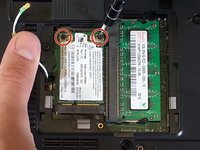
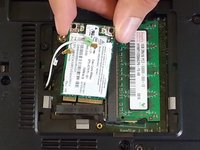
  4. HP Compaq 6710b Wireless Card Replacement: 步骤 4 中的图像 1,2 HP Compaq 6710b Wireless Card Replacement: 步骤 4 中的图像 2,2
    • Using the Phillips #1 screwdriver, unscrew the 2 3mm screws.

    • Adaptor is spring-loaded.

    • You can now take out the adaptor.

    询问修复机器人

    添加评论

结论

To reassemble your device, follow these instructions in reverse order.

取消:我没有完成这个指南。

3等其他人完成本指南。

Khulan Orgil

于04/14/15注册

1,186 声望

创作了6篇指南

团队

Cal Poly, Team 4-2, Maness Spring 2015 Cal Poly, Team 4-2, Maness Spring 2015 的会员

CPSU-MANESS-S15S4G2

4 名成员

创作了6篇指南

0指南评论

添加评论

浏览统计数据:

过去 24 小时: 2

过去 7 天: 9

过去 30 天: 42

总计 3,043