跳转到主内容
加入维修社区 - 创建账户

HP Compaq 6710b Keyboard Replacement

你所需要的

    1. HP Compaq 6710b Keyboard Replacement, Keyboard: 步骤 1 中的图像 1,3 HP Compaq 6710b Keyboard Replacement, Keyboard: 步骤 1 中的图像 2,3 HP Compaq 6710b Keyboard Replacement, Keyboard: 步骤 1 中的图像 3,3
      • Turn off computer before starting.

      • Flip to the backside of the laptop.

      • Using a Phillips #1 screwdriver, unscrew the 5mm screw and take off the shown cover.

      • Using the same screwdriver, unscrew the 8mm screws.

      • The screws may not completely fall out of the laptop, just ensure they are unscrewed as far as they will go.

      询问修复机器人

      添加评论

    2. HP Compaq 6710b Keyboard Replacement: 步骤 2 中的图像 1,1
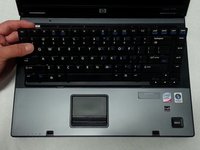
      • Flip over the laptop to the top side, and open the laptop.

      • Slide the locking tabs down using a blue plastic opening tool or your fingernail.

      询问修复机器人

      添加评论

    3. HP Compaq 6710b Keyboard Replacement: 步骤 3 中的图像 1,2 HP Compaq 6710b Keyboard Replacement: 步骤 3 中的图像 2,2
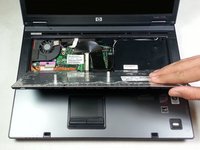
      • Using the plastic prying tool, lift the keyboard gently towards you.

      • Don't take the keyboard completely off because it is still attached with a ribbon cable to the computer.

      询问修复机器人

      添加评论

    4. HP Compaq 6710b Keyboard Replacement: 步骤 4 中的图像 1,1
      • Pull up on both sides of the black locking tab of the connector.

      • The keyboard should now be free of the computer.

      询问修复机器人

      添加评论

结论

To reassemble your device, follow these instructions in reverse order.

取消:我没有完成这个指南。

4等其他人完成本指南。

Khulan Orgil

于04/14/15注册

1,186 声望

创作了6篇指南

团队

Cal Poly, Team 4-2, Maness Spring 2015 Cal Poly, Team 4-2, Maness Spring 2015 的会员

CPSU-MANESS-S15S4G2

4 名成员

创作了54篇指南

2指南评论

No parts required to *replace* the keyboard?

David - 回复 分享

Did you really need to be told to get a keyboard part to do a keyboard replacement?

Thanks for the guide

Victor Izquierdo Quesada - 回复 分享

添加评论

浏览统计数据:

过去 24 小时: 2

过去 7 天: 6

过去 30 天: 39

总计 5,741