跳转到主内容
加入维修社区 - 创建账户

HP 17-bs049dx RAM Replacement

你所需要的

    1. HP 17-bs049dx RAM Replacement, Battery: 步骤 1 中的图像 1,1
      • To remove the battery, simply push the tabs towards each other.

      • The battery will come out with force, be sure to keep anything fragile away from the laptop during this process.

      询问修复机器人

      添加评论

    1. HP 17-bs049dx RAM Replacement, Back Panel: 步骤 2 中的图像 1,1
      • Remove the four screws (13.7mm) with a Phillips #0 screwdriver.

      • Be sure to lift all four rubber tabs to access screws (7.51mm) underneath.

      • Rubber tabs will require force to access screws.

      添加评论

    2. HP 17-bs049dx RAM Replacement: 步骤 3 中的图像 1,1
      • Use the Philips 0 screwdriver to unscrew the screws (7.51mm) that were underneath the battery.

      询问修复机器人

      添加评论

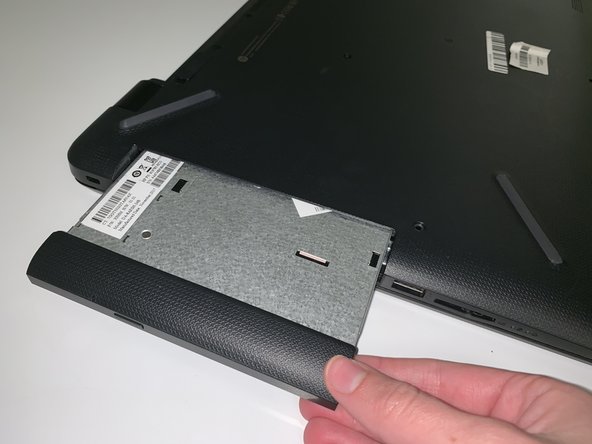
    3. HP 17-bs049dx RAM Replacement: 步骤 4 中的图像 1,2 HP 17-bs049dx RAM Replacement: 步骤 4 中的图像 2,2
      • Pull outwards on the disk reader to remove from main frame.

      • This removal will require force.

      • All screws must be removed before removing disk reader.

      询问修复机器人

      添加评论

    4. HP 17-bs049dx RAM Replacement: 步骤 5 中的图像 1,1
      • Lift back panel to access internal components.

      • You will need to use force to pry it open.

      询问修复机器人

      添加评论

    1. HP 17-bs049dx RAM Replacement, RAM: 步骤 6 中的图像 1,2 HP 17-bs049dx RAM Replacement, RAM: 步骤 6 中的图像 2,2
      • To take off the RAM, pull out the circled taps in the direction of the arrows on the pictures.

      • You will have to gently force it out to avoid breaking it.

      询问修复机器人

      添加评论

结论

To reassemble your device, follow these instructions in reverse order.

取消:我没有完成这个指南。

另外一个人完成了本指南。

0指南评论

添加评论

浏览统计数据:

过去 24 小时: 0

过去 7 天: 7

过去 30 天: 26

总计 1,135