跳转到主内容
加入维修社区 - 创建账户

Gateway NV52 Hard Drive Replacement

你所需要的

  1. Gateway NV52 Hard Drive Replacement, Base Cover: 步骤 1 中的图像 1,1
    • Remove the five identical 3/16" Phillips screws that secures the hard drive and memory cover using a Phillips #0 Screwdriver.

    询问修复机器人
  2. Gateway NV52 Hard Drive Replacement: 步骤 2 中的图像 1,1
    • Lift up the base cover from the the top with your hands to a 90 degree angle.

    • Remove the base cover and place it in a safe and dry place.

    询问修复机器人
  3. Gateway NV52 Hard Drive Replacement, Hard Drive Compartment: 步骤 3 中的图像 1,1
    • Remove the 1/4" Phillip screw located at the top right of the Hard Drive using a Phillips #0 Screwdriver .

    询问修复机器人
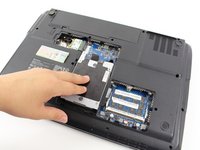
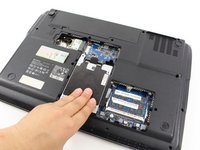
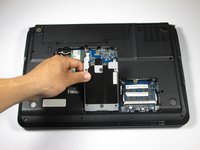
  4. Gateway NV52 Hard Drive Replacement: 步骤 4 中的图像 1,3 Gateway NV52 Hard Drive Replacement: 步骤 4 中的图像 2,3 Gateway NV52 Hard Drive Replacement: 步骤 4 中的图像 3,3
    • Remove the Hard Drive component from its compartment. To do so, slide the component downward away from the battery pack.

    • Lift the Hard Drive to a 90 degree angle and out of its slot.

    • Place the Hard Drive in a designated zone.

    询问修复机器人
  5. Gateway NV52 Hard Drive Replacement, Hard Drive: 步骤 5 中的图像 1,1
    • Remove the four identical 1/8" Phillip screws located in every corner of the Hard Drive using the Phillips #0 Screwdriver.

    询问修复机器人
  6. Gateway NV52 Hard Drive Replacement: 步骤 6 中的图像 1,1
    • Access to the Hard drive by gently sliding the metal cover away from the Hard Drive.

    询问修复机器人
结论

To reassemble your device, follow these instructions in reverse order.

Irma Marin

于04/10/14注册

608 声望

创作了3篇指南

团队

Cal Poly, Team 7-24, Regan Spring 2014 Cal Poly, Team 7-24, Regan Spring 2014 的会员

CPSU-REGAN-S14S7G24

4 名成员

创作了18篇指南

0指南评论

添加评论

浏览统计数据:

过去 24 小时: 1

过去 7 天: 4

过去 30 天: 76

总计 4,044