跳转到主内容
加入维修社区 - 创建账户

Garmin GPSmap 60CSx Battery Terminal Replacement

你所需要的

    1. Garmin GPSmap 60CSx Battery Terminal Replacement, Back Cover and AA Batteries: 步骤 1 中的图像 1,1
      • Lift and twist the battery cover release 90 degrees counterclockwise on the back of the device.

      询问修复机器人

      添加评论

    2. Garmin GPSmap 60CSx Battery Terminal Replacement: 步骤 2 中的图像 1,1
      • Lift battery release up to remove battery cover.

      询问修复机器人

      添加评论

    3. Garmin GPSmap 60CSx Battery Terminal Replacement: 步骤 3 中的图像 1,2 Garmin GPSmap 60CSx Battery Terminal Replacement: 步骤 3 中的图像 2,2
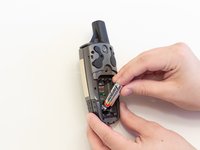
      • Pull AA batteries out.

      询问修复机器人

      添加评论

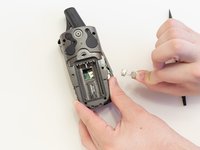
    1. Garmin GPSmap 60CSx Battery Terminal Replacement, Battery Terminals: 步骤 4 中的图像 1,1
      • Remove the six 10 mm screws on the back of the device with a Phillips #0 Screwdriver.

      询问修复机器人

      添加评论

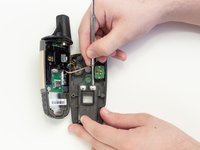
    2. Garmin GPSmap 60CSx Battery Terminal Replacement: 步骤 5 中的图像 1,2 Garmin GPSmap 60CSx Battery Terminal Replacement: 步骤 5 中的图像 2,2
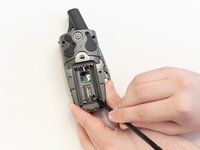
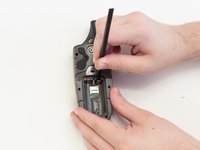
      • Place spudger behind the lower right battery terminal.

      • Push spudger behind the battery terminal to pop it out of place.

      • Now do the same on the bottom left side.

      添加评论

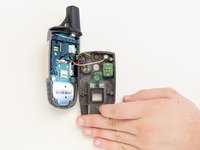
    3. Garmin GPSmap 60CSx Battery Terminal Replacement: 步骤 6 中的图像 1,2 Garmin GPSmap 60CSx Battery Terminal Replacement: 步骤 6 中的图像 2,2
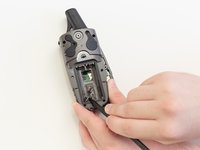
      • Grab the now loose battery terminals and pull them from the GPSMap 60CSx.

      询问修复机器人

      添加评论

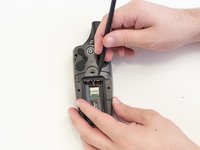
    4. Garmin GPSmap 60CSx Battery Terminal Replacement: 步骤 7 中的图像 1,2 Garmin GPSmap 60CSx Battery Terminal Replacement: 步骤 7 中的图像 2,2
      • Flip the back panel over to expose the backs of the top battery terminals.

      • Use a metal spudger to remove the glue that covers them.

      询问修复机器人

      添加评论

    5. Garmin GPSmap 60CSx Battery Terminal Replacement: 步骤 8 中的图像 1,2 Garmin GPSmap 60CSx Battery Terminal Replacement: 步骤 8 中的图像 2,2
      • Flip the back panel back over to view the battery compartment.

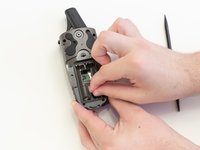
      • Place the spudger behind one of the top remaining battery terminals.

      • Push the spudger down and pop the battery terminal out of place.

      • Repeat with the remaining battery terminal.

      添加评论

结论

To reassemble your device, follow these instructions in reverse order.

取消:我没有完成这个指南。

另外一个人完成了本指南。

10指南评论

What did you use to replace the contacts?

Austin Chopra - 回复 分享

Where can I buy replacement terminals?

Mitch - 回复 分享

Mitch, Garmin just told me they do no sell replacement terminals for this 60CSx. Were you able to find any?

Ernie Sammons - 回复 分享

Where can I find replacement battery terminals for a

Garmin 60CS4?

Sonny Pierce - 回复 分享

Where can I find replacement battery terminals for a Garmin Map76CS?

Paul - 回复 分享

添加评论

浏览统计数据:

过去 24 小时: 3

过去 7 天: 23

过去 30 天: 118

总计 12,198