简介
Use this guide to replace a defective or broken internal LCD screen display for the Garmin Edge 530 (identified by part number 010-02060-00).
The LCD screen display assembly is made up of the glass panel (commonly thought of as the screen), a digitizer sheet, and the LCD component which utilizes a backlight to supply light which then passes through a crystal element to polarize the light and create pixels. The display may need to be replaced if the screen is cracked or broken, affecting the display assembly. Or, if the screen is remaining black or blank, indicating issues with connections to the display or components to the LCD itself.
In this guide, you will have to pry up the glass panel with a metal spudger. It is important to note the potential broken glass hazard when prying the screen from the back cover. After this step, use ESD-safe tools to avoid damage to the rest of the device and protect it from electrostatic discharge.
你所需要的
-
-
-
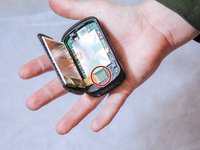
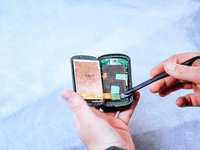
Insert the metal spudger between the edge of the device screen and back cover.
-
Begin to pry along the perimeter between the device screen and back cover.
 询问修复机器人
-
-
在这个步骤中使用的工具:Halberd Spudger$2.99
-
Use the nylon halberd spudger to lift the edge of the screen and begin separating it from the back cover.
-
-
-


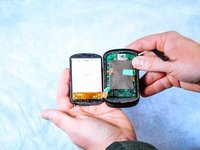

To reassemble your device, follow these instructions in reverse order to attach the new LCD screen.
9等其他人完成本指南。

团队

Clemson, Team 2-1, Hunter Spring 2022 Clemson, Team 2-1, Hunter Spring 2022 的会员
CLEM-HUNTER-S22S2G1
5 名成员
创作了34篇指南
6指南评论
Thanks for the instructions!
I didn't have a spudger, so I used a small knife instead.
For the assembly: when you put the new screen on the hardest part is the connection of the cable to the small socket of the back plate.
Also don't forget to put on some glue to the edges of the screen. In that way it stays better in place and is more water resistant.
worked well for me. Got screen off ebay from US seller. The glue was a little tough to get the old screen out. Ended up destroying it completely in the process, which was ok of course. Try to scrape as much of the old glue off as you can. New screen went in fine. Used a little glue to keep it in.
Hi, I was able to replace my Garmin 530 LCD screen, but the new one that I installed has a poor backlight(?) and appears permanently dimmed and is diffiult to read. (All the settings are on highest screen brightness). The seller is non responsive to my complaint. Can anyone advise of where I can buy a decent after market LCD screen?
Appreciated the guide. The connector is very small, so it took a lot of tries to get it connected. No adhesive is mentioned but the adhesive that made the old screen such a bear to pry up seems to have grabbed the new one pretty securely. (I put it in place to test the new screen)
