简介
This guide shows how to replace the USB-C cable in a GameSir X2 Pro controller. The USB-C cable provides the wired connection between the controller and your phone, enabling device control, compatibility, and passthrough charging.
Over time, the cable or connector may wear out from repeated use, bending, or stress on the port. A damaged cable can cause connection issues, intermittent disconnections, charging problems, or input lag. Replacing the cable can help restore reliable operation.
你所需要的
-
-
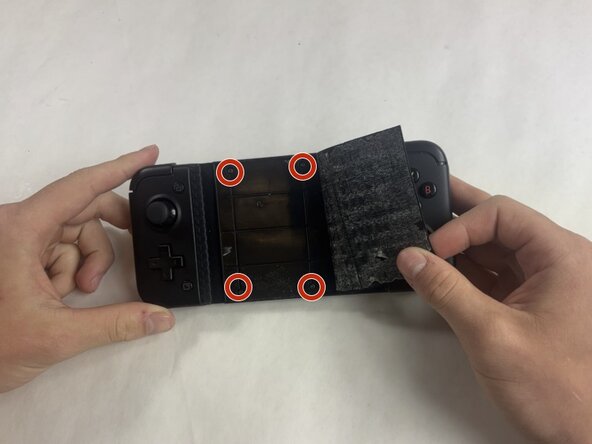
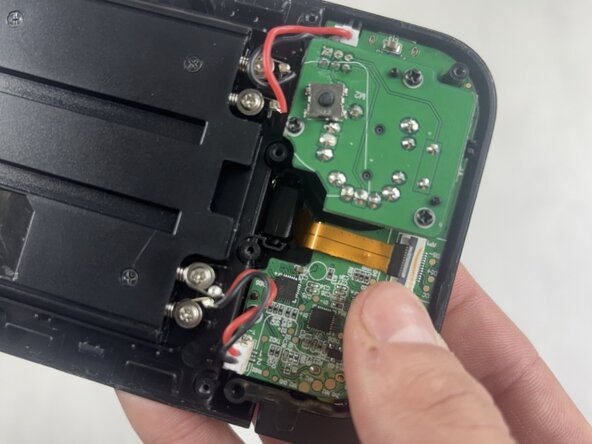
Insert the tip of the Jimmy between the rubber pad and the back of the controller, then slide it along the edge to loosen the adhesive and lift the pad away.
-
Gently remove the rubber pad.
 询问修复机器人
-
-





To reassemble your device, follow these instructions in reverse order. Take your e-waste to an R2 or e-Stewards certified recycler.
另外一个人完成了本指南。

团队

UMass Dartmouth, Team 5-2, Rioux Spring 2026 UMass Dartmouth, Team 5-2, Rioux Spring 2026 的会员
UMASSD-RIOUX-S26S5G2
3 名成员
创作了5篇指南
