跳转到主内容
加入维修社区 - 创建账户

GameSir Nova 2 Lite Button Replacement

你所需要的

  1. GameSir Nova 2 Lite Button Replacement, Battery: 步骤 1 中的图像 1,2 GameSir Nova 2 Lite Button Replacement, Battery: 步骤 1 中的图像 2,2
    • Before you take your controller apart make sure it is powered off by holding the power button down for 15 seconds until it stops blinking.

    • Use a Phillips #0 screwdriver to remove the four 8.5 mm screws from the bottom of the controller's casing.

  2. GameSir Nova 2 Lite Button Replacement: 步骤 2 中的图像 1,3 GameSir Nova 2 Lite Button Replacement: 步骤 2 中的图像 2,3 GameSir Nova 2 Lite Button Replacement: 步骤 2 中的图像 3,3
    • Insert an opening tool between the two halves to open the controller's casing.

    • You will feel several internal latches called “snap-fit connectors.”

    • Disconnect them by sliding the opening tool along the seam in the casing, applying continuous pressure.

    • Once you find a connector, apply increased pressure until you hear a snapping sound.

    • Repeat this process until all of the connectors are disconnected.

    • Separate the top and bottom of the controller case.

  3. GameSir Nova 2 Lite Button Replacement: 步骤 3 中的图像 1,2 GameSir Nova 2 Lite Button Replacement: 步骤 3 中的图像 2,2
    • Set aside the bottom half of the shell.

    • Position the controller so that the motherboard is visible.

    • Use the point of a spudger to push on alternating sides of the battery connector to "walk" it out of its socket.

    • If that doesn't work, use a pair of tweezers to firmly grip the sides of the connector and pull straight away from the socket. Hold the tweezers closer to the connector to get a better grip.

  4. GameSir Nova 2 Lite Button Replacement: 步骤 4 中的图像 1,2 GameSir Nova 2 Lite Button Replacement: 步骤 4 中的图像 2,2
    • If the battery appears swollen follow this link.

    • The battery is held in place by double-sided adhesive.

    • Use a spudger to loosen the tape securing the battery.

    • Remove the battery from the controller.

  5. GameSir Nova 2 Lite Button Replacement, Rumble Motor: 步骤 5 中的图像 1,2 GameSir Nova 2 Lite Button Replacement, Rumble Motor: 步骤 5 中的图像 2,2
    • Push on alternating sides of the JST connector to release it from the socket on the circuit board.

    • If that doesn't work, use a pair of tweezers to firmly grip the sides of the connector and pull straight away from the socket. Hold the tweezers closer to the connector to get a better grip.

  6. GameSir Nova 2 Lite Button Replacement: 步骤 6 中的图像 1,1
    • Pull the motor out of its socket.

    • Repeat the steps for the other rumble motor.

  7. GameSir Nova 2 Lite Button Replacement, Buttons: 步骤 7 中的图像 1,3 GameSir Nova 2 Lite Button Replacement, Buttons: 步骤 7 中的图像 2,3 GameSir Nova 2 Lite Button Replacement, Buttons: 步骤 7 中的图像 3,3
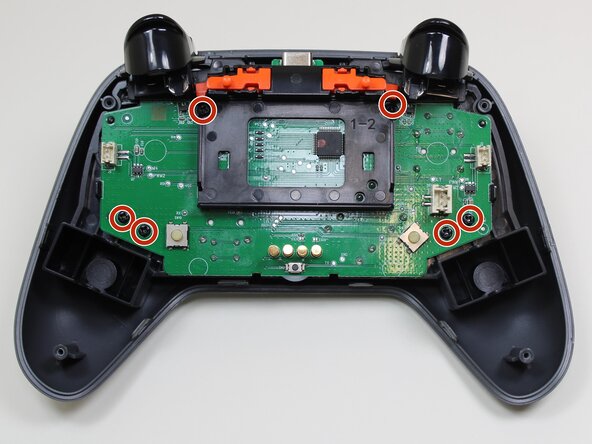
    • Use a Phillips #0 screwdriver to remove the six 5.7 mm screws securing the motherboard.

    • Separate the midframe that holds the motherboard from the outer shell.

  8. GameSir Nova 2 Lite Button Replacement: 步骤 8 中的图像 1,3 GameSir Nova 2 Lite Button Replacement: 步骤 8 中的图像 2,3 GameSir Nova 2 Lite Button Replacement: 步骤 8 中的图像 3,3
    • At this point the only thing holding the buttons in place is gravity.

    • Remove the buttons from the top case.

结论

To reassemble your device, follow these instructions in reverse order. Take your e-waste to an R2 or e-Stewards certified recycler.

3等其他人完成本指南。

1指南评论

I .... where to find the ( new stick )for the controller Gamesir ?

Leandro Montiel - 回复 分享

添加评论

浏览统计数据:

过去 24 小时: 7

过去 7 天: 35

过去 30 天: 133

总计 650