跳转到主内容

Game Boy Micro Battery Replacement

你所需要的

  1. Game Boy Micro Battery Replacement, Remove the Cover: 步骤 1 中的图像 1,2 Game Boy Micro Battery Replacement, Remove the Cover: 步骤 1 中的图像 2,2
    • Remove the Phillips #00 screw on the side of the Game Boy closest to the directional pad.

    • Once the screw has been loosened, lift the cover off the back of the device.

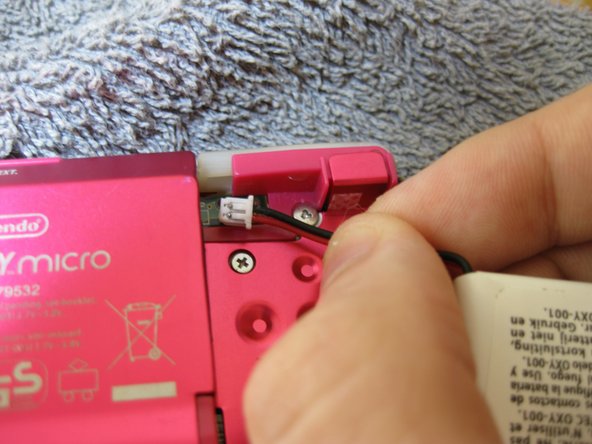
  2. Game Boy Micro Battery Replacement, Remove battery: 步骤 2 中的图像 1,3 Game Boy Micro Battery Replacement, Remove battery: 步骤 2 中的图像 2,3 Game Boy Micro Battery Replacement, Remove battery: 步骤 2 中的图像 3,3
    • Grip, and gently pull outwards on the cable as close to the battery connector as you can

    • Pull in level with the back cover in the direction as indicated by the arrow (not upwards, and not sideways), otherwise you could damage the connector, the cable, or just rip everything off.

    • When plugging the battery back in, make sure to use a non-conductive tool with a flat head to push the battery plug back into the connector, to avoid shorting the battery pins in the plug.

结论

To reassemble your device, follow these instructions in reverse order.

另外一个人完成了本指南。

SonoSooS

于07/30/24注册

242 声望

创作了2篇指南

0指南评论

添加评论

浏览统计数据:

过去 24 小时: 5

过去 7 天: 36

过去 30 天: 121

总计 1,743