跳转到主内容
加入维修社区 - 创建账户

Fujitsu Lifebook A6110 RAM Replacement

你所需要的

    1. Fujitsu Lifebook A6110 RAM Replacement, Battery: 步骤 1 中的图像 1,2 Fujitsu Lifebook A6110 RAM Replacement, Battery: 步骤 1 中的图像 2,2
      • The computer should be fully turned off and disconnected from the power source.

      • Before handling electronic components, you should ground yourself. This will prevent damage to the components from a static charge. You can do this by touching any metal object.

      • Flip your laptop so that the bottom of the laptop is facing up and the hinges of the screen are closest to you.

      询问修复机器人

      添加评论

    2. Fujitsu Lifebook A6110 RAM Replacement: 步骤 2 中的图像 1,1
      • To remove the battery, place your fingers underneath the two clips and simultaneously lift them up while pulling the cover towards you.

      询问修复机器人

      添加评论

    1. Fujitsu Lifebook A6110 RAM Replacement, RAM: 步骤 3 中的图像 1,2 Fujitsu Lifebook A6110 RAM Replacement, RAM: 步骤 3 中的图像 2,2
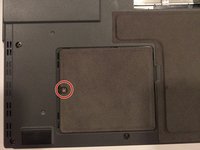
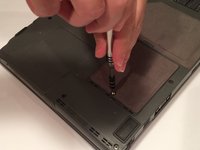
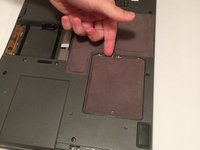
      • The RAM compartment will be located near the bottom-left corner of your lifebook. The compartment is behind the cover held in place by a 6 mm screw.

      • Using a Phillips #1 screwdriver, remove the 6 mm screw from the RAM compartment on the bottom-left corner of the rear cover.

      询问修复机器人

      添加评论

    2. Fujitsu Lifebook A6110 RAM Replacement: 步骤 4 中的图像 1,3 Fujitsu Lifebook A6110 RAM Replacement: 步骤 4 中的图像 2,3 Fujitsu Lifebook A6110 RAM Replacement: 步骤 4 中的图像 3,3
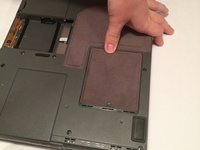
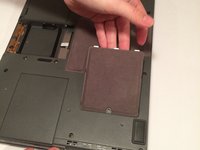
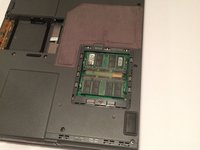
      • Slide the cover towards the screw, and then lift the cover upwards.

      询问修复机器人

      添加评论

    3. Fujitsu Lifebook A6110 RAM Replacement: 步骤 5 中的图像 1,2 Fujitsu Lifebook A6110 RAM Replacement: 步骤 5 中的图像 2,2
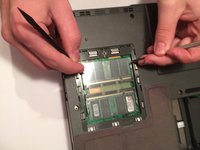
      • There are two RAM cards in this compartment. They look like small green plastic chips with black squares on each of them. These cards are beneath a thin plastic sheet that must be pulled out of the way.

      • Simultaneously pull each metal and plastic clip away from the center of the RAM stick.

      • If done correctly, the RAM card will eject at a 45 degree angle.

      询问修复机器人

      添加评论

    4. Fujitsu Lifebook A6110 RAM Replacement: 步骤 6 中的图像 1,1
      • Pull the RAM card out while maintaining the 45 degree angle it ejected at.

      • When reassembling, the gold pins on the RAM card must match the corresponding pins found on the motherboard.

      • If you choose to replace the other RAM card, repeat the process in Step 5.

      询问修复机器人

      添加评论

结论

To reassemble your device, follow these instructions in reverse order.

取消:我没有完成这个指南。

Cody Moniz

于10/19/16注册

422 声望

创作了4篇指南

团队

UMass Dartmouth, Team 3-2, Isaacson Fall 2016 UMass Dartmouth, Team 3-2, Isaacson Fall 2016 的会员

UMASSD-ISAACSON-F16S3G2

3 名成员

创作了45篇指南

0指南评论

添加评论

浏览统计数据:

过去 24 小时: 3

过去 7 天: 10

过去 30 天: 38

总计 1,359