跳转到主内容
加入维修社区 - 创建账户

Fujitsu LifeBook U810 Battery Replacement

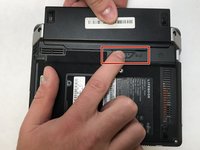
    1. Fujitsu LifeBook U810 Battery Replacement, Battery: 步骤 1 中的图像 1,3 Fujitsu LifeBook U810 Battery Replacement, Battery: 步骤 1 中的图像 2,3 Fujitsu LifeBook U810 Battery Replacement, Battery: 步骤 1 中的图像 3,3
      • Flip the Lifebook so it's underside is showing and you see a small latch with the lock symbol on the right side.

      询问修复机器人

      添加评论

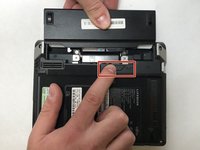
    2. Fujitsu LifeBook U810 Battery Replacement: 步骤 2 中的图像 1,1
      • Push the latch to the right to release the battery.

      询问修复机器人

      添加评论

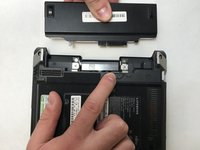
    3. Fujitsu LifeBook U810 Battery Replacement: 步骤 3 中的图像 1,3 Fujitsu LifeBook U810 Battery Replacement: 步骤 3 中的图像 2,3 Fujitsu LifeBook U810 Battery Replacement: 步骤 3 中的图像 3,3
      • Hold the latch in the unlocked position and with your other hand pull the battery straight out from the back of the device.

      询问修复机器人

      添加评论

结论

To reassemble your device, follow these instructions in reverse order.

取消:我没有完成这个指南。

Emmy Hughes

于10/22/18注册

147 声望

撰写一个指南

团队

UC Davis, Team S4-G7, Lore Fall 2018 UC Davis, Team S4-G7, Lore Fall 2018 的会员

UCD-LORE-F18S4G7

3 名成员

创作了18篇指南

0指南评论

添加评论

浏览统计数据:

过去 24 小时: 4

过去 7 天: 6

过去 30 天: 27

总计 984