跳转到主内容
加入维修社区 - 创建账户

Fujifilm FinePix T500 Lens Replacement

你所需要的

    1. Fujifilm FinePix T500 Lens Replacement, LCD Screen: 步骤 1 中的图像 1,3 Fujifilm FinePix T500 Lens Replacement, LCD Screen: 步骤 1 中的图像 2,3 Fujifilm FinePix T500 Lens Replacement, LCD Screen: 步骤 1 中的图像 3,3
      • Unscrew the six 3.5mm Philips head from the outer casing.

      询问修复机器人
      添加评论

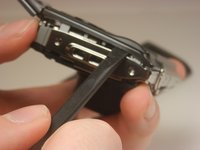
    2. Fujifilm FinePix T500 Lens Replacement: 步骤 2 中的图像 1,3 Fujifilm FinePix T500 Lens Replacement: 步骤 2 中的图像 2,3 Fujifilm FinePix T500 Lens Replacement: 步骤 2 中的图像 3,3
      • Open the battery compartment and remove the battery.

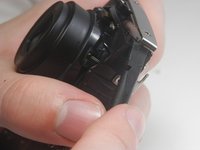
      • Carefully pry the front half of the casing away from the camera.

      • Pay close attention to the sensor cover—a small piece of translucent plastic—as it may fall out of place. If it does, place it back in its original position.

      询问修复机器人
      添加评论

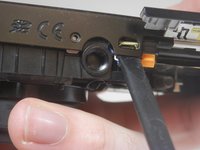
    3. Fujifilm FinePix T500 Lens Replacement: 步骤 3 中的图像 1,2 Fujifilm FinePix T500 Lens Replacement: 步骤 3 中的图像 2,2
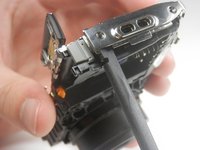
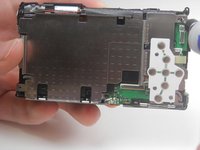
      • Pry the back half of the casing from the camera.

      • Be careful when maneuvering the camera without the casing on as the LCD screen is not fastened to anything.

      询问修复机器人

      添加评论

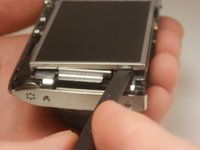
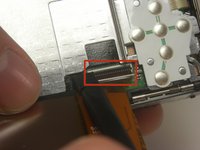
    4. Fujifilm FinePix T500 Lens Replacement: 步骤 4 中的图像 1,3 Fujifilm FinePix T500 Lens Replacement: 步骤 4 中的图像 2,3 Fujifilm FinePix T500 Lens Replacement: 步骤 4 中的图像 3,3
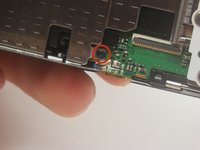
      • Lift the LCD screen out of the camera.

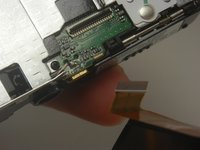
      • Locate the tab securing the ribbon cable that connects the screen to the motherboard. Using a spudger, gently lift the tab to release the ribbon. Carefully disconnect the screen from the motherboard.

      询问修复机器人

      添加评论

    1. Fujifilm FinePix T500 Lens Replacement, Lens: 步骤 5 中的图像 1,1
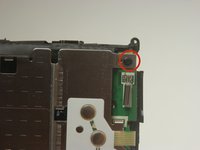
      • Unscrew the 3.5 mm Phillips head screw from the corner of the camera.

      询问修复机器人

      添加评论

    2. Fujifilm FinePix T500 Lens Replacement: 步骤 6 中的图像 1,3 Fujifilm FinePix T500 Lens Replacement: 步骤 6 中的图像 2,3 Fujifilm FinePix T500 Lens Replacement: 步骤 6 中的图像 3,3
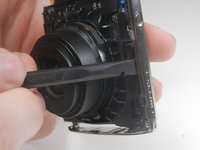
      • Pry off the center casing of the camera. Separate the top and side sections individually before fully removing the casing.

      询问修复机器人
      添加评论

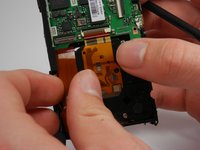
    3. Fujifilm FinePix T500 Lens Replacement: 步骤 7 中的图像 1,3 Fujifilm FinePix T500 Lens Replacement: 步骤 7 中的图像 2,3 Fujifilm FinePix T500 Lens Replacement: 步骤 7 中的图像 3,3
      • Unscrew the two 3.5 mm Phillips head screws in the metal plate.

      询问修复机器人
      添加评论

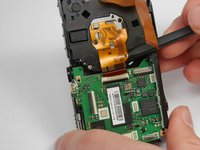
    4. Fujifilm FinePix T500 Lens Replacement: 步骤 8 中的图像 1,2 Fujifilm FinePix T500 Lens Replacement: 步骤 8 中的图像 2,2
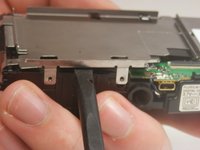
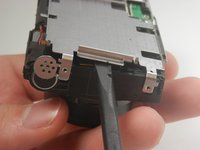
      • Pry the metal plate out using the spudger.

      询问修复机器人
      添加评论

    5. Fujifilm FinePix T500 Lens Replacement: 步骤 9 中的图像 1,3 Fujifilm FinePix T500 Lens Replacement: 步骤 9 中的图像 2,3 Fujifilm FinePix T500 Lens Replacement: 步骤 9 中的图像 3,3
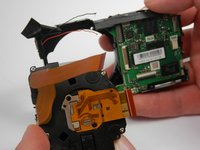
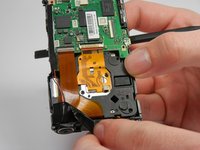
      • Peel back the strip of black tape to reveal a red and black wire.

      • Detach the orange ribbon by gently pulling on it.

      • Detach the golden ribbon by gently lifting it with the spudger.

      询问修复机器人

      添加评论

    6. Fujifilm FinePix T500 Lens Replacement: 步骤 10 中的图像 1,2 Fujifilm FinePix T500 Lens Replacement: 步骤 10 中的图像 2,2
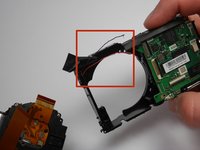
      • The lens should now be free to simply be pushed out of its socket.

      • The black and red wires that were exposed previously may be in the way of removing the lens and may break. If they do, you will need to solder these wires back into place upon reassembly.

      询问修复机器人

      添加评论

结论

To reassemble your device, follow these instructions in reverse order.

取消:我没有完成这个指南。

Brian Lasher

于01/16/15注册

328 声望

创作了3篇指南

团队

USF Tampa, Team 19-3, Blackwell Winter 2015 USF Tampa, Team 19-3, Blackwell Winter 2015 的会员

USFT-BLACKWELL-W15S19G3

4 名成员

创作了45篇指南

0指南评论

添加评论

浏览统计数据:

过去 24 小时: 0

过去 7 天: 8

过去 30 天: 32

总计 1,543