跳转到主内容
加入维修社区 - 创建账户

Framework Laptop 12 Top Cover Replacement

你所需要的

  1. Framework Laptop 12 Top Cover Replacement, Power down your laptop: 步骤 1 中的图像 1,3 Framework Laptop 12 Top Cover Replacement, Power down your laptop: 步骤 1 中的图像 2,3 Framework Laptop 12 Top Cover Replacement, Power down your laptop: 步骤 1 中的图像 3,3
    • Before you begin repairs, unplug your laptop and shut it down from the operating system. This ensures that the laptop isn't in standby/suspend mode.

    • The indicator LEDs along the edges should be unlit. The laptop should be silent.

    • If you accidentally turn on the laptop during repair, hold the power button down for 10 seconds to shut it down.

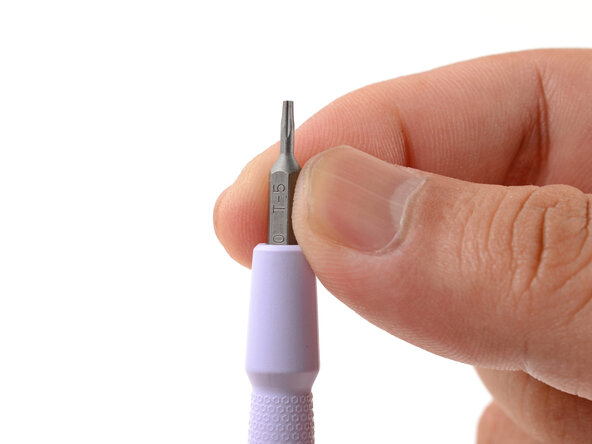
    • Make sure your Framework Screwdriver has the T5 Torx bit (labeled as T-5) facing outwards. If it's not, pull the bit out and flip it.

  2. Framework Laptop 12 Top Cover Replacement, Open your laptop: 步骤 2 中的图像 1,2 Framework Laptop 12 Top Cover Replacement, Open your laptop: 步骤 2 中的图像 2,2
    • Open the laptop lid so that both the screen and the base lie flat on your work surface.

  3. Framework Laptop 12 Top Cover Replacement, Remove the Display Cover: 步骤 3 中的图像 1,2 Framework Laptop 12 Top Cover Replacement, Remove the Display Cover: 步骤 3 中的图像 2,2
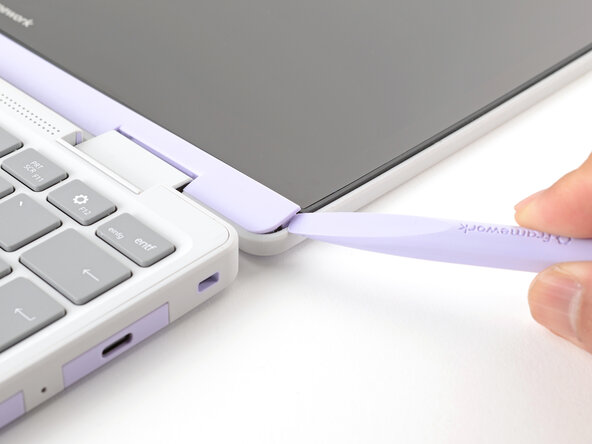
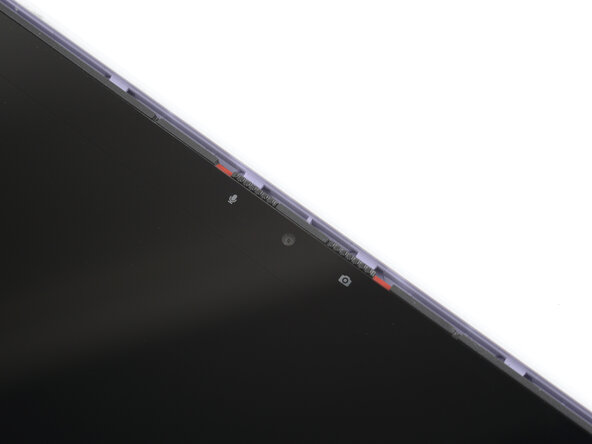
    • The Display Cover is held in place with magnets along the top edge and clips along the remaining edges.

    • Use the flat end of your Framework Screwdriver to pry up the right edge of the Display Cover.

  4. Framework Laptop 12 Top Cover Replacement: 步骤 4 中的图像 1,3 Framework Laptop 12 Top Cover Replacement: 步骤 4 中的图像 2,3 Framework Laptop 12 Top Cover Replacement: 步骤 4 中的图像 3,3
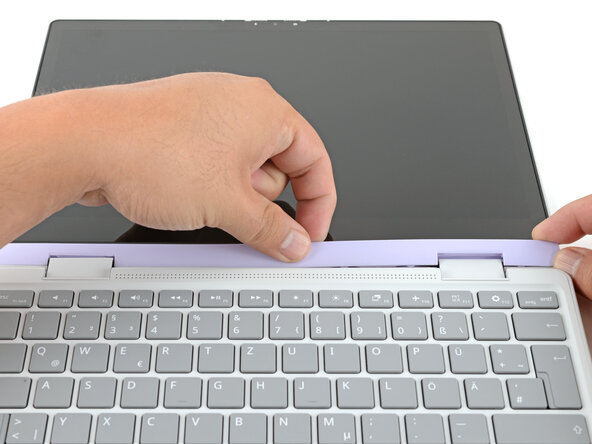
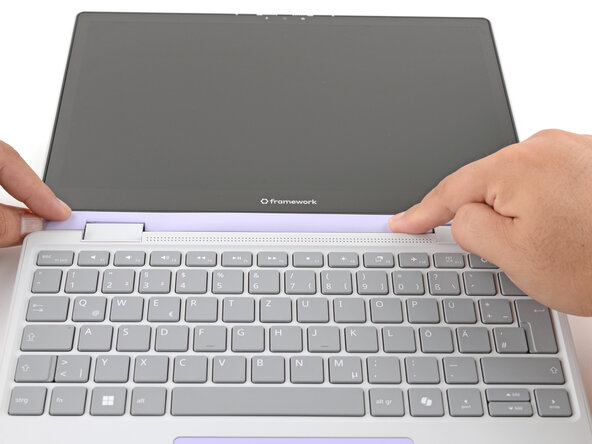
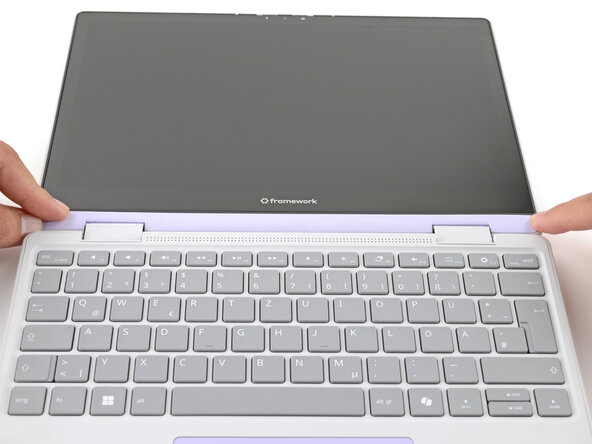
    • Slide your fingers under the top edge of the Display Cover to release it from the laptop.

  5. Framework Laptop 12 Top Cover Replacement: 步骤 5 中的图像 1,2 Framework Laptop 12 Top Cover Replacement: 步骤 5 中的图像 2,2
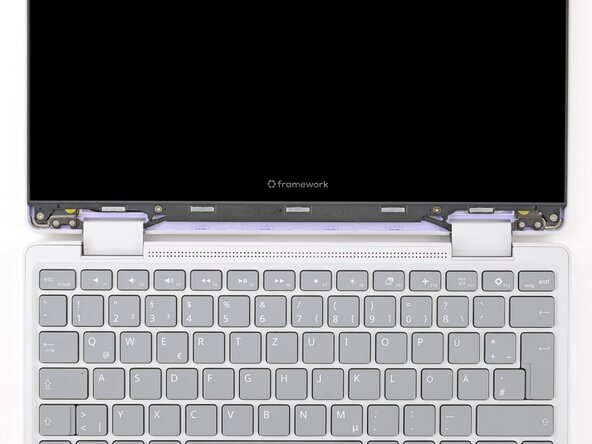
    • Remove the Display Cover.

  6. Framework Laptop 12 Top Cover Replacement, Remove the display screws: 步骤 6 中的图像 1,2 Framework Laptop 12 Top Cover Replacement, Remove the display screws: 步骤 6 中的图像 2,2
    • Use your Framework Screwdriver to remove the four 3.3 mm‑long T5 Torx screws securing the display to the Top Cover.

    • These screws are not captive. Store them in a safe location for reassembly.

  7. Framework Laptop 12 Top Cover Replacement, Slide the display down: 步骤 7 中的图像 1,3 Framework Laptop 12 Top Cover Replacement, Slide the display down: 步骤 7 中的图像 2,3 Framework Laptop 12 Top Cover Replacement, Slide the display down: 步骤 7 中的图像 3,3
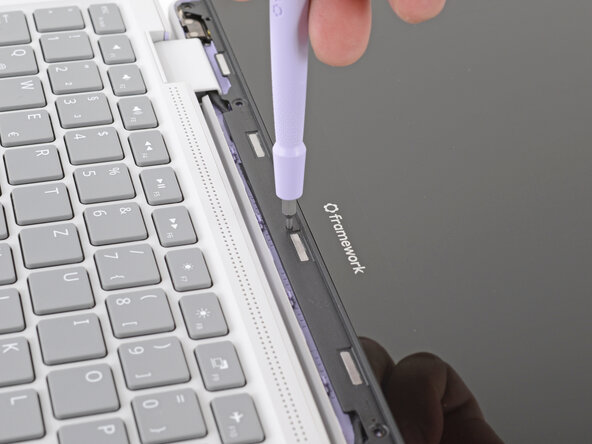
    • Insert the bit end of your Framework Screwdriver into the small hole on the display, below the Framework logo.

    • Slide the display down towards the hinge edge to release the tabs holding the top edge of the display in place.

  8. Framework Laptop 12 Top Cover Replacement, Lift the display: 步骤 8 中的图像 1,2 Framework Laptop 12 Top Cover Replacement, Lift the display: 步骤 8 中的图像 2,2
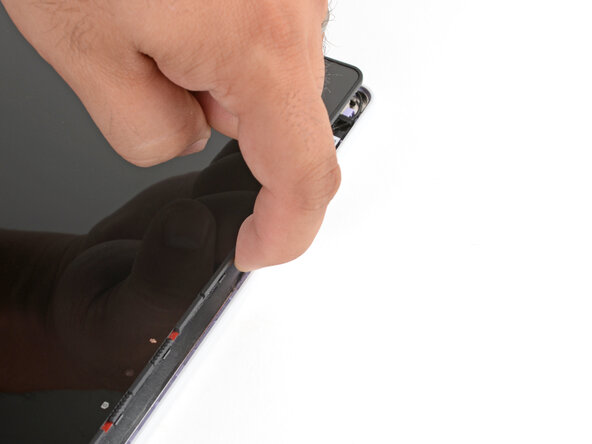
    • Use your fingers to lift the top edge of the display from the Top Cover.

  9. Framework Laptop 12 Top Cover Replacement, Swing the display over: 步骤 9 中的图像 1,3 Framework Laptop 12 Top Cover Replacement, Swing the display over: 步骤 9 中的图像 2,3 Framework Laptop 12 Top Cover Replacement, Swing the display over: 步骤 9 中的图像 3,3
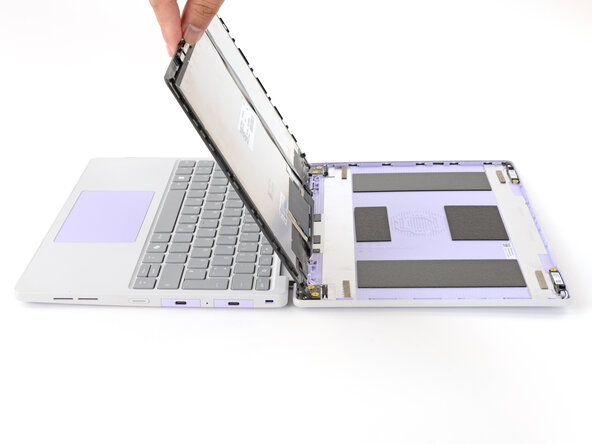
    • Use your fingers to carefully swing the display over so it lies on top of the keyboard.

  10. Framework Laptop 12 Top Cover Replacement, Remove the antenna screws: 步骤 10 中的图像 1,2 Framework Laptop 12 Top Cover Replacement, Remove the antenna screws: 步骤 10 中的图像 2,2
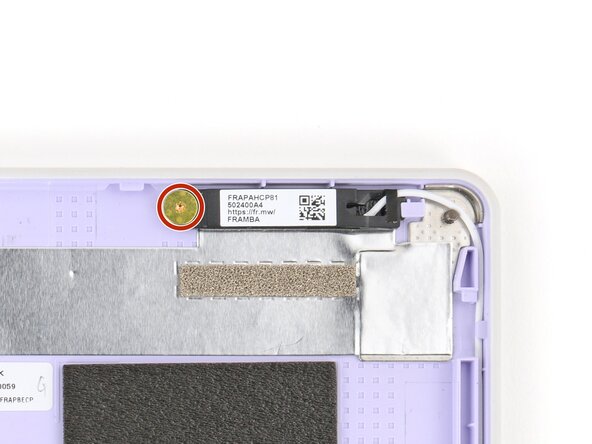
    • Use your Framework Screwdriver to remove the two 2.4 mm‑long T5 Torx screws securing the two antennas to the Top Cover.

  11. Framework Laptop 12 Top Cover Replacement, Unthread the antenna cables: 步骤 11 中的图像 1,3 Framework Laptop 12 Top Cover Replacement, Unthread the antenna cables: 步骤 11 中的图像 2,3 Framework Laptop 12 Top Cover Replacement, Unthread the antenna cables: 步骤 11 中的图像 3,3
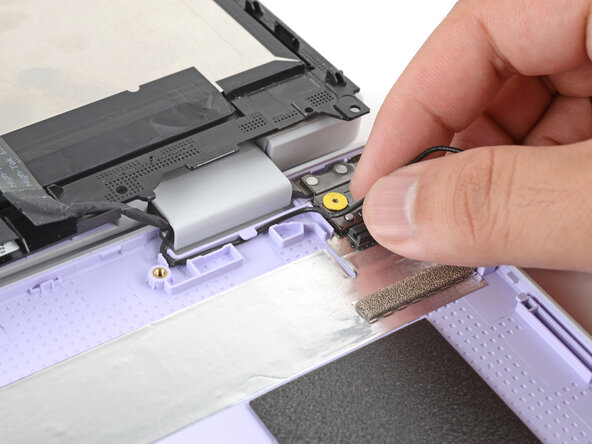
    • Use your fingers to lift the right antenna away from the Top Cover.

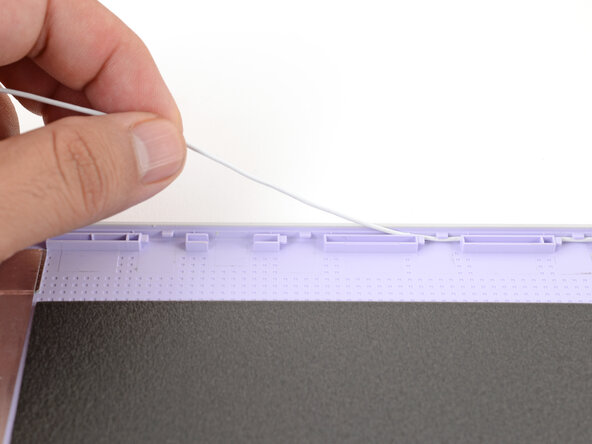
    • Carefully guide the white antenna cable out of its channel until you reach the hinge.

  12. Framework Laptop 12 Top Cover Replacement: 步骤 12 中的图像 1,2 Framework Laptop 12 Top Cover Replacement: 步骤 12 中的图像 2,2
    • Repeat the previous step to guide the black antenna cable out of its channel.

  13. Framework Laptop 12 Top Cover Replacement, Remove the hinge screws: 步骤 13 中的图像 1,2 Framework Laptop 12 Top Cover Replacement, Remove the hinge screws: 步骤 13 中的图像 2,2
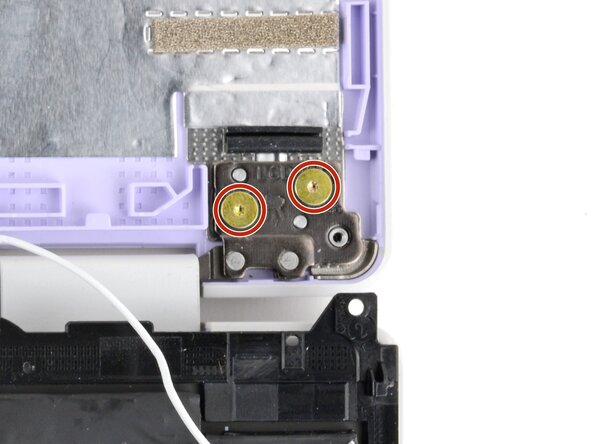
    • Use your Framework Screwdriver to remove the four (two per hinge) 2.4 mm‑long T5 Torx screws securing the two hinges to the Top Cover.

    • These screws are not captive. Store them in a safe location for reassembly.

  14. Framework Laptop 12 Top Cover Replacement, Separate the Top Cover: 步骤 14 中的图像 1,3 Framework Laptop 12 Top Cover Replacement, Separate the Top Cover: 步骤 14 中的图像 2,3 Framework Laptop 12 Top Cover Replacement, Separate the Top Cover: 步骤 14 中的图像 3,3
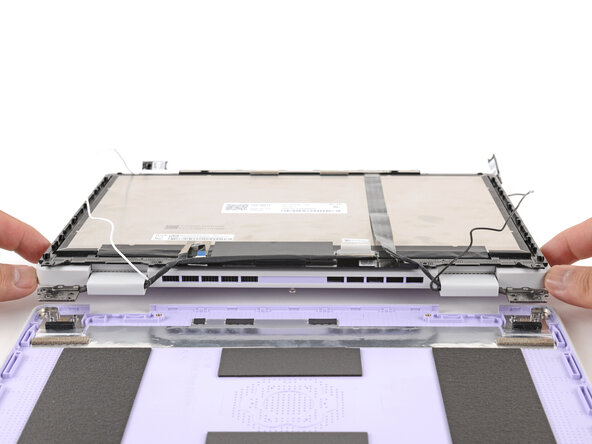
    • Use your fingers to lift the hinges over the Top Cover lip.

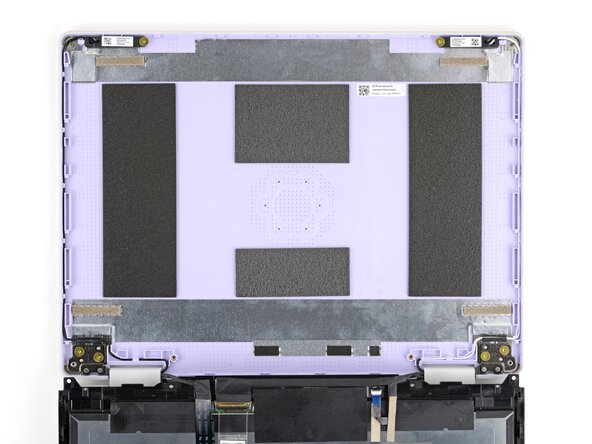
    • Separate the Top Cover from the rest of the laptop.

  15. Framework Laptop 12 Top Cover Replacement, Remove the Top Cover: 步骤 15 中的图像 1,1
    • Remove the Top Cover.

  16. Framework Laptop 12 Top Cover Replacement, Disassembly complete: 步骤 16 中的图像 1,1
    • Congratulations on completing disassembly! The remaining steps will show how to reassemble your Framework Laptop.

  17. Framework Laptop 12 Top Cover Replacement, Install the Top Cover: 步骤 17 中的图像 1,3 Framework Laptop 12 Top Cover Replacement, Install the Top Cover: 步骤 17 中的图像 2,3 Framework Laptop 12 Top Cover Replacement, Install the Top Cover: 步骤 17 中的图像 3,3
    • Use your fingers to lift the hinges over the Top Cover lip and lay them in place.

  18. Framework Laptop 12 Top Cover Replacement: 步骤 18 中的图像 1,2 Framework Laptop 12 Top Cover Replacement: 步骤 18 中的图像 2,2
    • Use your Framework Screwdriver to install the four 2.4 mm‑long T5 Torx screws to secure the two hinges to the Top Cover.

    • Make sure to install these screws in the marked locations. There are additional screw holes on the hinges that are not for these screws.

  19. Framework Laptop 12 Top Cover Replacement: 步骤 19 中的图像 1,3 Framework Laptop 12 Top Cover Replacement: 步骤 19 中的图像 2,3 Framework Laptop 12 Top Cover Replacement: 步骤 19 中的图像 3,3
    • Lay each antenna in place in the Top Cover.

  20. Framework Laptop 12 Top Cover Replacement: 步骤 20 中的图像 1,2 Framework Laptop 12 Top Cover Replacement: 步骤 20 中的图像 2,2
    • Use your Framework Screwdriver to install the two 2.4 mm‑long T5 Torx screws to secure the antennas to the Top Cover.

  21. Framework Laptop 12 Top Cover Replacement: 步骤 21 中的图像 1,3 Framework Laptop 12 Top Cover Replacement: 步骤 21 中的图像 2,3 Framework Laptop 12 Top Cover Replacement: 步骤 21 中的图像 3,3
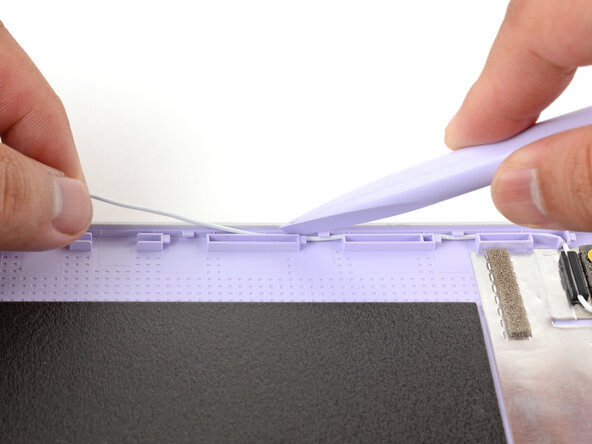
    • Use your fingers and your Framework Screwdriver to guide and press both antenna cables back into their channels.

    • Zoom in on the third image to see how the cables sit in their channels.

  22. Framework Laptop 12 Top Cover Replacement, Swing the display over: 步骤 22 中的图像 1,3 Framework Laptop 12 Top Cover Replacement, Swing the display over: 步骤 22 中的图像 2,3 Framework Laptop 12 Top Cover Replacement, Swing the display over: 步骤 22 中的图像 3,3
    • Use your fingers to carefully swing the display over so it lies on top of the Top Cover.

  23. Framework Laptop 12 Top Cover Replacement, Slide the display in place: 步骤 23 中的图像 1,3 Framework Laptop 12 Top Cover Replacement, Slide the display in place: 步骤 23 中的图像 2,3 Framework Laptop 12 Top Cover Replacement, Slide the display in place: 步骤 23 中的图像 3,3
    • Align the display in the Top Cover such that the top edge of the display is slightly below the top edge of the Top Cover.

    • Use your fingers to slide the display upwards to latch the tabs on the top edge of the display.

    • The top edge shouldn't have any gaps when the display's in place.

  24. Framework Laptop 12 Top Cover Replacement, Install the display screws: 步骤 24 中的图像 1,2 Framework Laptop 12 Top Cover Replacement, Install the display screws: 步骤 24 中的图像 2,2
    • Use your Framework Screwdriver to install the four 3.3 mm‑long T5 Torx screws to secure the display to the Top Cover.

    • Tighten the screws until they're snug. Don't over-tighten them, or you may damage the screw tabs.

  25. Framework Laptop 12 Top Cover Replacement, Install the Display Cover: 步骤 25 中的图像 1,2 Framework Laptop 12 Top Cover Replacement, Install the Display Cover: 步骤 25 中的图像 2,2
    • Align the Display Cover to the bottom of the display.

  26. Framework Laptop 12 Top Cover Replacement: 步骤 26 中的图像 1,2 Framework Laptop 12 Top Cover Replacement: 步骤 26 中的图像 2,2
    • Use your finger to press along the length of the Display Cover to snap it onto the laptop.

    • Make sure all the clips along the left, top, and right edges are fully seated.

结论

You finished fixing your Framework Laptop!

Take your e-waste to an R2 or e-Stewards certified recycler.

If you need help, contact Framework support.

Arthur Shi

于01/03/18注册

317,015 声望

创作了730篇指南

团队

Guide Team Guide Team 的会员

Staff

10 名成员

创作了16,142篇指南

0指南评论

添加评论

浏览统计数据:

过去 24 小时: 0

过去 7 天: 4

过去 30 天: 31

总计 275