跳转到主内容
加入维修社区 - 创建账户

Framework Laptop 12 Fan Installation

仅作为前提条件
本指南仅提供前提条件!本指南是另一个程序的一部分,不能单独使用。

你所需要的

  1. Framework Laptop 12 Fan Installation, Install the fan: 步骤 1 中的图像 1,1
    • Lay the fan in the laptop.

  2. Framework Laptop 12 Fan Installation, Tighten the fan screws: 步骤 2 中的图像 1,1
    • Use your Framework Screwdriver to tighten the two captive T5 Torx screws to secure the fan.

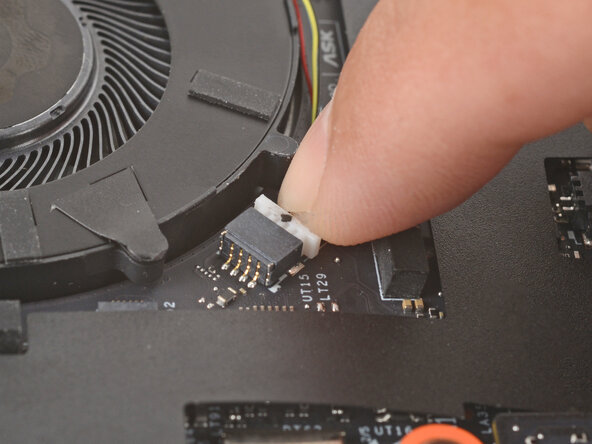
  3. Framework Laptop 12 Fan Installation: 步骤 3 中的图像 1,2 Framework Laptop 12 Fan Installation: 步骤 3 中的图像 2,2
    • Use your fingers to gently push the fan connector back into its socket.

    • Don't push too hard, or you may break the socket. If you're having trouble, wiggle the connector slightly to help it slide into the socket.

终点

Arthur Shi

于01/03/18注册

324,055 声望

创作了802篇指南

0指南评论

添加评论

浏览统计数据:

过去 24 小时: 0

过去 7 天: 1

过去 30 天: 2

总计 26