跳转到主内容
加入维修社区 - 创建账户

Framework Laptop 12 Expansion Card Installation

仅作为前提条件
本指南仅提供前提条件!本指南是另一个程序的一部分,不能单独使用。
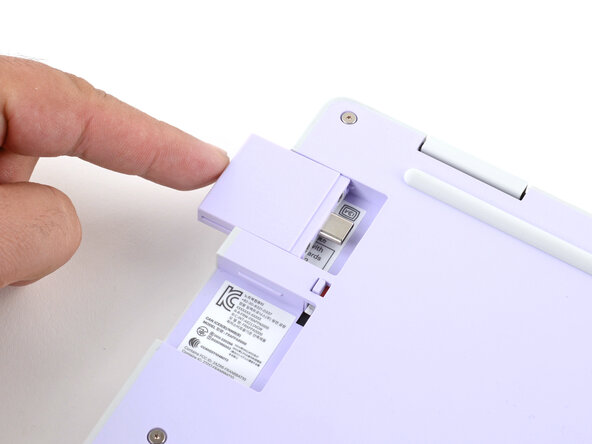
  1. Framework Laptop 12 Expansion Card Installation, Install the Expansion Cards: 步骤 1 中的图像 1,3 Framework Laptop 12 Expansion Card Installation, Install the Expansion Cards: 步骤 1 中的图像 2,3 Framework Laptop 12 Expansion Card Installation, Install the Expansion Cards: 步骤 1 中的图像 3,3
    • Slide each Expansion Card into its Expansion Card slot.

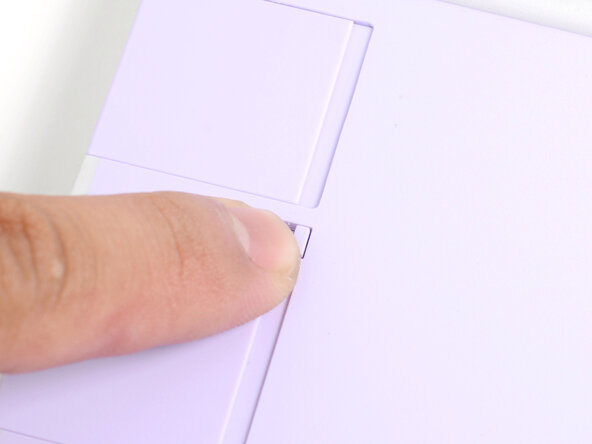
  2. Framework Laptop 12 Expansion Card Installation, Lock the Expansion Card slots: 步骤 2 中的图像 1,2 Framework Laptop 12 Expansion Card Installation, Lock the Expansion Card slots: 步骤 2 中的图像 2,2
    • If there's a red bar showing under either Expansion Card latch, use your finger to flip the latch and lock the Expansion Card into its slot.

    • Locking the Expansion Card slots helps keep the cards in place when you unplug cables from them.

结论

To reassemble your device, follow these instructions in reverse order.

Arthur Shi

于01/03/18注册

317,155 声望

创作了730篇指南

0指南评论

添加评论

浏览统计数据:

过去 24 小时: 0

过去 7 天: 0

过去 30 天: 2

总计 29