跳转到主内容
加入维修社区 - 创建账户

Flydigi Apex 4 Trigger Assembly Replacement

你所需要的

  1. Flydigi Apex 4 Trigger Assembly Replacement, Trigger Assembly: 步骤 1 中的图像 1,3 Flydigi Apex 4 Trigger Assembly Replacement, Trigger Assembly: 步骤 1 中的图像 2,3 Flydigi Apex 4 Trigger Assembly Replacement, Trigger Assembly: 步骤 1 中的图像 3,3
    • Ensure the controller is fully powered off before beginning.

    • Disconnect the USB-C cable if the controller is plugged in.

    • Remove any wireless adapter or dongle connected to your device.

    • Never work on the controller while it is powered on or charging. Doing so may damage internal components or cause injury.

    询问修复机器人

    添加评论

  2. Flydigi Apex 4 Trigger Assembly Replacement: 步骤 2 中的图像 1,3 Flydigi Apex 4 Trigger Assembly Replacement: 步骤 2 中的图像 2,3 Flydigi Apex 4 Trigger Assembly Replacement: 步骤 2 中的图像 3,3
    • Remove the button caps and the magnetic faceplate of the controller.

    • It should come off with a tug.

    • Use a Phillips #00 screwdriver to remove the four screws securing the front of the controller to the frame.

    • Some screws may be hidden under grip pads or stickers. Gently peel these back if necessary.

    询问修复机器人

    添加评论

  3. Flydigi Apex 4 Trigger Assembly Replacement: 步骤 3 中的图像 1,2 Flydigi Apex 4 Trigger Assembly Replacement: 步骤 3 中的图像 2,2
    • Insert a plastic opening tool into the seam between the front and back shell along the bottom edge of the controller.

    • Gently run the opening tool along the seam to release the plastic clips holding the two halves together.

    • Work your way around all edges until the back shell is fully unclipped.

    • Carefully lift the back shell away from the front half and set it aside.

    • Do not force the shell open. If you feel strong resistance, check for any screws you may have missed.

    询问修复机器人

    添加评论

  4. Flydigi Apex 4 Trigger Assembly Replacement: 步骤 4 中的图像 1,1
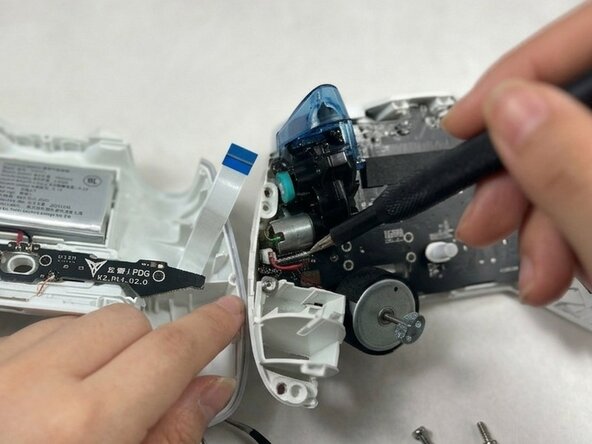
    • With the controller open, identify the trigger assembly on the side you are replacing.

    • The trigger assembly consists of the trigger lever, the spring mechanism, and the analog sensor attached to the internal frame.

    • Take a photo of the internal layout before removing any components. This will help you reassemble the controller correctly.

    询问修复机器人

    添加评论

  5. Flydigi Apex 4 Trigger Assembly Replacement: 步骤 5 中的图像 1,3 Flydigi Apex 4 Trigger Assembly Replacement: 步骤 5 中的图像 2,3 Flydigi Apex 4 Trigger Assembly Replacement: 步骤 5 中的图像 3,3
    • Use a spudger or your fingernail to gently flip up the locking tab on the connector linking the trigger assembly to the main PCB.

    • Carefully pull the ribbon cable straight out of the connector.

    • Do not pull at an angle, as this may tear the cable.

    询问修复机器人

    添加评论

  6. Flydigi Apex 4 Trigger Assembly Replacement: 步骤 6 中的图像 1,2 Flydigi Apex 4 Trigger Assembly Replacement: 步骤 6 中的图像 2,2
    • Use a Phillips #00 screwdriver to remove the screws securing each trigger assembly.

    • Lift the trigger assembly straight up and out of the controller frame.

    询问修复机器人

    添加评论

结论

To reassemble your device, follow these instructions in reverse order. Take your e-waste to an R2 or e-Stewards certified recycler.

取消:我没有完成这个指南。

janavi

于03/23/25注册

241 声望

创作了2篇指南

团队

UMass Dartmouth, Team 3-1, Shaddix Spring 2026 UMass Dartmouth, Team 3-1, Shaddix Spring 2026 的会员

UMASSD-SHADDIX-S26S3G1

3 名成员

创作了2篇指南

0指南评论

添加评论

浏览统计数据:

过去 24 小时: 6

过去 7 天: 20

过去 30 天: 54

总计 84